Best laptop for programming in 2026: eight compared on RAM, storage and the keyboard question you must ask
 m8d.ioUpdated on

This guide contains affiliate links. As an Amazon Associate, m8d.io earns from qualifying purchases, at no extra cost to you.
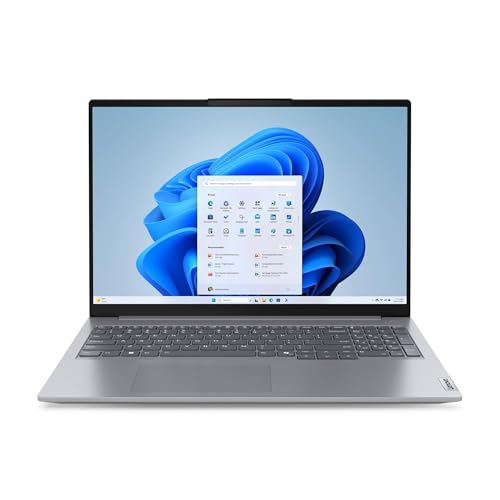
Lenovo ThinkBook 16

Lenovo ThinkPad L14
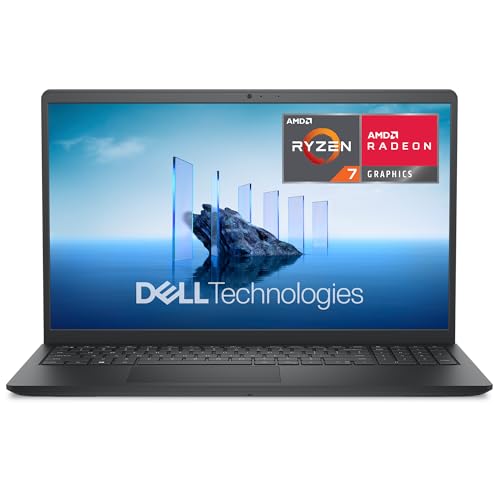
Dell 15 DC15255
The best laptop for programming in 2026 is the Lenovo ThinkBook 16see ›: Ryzen 5, 16 GB, a 512 GB NVMe drive and Windows 11 Pro, which is what unlocks Hyper-V and BitLocker. If the keyboard is what decides it for you, the ThinkPad L14see ›. And if you build for Apple platforms, only a Mac will do. What matters, in order: 16 GB of RAM, an NVMe drive, and a keyboard layout you checked before you paid.
- 16 GB of RAM is not negotiable in 2026, and 32 GB if you live in Docker, virtual machines or emulators. It is where people economise and where they regret it.
- NVMe, always. It sets how long a project takes to open and how long a build takes. 512 GB is the sweet spot.
- You do not need an i9. A current Ryzen 5 or Core i5 is plenty to start. Put that money into RAM and into a screen you can look at all day.
- Check the keyboard layout on the listing. On a machine used for code it is the single spec most likely to be wrong and least likely to be mentioned, and the section below shows the ten-second check.
- Nobody has to tell you how long it will get security updates. The UK law that forces a published support period exempts laptops by name. The section on that explains what does protect you instead.
Choosing a laptop for programming has one trap in it: the market is full of machines that look identical on paper and are not. The good news is that you do not need the most expensive one. You need a reliable tool that compiles code, brings up containers and moves your editor around without friction. We have picked eight against the same criteria we apply when specifying development machines for client projects.
The keyboard question, and the ten-second check before you pay
A laptop's keyboard cannot be swapped, and it is the only component on this page you will touch every second you use the machine. For someone writing code that makes the layout a first-order spec, because the braces, square brackets, backslash, pipe, hash and tilde live on different keys in ISO-UK and ANSI-US, and further away again on the continental ISO layouts.
Read the listing title and the variant selector, not the model name. Manufacturers sell the same laptop model with several keyboards, and a variant is one click apart from another. If the title, the variant selector or the specification table does not name a layout, treat it as unknown.
Look at the Enter key in the product photo. An ISO board has a tall L-shaped Enter taking two rows, with a narrow key immediately to its left. An ANSI board has a wide horizontal Enter and that key has moved above it. That tells you the family in two seconds; the national variant takes reading the legends on the number row.
Do not assume the store decides it. An import, a marketplace seller or a returned unit can carry any layout, and the photo on the listing is often a stock image of a different variant. If the seller is not the manufacturer or the store itself, the two checks above are all you have.
Know your fallback. Under the Consumer Rights Act 2015 you have a short-term right to reject goods that are not as described, and it runs for 30 days from when you take ownership. A laptop delivered with a layout the listing did not describe is exactly that case. Say so in writing, and say it inside the 30 days: after that the remedy becomes a repair or a replacement first.
And the fix that costs nothing. If you are keeping the machine, plug in an external keyboard in the layout you want. Which is also what the law expects of a workstation: the Schedule to the Display Screen Equipment Regulations says the keyboard "shall be tiltable and separate from the screen", and a laptop's built-in keyboard is neither. If you use a screen daily for continuous periods of an hour or more, an external board and something to raise the laptop are not accessories, they are what makes the desk compliant. We go through the options in the guide to choosing a keyboard for programming.
⚠ We do not state the keyboard layout of any specific model on this page. Manufacturers ship different configurations by country and by seller, and a claim we cannot verify on the listing you are looking at is worth less than a check you can do yourself. Quotation from the Schedule to the Health and Safety (Display Screen Equipment) Regulations 1992 (SI 1992/2792); the 30-day right is section 22 of the Consumer Rights Act 2015. Both consulted on 1 September 2026.
Lenovo ThinkBook 16

The balance point for writing code in 2026. The Ryzen 5 7535HS has more than enough for web, backend and full-stack work, 16 GB covers a normal day with Docker running, and a 16-inch WUXGA panel is a genuine luxury when you want the code and the documentation side by side. The detail that makes it: it ships with Windows 11 Pro, so you get BitLocker for full-disk encryption and Hyper-V for virtualisation without paying to upgrade later.
Each laptop was scored against what development work actually asks for: a processor that compiles and runs local servers, RAM for an editor plus a browser plus containers, drive speed and size, keyboard and screen quality, the operating system and what it unlocks, and the security features that protect your code and your credentials.
Every figure here carries its source. The analysis combines the specifications each manufacturer publishes, the experience of building and configuring development machines on real projects, and the aggregate view of buyers. The m8d score is our own editorial judgement, with the method in plain sight. The catalogue is Amazon Spain, part of the shared European catalogue, read on 1 September 2026. Configurations, and above all keyboard layouts, vary by country and by seller, so the buttons take you to your own local store and this guide teaches the check rather than asserting the answer.
The eight laptops compared
Ordered by our score. The names are links, and so is the button on each row.
| Laptop | m8d | CPU | RAM | Storage | OS | Best for | |
|---|---|---|---|---|---|---|---|
| Lenovo ThinkBook 16see › | 9.0 | Ryzen 5 7535HS | 16 GB | 512 GB | W11 Pro | Most people | See › |
| Lenovo ThinkPad L14see › | 8.7 | Ryzen 5 7535U | 16 GB | 512 GB | W11 Pro | Typing all day | See › |
| Dell 15 DC15255see › | 8.4 | Ryzen 7 7730U | 16 GB | 1 TB | W11 | Storage and a 120 Hz panel | See › |
| MacBook Air M5see › | 8.2 | Apple M5 | 16 GB | 256 GB | macOS | Apple platforms, and only those | See › |
| MSI Modern 15see › | 7.8 | Ryzen 5 7430U | 16 GB | 512 GB | W11 Home | Learning to code | See › |
| ASUS Vivobook Go 15see › | 7.5 | Ryzen 5 7520U | 16 GB | 512 GB | W11 | The smallest sensible outlay | See › |
| HP 15-fc0245nssee › | 8.0 | Ryzen 7 7730U | 16 GB | 1 TB | W11 | Listed for reference | See › |
| Acer Aspire Go 15see › | 8.5 | Ryzen 7 5825U | 32 GB | 512 GB | W11 | Listed for reference | See › |
As an Amazon Associate, m8d.io earns from qualifying purchases. Specifications read on 1 September 2026; configurations and availability vary by country. The last two rows are here because their specifications are worth comparing against, not as recommendations: stock of individual configurations moves constantly and both were unsettled in the catalogue we track when this guide was written. Check availability in your own store before deciding.
What RAM, CPU and storage writing code actually needs
For programming in 2026, prioritise in this order: 16 GB of RAM, a 512 GB NVMe drive, and a current Ryzen 5 or Core i5. A machine with those three covers years of web, backend and full-stack work. Going to 32 GB only earns its place if you work with heavy Docker use, virtual machines or emulators.
RAM: 16 GB is the standard, 32 GB if you virtualise
This is where people economise and where they regret it. Your editor, a browser with thirty documentation tabs, a dev server and a database in Docker will eat 8 GB before you notice. 16 GB is the comfortable floor. If your day includes several virtual machines or a lot of containers, you want 32, and none of the machines on this page ships with it in the configuration we track. That is a real limitation and the section on spec traps explains the way round it: buy one with a free SO-DIMM slot and add a stick yourself.
CPU: a Ryzen 5 or Core i5 is plenty to start
The processor runs your builds, your tests and your local servers. You do not need an i9 or a Ryzen 9: an Intel Core i5 from the 12th generation or later, or an AMD Ryzen 5 in the 5000 or 7000 series, is the right starting point. The Ryzen 7 in the Dell 15see › adds headroom for large builds. An i3 or a Ryzen 3 runs out as soon as you scale up to heavy frameworks or virtualisation.
Storage: NVMe, and nothing else
Forget mechanical drives. Boot time, opening a project and build times all follow the drive directly. 512 GB of NVMe is the balance point: projects, their dependencies, SDKs and container images grow fast. 256 GB works until you install a second toolchain. And to be clear about the jargon, NVMe and SATA are both solid state drives, but NVMe is several times faster and it is the one that changes how a working day feels.
Lenovo ThinkPad L14
If you type for a living, the argument for this machine is the part of it your fingers touch. The ThinkPad keyboard has deeper travel and a firmer bottom-out than almost anything else at this size, which over a full day is the difference between a machine you tolerate and one you stop noticing. It also carries Windows 11 Pro, so BitLocker and Hyper-V are there without an upgrade, and the business chassis is built to be opened, which matters for the RAM point above.
The spec traps, rewritten for a UK buyer
Two laptops that both say "Ryzen 7, 16 GB, 512 GB" can be very different machines to live with. These are the six places manufacturers cut, and they decide whether your purchase ages well or badly.
Soldered RAM against socketed RAM. Many budget machines, and every Mac, solder the memory to the board: buy 8 GB and you die with 8 GB. If you are choosing between 16 and 32, check whether there is a free SO-DIMM slot. On this page the two Lenovo business machines are the ones most likely to have one, and that is the only realistic route to 32 GB here.
A free M.2 slot for a second drive. A machine with 512 GB and an empty M.2 socket lets you add a terabyte in two years for the price of the drive alone. Without one you have to clone and replace. Lenovo and the 15-inch HP and Dell models usually have it.
Screen brightness and colour, in nits and sRGB. You are going to look at it for eight hours. Below 250 nits you will struggle in daylight, and 45% NTSC panels look washed out. It is often absent from the spec sheet, and when it is absent, assume basic.
Windows 11 Home against Pro. Virtualisation with Hyper-V and full-disk encryption with BitLocker both need Pro. The ThinkBook 16see › and the ThinkPad L14see › ship with Pro; on the others it is a paid upgrade. Work out that cost before comparing two headline prices, because Pro is the difference between a laptop you can encrypt and one you cannot.
A machine sold without an operating system. It looks cheaper and the licence costs roughly the difference. It is only a bargain if you are going straight to Linux or you already hold a licence. In UK retail this configuration is far less common than in continental stores, so if you see it, read the listing twice: it is usually an import.
Encryption on day one, which is why Pro is not optional. A development machine does not just create code, it stores API keys, database credentials and source you are not free to lose. Turn on BitLocker on Windows Pro, FileVault on macOS, or tick LUKS during a Linux install. If the laptop is stolen, your employer's incident is a lost asset rather than a data breach. It takes ten minutes and it is the single highest-value thing you will do to the machine.
How long will it get security updates? The UK rule that skips laptops
Since 29 April 2024, a manufacturer selling a consumer connectable product in the UK has had to publish how long that product will receive security updates. It is one of three requirements in the PSTI regime, alongside banning default passwords and publishing a route to report vulnerabilities. It does not apply to your laptop.
Schedule 3 of the Product Security and Telecommunications Infrastructure (Security Requirements for Relevant Connectable Products) Regulations 2023 lists the excepted products, and computers are named in it: products are excepted if they are "computers which are (a) desktop computers; (b) laptop computers; (c) tablet computers which do not have the capability to connect to cellular networks". So the smart speaker on your shelf comes with a published support period and the machine holding your source code does not.
Sources: the Product Security and Telecommunications Infrastructure (Security Requirements for Relevant Connectable Products) Regulations 2023, Schedule 3; and the Consumer Rights Act 2015. Both consulted on 1 September 2026. We have quoted the exception verbatim because it is the kind of thing that gets paraphrased into the opposite of what it says.
Which laptop for your profile
Worth reading next: once the laptop is chosen, the next step is the screen, which we cover in the guide to the best 27-inch monitor, and the cable that connects it, in the guide to the best USB-C hub. The hub matters more than it sounds: if your laptop's USB-C port does not carry DisplayPort Alt Mode, no hub will get a picture out of it. And if what you are really building is a desktop rather than a portable machine, the choice moves to the card: the guide to the best value graphics card compares seven of them on the memory that decides what you can play and edit, which is the one thing a laptop cannot be upgraded into.
Five more, by brand and case
| Laptop | Why it is here | |
|---|---|---|
| Dell 15 DC15255see › | Ryzen 7, 16 GB and a full terabyte, with a 120 Hz panel. Storage and screen smoothness are the two specs you feel every day and that never make a headline. It is the machine on this page with the most room to grow into. | See › |
| MacBook Air M5see › | If your target is the App Store there is no alternative: Xcode requires macOS. The M5 with 16 GB is the serious entry point, and unified memory means those 16 GB stretch further than 16 GB in an ordinary laptop. The storage is soldered and so is the memory: buy the configuration you will need in three years, because there is no upgrade path. | See › |
| MSI Modern 15see › | The one the UK technology press keeps naming as the value pick for people learning to code, and the specification supports it: a current Ryzen 5, 16 GB and a 512 GB NVMe drive. It will hold multiple browser tabs, an editor, a local server and light builds without complaint. | See › |
| ASUS Vivobook Go 15see › | The smallest sensible outlay here that still clears the 16 GB floor and uses an NVMe drive. If you are starting out and cannot stretch, this is where to start. If you can stretch, the ThinkBook lasts longer. | See › |
| HP 15-fc0245nssee › | A Ryzen 7 with 16 GB and a terabyte, in a 15-inch body. On specification it sits alongside the Dell. It is listed here as a comparison point rather than as a recommendation, because availability of this exact configuration has been unsettled in the catalogue we track. | See › |
And the honest alternative: if the machine is really only going to read, review and cover you away from the desk, there is a tier below this one that costs a fraction of it. We compare it in the guide to the best budget tablets, with the warning about the inflated RAM figures the cheapest models advertise. What a tablet will not do is replace a development machine: there is no local toolchain, no containers and no second window worth the name.
Windows with WSL2, Linux or macOS
Windows with WSL2 is the most versatile option for most people: you run a real Linux kernel inside Windows with full software compatibility. Native Linux is the choice of backend and DevOps people because production runs on it. macOS is compulsory for iOS work. Every laptop on this list runs Windows with WSL2 or Linux; only the MacBook gives you macOS.
In practice: if you do full-stack or .NET and need office software, take Windows and WSL2, and the two Lenovo machines with their Pro licence go further than the rest. If you are backend or DevOps and live in a terminal, install Ubuntu natively and treat the Windows licence as a spare. And if the target is the App Store, stop looking: you need a Mac, and the MacBook Air M5see › with 16 GB is the serious entry point. One piece of jargon worth knowing: WSL2 is Windows Subsystem for Linux, a genuine Linux kernel running inside Windows, which gives you a Linux terminal and toolchain without giving up Windows.
Questions about laptops for programming

m8d.io
We are a technology analysis publication. In every guide we contrast what a product promises with what can be verified, and we publish the proof: the manufacturer's own spec sheet, or the official rule where one exists. We do not state the keyboard layout of any of them, because that is decided by the listing you buy from and not by the model name. No manufacturer pays to appear or to rank first, purchase links are affiliate links and are disclosed on every block, and corrections are published with their date.
Best 27-inch monitor
The external screen that turns a laptop into a workstation, and the USB-C wattage rule.
Best keyboard for programming
The board the workstation rules require, and where an ISO-UK layout puts the symbols you type.
Best USB-C hub
One cable for the screen, the network and the power, and how to check your port can do it.
Best GPU for local AI
If you go beyond the laptop and want to run language models on your own machine.
Comments
Be the firstNo sign-up: just a name. Every comment is reviewed before it is published.