Best keyboard for programming in 2026: seven compared, and where an ISO-UK layout puts the symbols you actually type
 m8d.ioUpdated on
This guide contains affiliate links. As an Amazon Associate, m8d.io earns from qualifying purchases, at no extra cost to you.

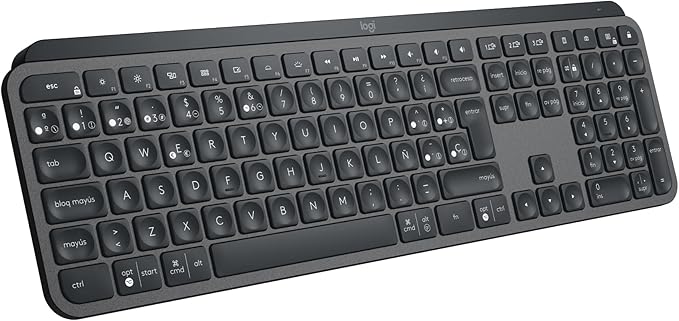
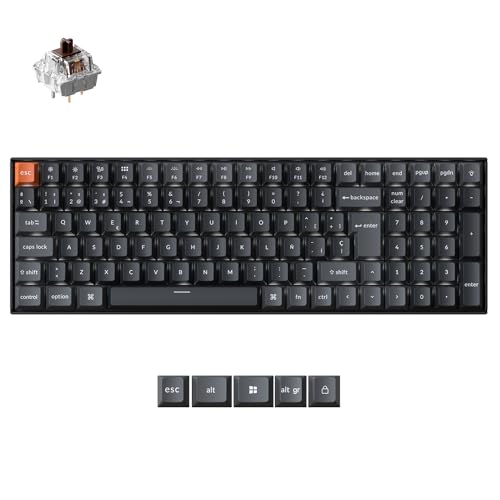
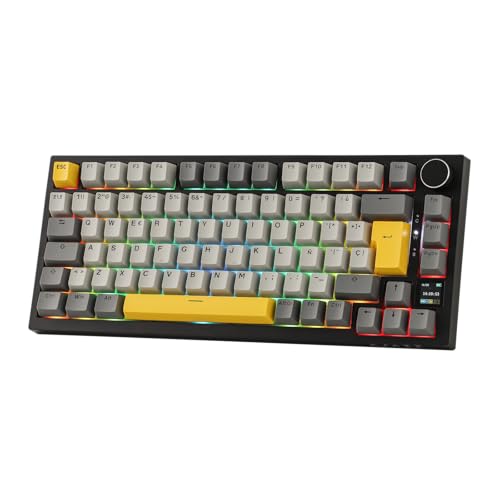
The best keyboard for programming in 2026 depends on where you sit, and on one thing no other guide checks: the layout. The Logitech MX Keys S wins as the quiet all-rounder for a shared office. If you want a mechanical board whose keys you can move in firmware, the Keychron K4 QMK. And the EPOMAKER Ajazz AK820 Pro is the value pick with hot-swap sockets. Whichever you choose, check the layout line on the listing before you pay: it is a variant, not a model.
The symbols you actually type, and where ISO-UK puts them
Every buying guide for programmers opens with switches. That is the second decision. The first is which of the physical layouts your keyboard uses, because a keyboard is not a model, it is a model in a layout, and the layouts move exactly the keys that code is made of.
The characters a developer reaches for all day are the braces, the square brackets, the backslash and the pipe, the hash, the tilde, the angle brackets and the at sign. On ISO-UK, all of them are reachable on their own key or on a plain shift. That is not true of every layout sold on the same product page.
ISO-UK
Backslash and pipe sit on their own key next to the left shift, the hash and tilde key sits to the left of a tall L-shaped Enter, and the at sign and double quote are swapped relative to ANSI. Braces and brackets are plain, unshifted or shifted keys. Nothing a coder types needs a third modifier.
ANSI-US
Enter is a wide bar, backslash and pipe move above it, and the at sign returns to shift and 2. It is the layout most switch tables, keycap sets and custom builds assume, so it is the layout with the widest choice. A perfectly deliberate pick for a developer, as long as it is a pick.
Other ISO variants
The continental ISO layouts keep the L-shaped Enter but reassign the second and third levels to their own accented characters, so several bracket and brace characters move behind AltGr. Typing them is possible. Typing them a thousand times a day is a different question.
| What you type | On ISO-UK | On ANSI-US | Why a coder notices |
|---|---|---|---|
| Backslash and pipe | Their own key, between the left shift and the Z | Their own key, directly above Enter | Both are one unshifted key. This is the biggest physical difference between the two boards and the one your left hand relearns |
| Hash | Its own key, to the left of the tall Enter, unshifted | Shift and the 3 | Comments, preprocessor directives, channel names, colour literals. On ISO-UK it costs no modifier at all |
| Tilde | Shift on that same key beside Enter | Shift on the top-left key | Home directories, destructors, approximate matching. Two different corners of the board |
| At sign and double quote | At is shift and the apostrophe; double quote is shift and the 2 | The other way round | The single swap that produces the most typos when you move between the two, because both are muscle memory |
| Backtick | Top-left key, left of the 1, unshifted | Top-left key, left of the 1, unshifted | Identical. Template literals and fenced code blocks behave the same on both |
| Square brackets and braces | Right of the P, plain and shifted | Right of the P, plain and shifted | Identical The characters people worry about most are the ones that do not move |
| Enter | Tall and L-shaped, two rows high | A single wide horizontal bar | Not a character, but the two-second way to identify which board a photo is showing |
Positions taken from the two physical layouts themselves. Note the last two rows: brackets and braces are in the same place on both, so the fear that an unfamiliar layout will bury the characters code is made of turns out to be mostly about four keys, not forty. The continental ISO layouts are a different matter, because they reassign the second and third levels to their own accented characters and push several of these behind AltGr.
Layout is nearly always a variant on the same listing rather than a different product, and the variant that shows first is not always the one your store would send you. So do this, in this order. One: read the title and the variant selector for the words ISO-UK, UK layout, QWERTY UK or the corresponding country name. Two: look at the Enter key in the main photo. If it is tall and L-shaped and there is a narrow key to its left, that is an ISO board; if Enter is a wide horizontal bar, that is ANSI. Three: if neither the text nor the photo commits, treat the layout as unknown and pick a different listing. A maker that has produced a UK variant says so, because it is the thing UK buyers search for.
The publishable rule: if a keyboard listing does not name a layout, assume ANSI-US. And if you already own the wrong one, the fix is firmware, not a return: a board with QMK or VIA lets you move any character to any key and keep it there, because the mapping lives in the keyboard rather than in the operating system, which means it survives a reinstall, a different machine and a remote session. That single property is why the Keychron K4 sits at number two on this page. The same logic applies to a keyboard bought to play rather than to type, and those are compared separately in our gaming keyboard guide, where the layout question is answered from the listing photo.
What UK workstation rules require of a keyboard, in four lines
If you use a screen daily for continuous periods of an hour or more, the Schedule to the Health and Safety (Display Screen Equipment) Regulations 1992 sets minimum requirements for the keyboard you use. There are four of them, they are short, and they are a better buying checklist than most of what gets written about switches.
Quotations from the Schedule to the Health and Safety (Display Screen Equipment) Regulations 1992 (SI 1992/2792), consulted on 1 September 2026. The Schedule also sets minimums for the desk and the environment, and none at all for the mouse, which we go through in the guide to choosing a mouse for work. Your employer has to carry out a workstation assessment and pay for an eye test if you ask for one, and HSE says the same applies when you work from home.
The day it arrives: making the board and the operating system agree
This is the half of the layout question that no buying guide finishes, and it is where most of the complaints actually come from. The layout printed on the keys and the layout the machine types are two separate settings, and they are set by two different parties. A correct board with the wrong setting types the wrong characters, and a wrong board with the right setting types the right characters onto the wrong legends. Both feel like a faulty keyboard and neither is.
The seven compared
| Keyboard | Type | Format | Remappable | Connection | Best for | |
|---|---|---|---|---|---|---|
| MX Keys S |
Low profile | Full size | Logi Options+ | Bluetooth / USB-C | Shared offices | See › |
| Keychron K4 QMK |
Mechanical | 96% | QMK / VIA | Bluetooth / 2.4G / cable | Layers and macros | See › |
| EPOMAKER AK820 Pro |
Mechanical | 75% | Own software | Bluetooth / 2.4G / cable | Hot-swap sockets | See › |
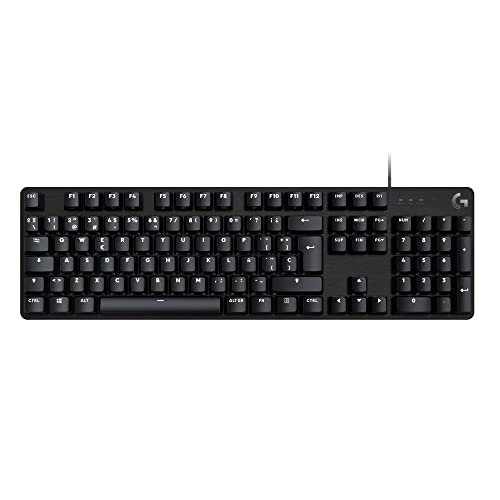 Logitech G413 SE Logitech G413 SE |
Mechanical | Full size | No | USB cable | Plug it in and forget it | See › |
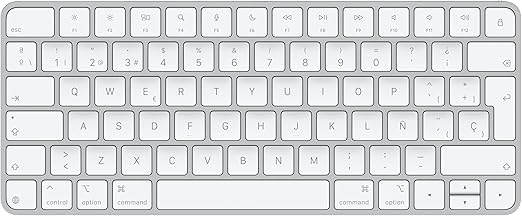 Apple Magic Keyboard Apple Magic Keyboard |
Membrane | Compact | macOS only | Bluetooth | A Mac and nothing else | See › |
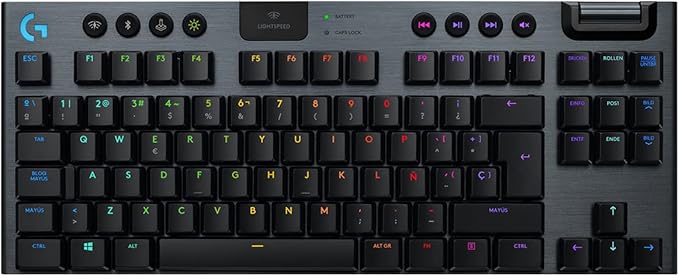 Logitech G915 TKL Logitech G915 TKL |
Mechanical, low profile | TKL | G HUB | Lightspeed / Bluetooth | Wireless with no cable at all | See › |
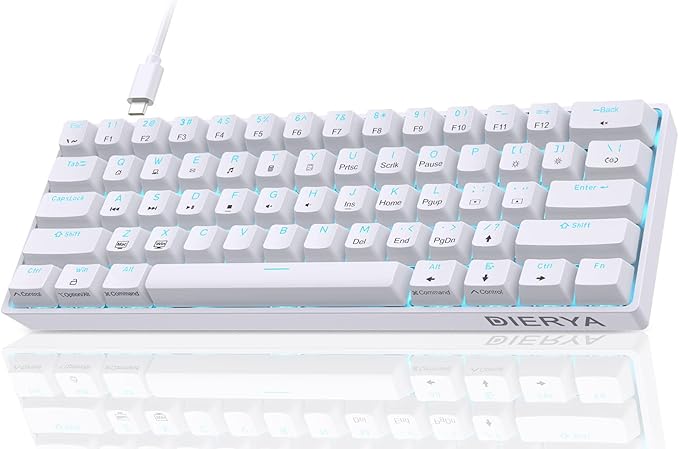
| Dierya DK61SE |
Mechanical | 60% | No | USB-C cable | ANSI-US, by design | See › |
Specifications as declared by each manufacturer, read on 1 September 2026 from the Amazon catalogue that m8d tracks. The layout column is deliberately absent: layout is a variant and it differs by store, so it is the one thing we will not state on your behalf. Check it on the listing you are actually looking at, with the three-step check above.
Which switch, and where you write code
The switch decides how the board feels and how much of it the room hears. Those are two separate questions and the second one is the one that gets people into trouble.
Linear (red)
A smooth, even press with no bump and no click. Fast to type on once you trust it, and the safest mechanical choice for a room with other people in it. If you are moving from a laptop keyboard, this is the least surprising switch.
Tactile (brown)
A small confirmation partway down the press, without the sound of a click mechanism. For long coding sessions this is the balance most people settle on: enough feedback to stop bottoming out, quiet enough for an office that is not silent.
Clicky (blue)
The click is the feedback: a separate mechanism produces it deliberately. Satisfying at home, and a genuine problem on a call or in a shared room, where the Schedule's own line about noise not disturbing speech starts to apply to you.
What the makers declare, and what we will not: mechanical switch manufacturers publish rated lifetimes in the range of 50 to 100 million actuations per key, which is the number behind the durability argument for mechanical over membrane. We are not going to publish decibel figures for these switches, because measuring sound pressure needs a meter and a room and we have neither. What we can tell you is which mechanism is designed to make noise and which is not, and that is the distinction that decides the purchase.
How to choose a keyboard for writing code
Once layout and switch are settled, the rest is short. For a developer, a security analyst or anyone working on cloud architecture, the keyboard is the interface between thinking and code, and a badly chosen one does not just slow you down: it adds friction, fatigue and typing errors. Three things decide it, in this order.
Format, because it is really a desk decision. A full-size board carries a numeric pad most developers touch once a week and pushes the mouse a hand's width further out, which over a working day is shoulder rotation you did not need. Tenkeyless and 75% give that space back. A 60% goes further and removes the dedicated arrow keys and function row, which for a coder is a genuine trade: those keys come back under a layer, and a layer is only comfortable if the board is remappable.
| Format | What you keep | What moves under a layer | On this page |
|---|---|---|---|
| Full size (100%) | Everything, including the numeric pad | Nothing | MX Keys S, G413 SE |
| 96% | Numeric pad and arrow keys, in a narrower body | Nothing, the keys are just closer together | Keychron K4 QMK |
| 75% and TKL | Function row, arrow keys, navigation cluster | The numeric pad | EPOMAKER AK820 Pro (75%), G915 TKL |
| Mini (60%) | The alphanumeric block and the modifiers | Arrow keys, function row, navigation cluster, numeric pad | Dierya DK61SE |
Read the third column before the second: what a format costs you is a set of keys you now reach through a modifier. For a coder that matters most for the arrow keys and the function row, which are used constantly in an editor and in a terminal, and it is the reason a 60% board is only comfortable when the firmware lets you put them somewhere you can live with.
Remapping, because it turns a permanent decision into a reversible one. Boards with QMK or VIA store the mapping in the keyboard itself. That is the difference between a layout you have to live with and a layout you can move, and it is also how you get IDE shortcuts onto a layer instead of into a piece of resident software.
Connection, because it decides how many machines it serves. A multi-device board that jumps between a work laptop, a personal machine and a tablet removes a second keyboard from the desk. A cable removes a battery to think about. Neither adds measurable latency when you are typing.
Every figure here carries its source. We scored each one on five things that can be checked on a manufacturer's own spec sheet: switch type and mechanism, format and the desk space it frees, whether the mapping can be changed and where it is stored, connection type and hot-swap sockets.
The catalogue behind this piece is Amazon Spain, part of Amazon's shared European catalogue, read on 1 September 2026. Availability and, above all, keyboard variants differ from country to country: the buttons take you to your own local store, and the layout you get is the one on the listing you buy from, which is why this guide teaches the check instead of stating the answer. We receive no hardware from manufacturers and affiliate links do not decide the order. The workstation requirements quoted above come from the Schedule to the Health and Safety (Display Screen Equipment) Regulations 1992.
The three worth a closer look
The low-profile keys are dished, so your fingertip lands in the middle of the cap rather than on the edge, which is why it feels like a good laptop keyboard rather than a cheap one. It jumps between three machines instantly, which on a desk with a work laptop and a personal one removes a second keyboard entirely, and the backlight comes on as your hands approach. Read against the workstation Schedule it ticks every line: it tilts, it is separate from the screen, the finish is matt and the legends are high contrast.
This is the answer to the layout section. With QMK or VIA you move any character to any key, build a layer of IDE shortcuts under a modifier, and the whole arrangement is stored in the board's own firmware. It survives a reinstall, follows you to a client's machine and works over a remote session, none of which is true of a mapping that lives in the operating system. The 96% format keeps the numeric pad and the arrow keys in noticeably less width than a full-size board, and the PBT caps do not go shiny after a year of use.
The one that punches above its tier. Hot-swap sockets mean the switch is a decision you can undo: if the linear you chose turns out to be too light, you pull it with the included puller and drop in another, with no soldering iron and no second keyboard. The 75% format keeps the function row and the arrow keys while giving back the width of the numeric pad, which is the format most developers land on once they have tried all three. EPOMAKER is also one of the few brands that publishes its keyboards by layout rather than burying it, which for a UK buyer is worth more than a spec line.
Four more, by case
Apple Magic Keyboard
Native macOS behaviour, every modifier where the system expects it, and a battery that lasts long enough that you forget it has one. Not mechanical, and the key travel is very short, which some people love and some cannot get used to.
See it on Amazon ›Logitech G413 SE
Wired, tactile, anti-ghosting, full size, from a brand with a real support route. No software, no pairing, no battery. If you want the mechanical feel and none of the hobby around it, this is the shortest path to it.
See it on Amazon ›Logitech G915 LIGHTSPEED TKL
Low-profile mechanical switches with Lightspeed wireless, in an aluminium TKL body. The rare board that is mechanical, wireless and short at the same time. Sold in several layouts, and the cheapest variant is often not the UK one: this is the listing on this page where the check matters most.
See it on Amazon ›Dierya DK61SE
A 60% mechanical board in ANSI-US, which is the layout most switch tables and keycap sets assume. The arrows and the function row move under a layer. It is the cheapest way to find out whether a compact board suits how you type before committing to an expensive one.
See it on Amazon ›Questions about keyboards for programming
There is no single correct keyboard, but there is one for each way of working. If you are unsure, the Logitech MX Keys S is the safe answer on comfort and silence; the Keychron K4 QMK if you want a mechanical board whose layout you own; and the Dierya DK61SE to find out cheaply whether a compact board suits you. A keyboard that fits disappears, and the next decision on the desk is the machine it plugs into, which we cover in the guide to choosing a laptop for programming.

m8d.io
We are a technology analysis publication. In every guide we contrast what a product promises with what can be verified, and we publish the proof: the manufacturer's own spec sheet, or the official standard where one exists. We do not state the layout you will receive because that is decided by the listing you buy from. No manufacturer pays to appear or to rank first, purchase links are affiliate links and are disclosed on every block, and corrections are published with their date.
About m8d.io ContactBest mouse for work
The other half of the noise problem, and the part of the workstation rules with no minimum at all.
Best gaming keyboards
If it is for playing rather than for typing eight hours: switches, formats and the layout check from the photo.
Best 27-inch monitor
The screen above the keyboard, and the USB-C wattage rule that decides whether one cable is enough.
Comments
Be the firstNo sign-up: just a name. Every comment is reviewed before it is published.