Best value graphics card 2026: seven compared on memory, bus width and the power supply each one needs
 m8d.ioUpdated on
This guide contains affiliate links. As an Amazon Associate, m8d.io earns from qualifying purchases, at no extra cost to you.
The best value graphics card of 2026 is the RX 9060 XT with 16 GB, and the reason is the year we are in: memory is the component in short supply, so the card carrying the most of it is the one that ages best. If you want the most complete spec sheet in the tier, the RTX 5060 publishes all three numbers and carries GDDR7. On the tightest budget, the RX 7600 is the floor that still plays 1080p properly. Before you pay, check three things in this order: memory, bus width and your power supply.
- Gigabytes do not read on their own. You need three numbers together: how many gigabytes, what type of memory, and how wide the bus carrying it is. Only three of these seven cards publish all three.
- One listing declares two different bus widths on the same page. The RX 9060 XT says 256 bits in its title and 128 in its own feature bullets. We recommend it anyway, and we say why.
- The only real change of tier in this list is the bus width, and only the RTX 5070 delivers it, at 192 bits. Everything below shares 128.
- The memory crunch has reached graphics cards, and it is not a local story. AMD has told partners it will raise prices across its range, NVIDIA is reported to be raising the price of the GPU and memory bundle, and shops in some markets have started rationing 16 GB cards.
- A card whose driver lives on a separate line from current cards is telling you something. AMD publishes its Polaris and Vega drivers as their own release-note series, which is the right way to read the RX 580 on this page.
The memory crunch, and why it is not something you can wait out
Any guide to value in graphics cards written in 2026 has to start with the reason value has become hard to find. The shortage that pushed up the price of system memory has reached the memory soldered onto graphics cards, and the manufacturers have stopped being coy about it.
What is on the record. AMD has notified supply chain partners that it will raise graphics card prices across its product line, attributing the rise to the AI-driven DRAM supply crisis. NVIDIA is reported to be increasing the price of the GPU and memory bundle it sells to board partners, affecting both GDDR6 and GDDR7. Retailers in some markets have begun rationing cards with 16 GB and above to one per customer. And the supply side offers no relief: the additional DRAM capacity coming online in 2026 is largely committed to AI and enterprise customers rather than to consumer PCs.
What that means for the decision in front of you. Two things, and they point the same way. First, the component under pressure is the memory itself, so the card that carries more of it is the one whose relative position improves rather than decays. Second, the usual advice to wait for a better moment does not have anything behind it this year: nothing published points to a fall.
The rule of this house, unchanged: if you need it and it is within your budget, buy it today. If you do not need it, do not buy out of fear. And if the card you already own still drives the resolution you play at, keeping it is also a decision made with data.
When new cards get expensive, the second-hand market becomes the obvious answer. In the UK the answer depends entirely on who you buy from, and the difference is worth more than the discount.
m8d rule: If the saving over a new card is small, buy from a trader. The Consumer Rights Act you keep is worth more than the difference, particularly on a component that has spent an unknown number of hours running a workload you cannot inspect.
Why the gigabytes on a graphics card do not mean what they look like
On a graphics card spec sheet there is one number everybody reads first and uses to compare: the gigabytes. It is also the only one of the three that says nothing on its own.
A card's memory talks to the chip over a bus, which has a width measured in bits, and it is made of a particular type, which determines how fast it runs. Eight gigabytes of GDDR7 over a 128-bit bus and eight gigabytes of GDDR5 over a 256-bit bus are two different things, and both are advertised as eight gigabytes. All three figures are published by the manufacturer. The problem is that only one of the three reaches the headline.
- Publish gigabytes, memory type and bus widthThe two GIGABYTE NVIDIA cards and the maxsun343%
- Publish only the gigabytesThe two ASUS cards229%
- Publish two of the threeMSI gives gigabytes and type, and the PCIe lanes as well114%
- Publishes the bus width twice, and differentlyGIGABYTE RX 9060 XT: 256 bits in the title, 128 in the bullets114%
Across the seven cards in this analysis, according to their listings and feature bullets, read on 1 September 2026.
Three listings, taken from the same graphics card search, ordered by what they advertise.
A very cheap GT 730 advertises 4 GB. An RTX 5060 advertises 8 GB. An RX 9060 XT advertises 16 GB. Read like that, the jump in price looks like it tracks the jump in memory.
The 4 GB on the GT 730 are GDDR3, a memory type from 2007, and its stablemate in the same catalogue, a GT 210, is still sold new with a 64-bit bus. The 8 GB on the RTX 5060 are GDDR7 over 128 bits. And the 16 GB on the RX 9060 XT travel, according to its own manufacturer's feature bullets, over 128 bits too, even though the title on the same page says 256.
More gigabytes of a slower memory type over a narrower bus is not more card. It is a bigger number on a box. The 4 GB card will not run a modern game at any settings, and the 8 GB card will, which is the whole point.
m8d rule: Before you compare gigabytes, find the other two figures. If a listing publishes the gigabytes and states neither the memory type nor the bus width, it is selling you the big number. And if it states one of them twice with two different values, believe the feature bullets over the title.
Is a 2017 card still worth buying? What AMD's own driver pages say
The RX 580 is the cheapest card in this analysis and it is the one that produces the most arguments, so it deserves a straight answer rather than a shrug. It carries 8 GB over a 256-bit bus, the widest path on this page, and it still does not compete with the cards above it. The reason is that a wide path with GDDR5 from 2017 moves less than a narrow path with GDDR7 from 2026, which is the whole lesson of the previous section.
But there is a second thing to check before spending anything on a card this old, and it is not a benchmark. It is where the manufacturer files its drivers.
Ignore the reviews and go to the maker's own download pages. What you are looking for is whether your card is served by the same driver as the current ones.
A card sold new in 2026, in a sealed box, with 8 GB and a 256-bit interface printed on the front. Everything about the transaction says current product.
AMD publishes its Adrenalin release notes for Polaris and Vega products as their own separate series, distinct from the release notes that cover its current cards. Two release-note pages, two product families, one company. That separation is a statement about where a chip sits in its life, and it is made by the only party with the authority to make it.
If the card you are looking at is served by a separate driver line, treat its remaining useful life as a known quantity rather than an open one. That is not a reason never to buy it. It is a reason to buy it only for what it does today, at 1080p on medium settings, and never as an investment in the next four years.
m8d rule: Before buying any graphics card that is more than two generations old, open the maker's driver page and check whether your card appears in the same release notes as the current range. If it has its own, you are buying a known ending.
So: is it a buy? Only in one case. If the machine is a 1080p machine, the budget genuinely stops there, and the alternative is not upgrading at all, the RX 580 does the job today and its three video outputs, DVI included, will drive a monitor nothing else on this page will. In every other case, including the one where you are tempted by the 256-bit number, the answer is the RTX 3050 above it or nothing.
The same chip with 8 and with 16 GB: the pair that shows what memory is worth
The clearest experiment in this category is one the shops run for you: the same silicon, sold in two memory capacities, side by side on the same day.
The RX 9060 XT with 8 GB. Same name, same generation, and cheaper than the one in this guide. On paper it is the obvious pick from the listing.
The RX 9060 XT with 16 GB in this guide. The chip is identical; what changes is the memory. And the context is set by the market itself: GDDR is precisely the component whose price is climbing, so that difference is buying the scarce resource rather than a badge.
At 1080p the 8 GB card is comfortable and the saving is legitimate. At 1440p with high textures, the big games of the last two years already fill 8 GB: the picture stutters not because of the chip but because of the memory, and no setting fixes it completely. If you are buying for 1440p and want it to last, pay for the memory.
m8d rule: If the same chip is sold with 8 and with 16 GB and you play at 1440p, pay for the memory: in 2026, 8 GB is the floor that big games already reach, not a saving.
What will you be able to play and edit with each one
Everything above is for not buying badly. This is for knowing what you will be able to do. One warning first, because it is our standing rule: we do not publish frame rate figures: that figure is cited only from the source that publishes it. What follows rests on where each manufacturer positions its own card and on how much memory each task needs.
| Card | For gaming | For video editing | For local AI | |
|---|---|---|---|---|
 ASUS Dual GeForce RTX 3050 OC 6GB view › ASUS Dual GeForce RTX 3050 OC 6GB view › | 1080p on medium. Demanding recent games will need details turned down | 1080p projects without trouble. At 4K it runs out of memory | Small models only. 6 GB is the floor | View › |
 maxsun Radeon RX 580 8GB view › maxsun Radeon RX 580 8GB view › | 1080p on medium to low. Games from a few years back are comfortable; current ones are tight | 1080p. No modern acceleration for the newer formats | Not the tool for it | View › |
 ASUS Dual Radeon RX 7600 EVO OC view › ASUS Dual Radeon RX 7600 EVO OC view › | 1080p on high with room to spare | 1080p easily and 4K with patience | 8 GB is enough for small image models | View › |
 MSI GeForce RTX 5050 8G Shadow 2X OC view › MSI GeForce RTX 5050 8G Shadow 2X OC view › | 1080p. MSI itself writes 1080p on its own spec sheet when it talks about ray tracing | 1080p easily | 8 GB, the same ceiling as the rest of its tier | View › |
 GIGABYTE RTX 5060 WINDFORCE OC 8G view › GIGABYTE RTX 5060 WINDFORCE OC 8G view › | 1080p comfortably and 1440p with textures turned down in the most demanding titles | 4K without drama, helped by GDDR7 | 8 GB, with faster memory than its AMD rivals | View › |
| GIGABYTE Radeon RX 9060 XT OC Ice 16G view › | 1440p with high textures, which is what the 16 GB buy you | 4K comfortably: memory is what 4K timelines run out of first | 16 GB, the only card here with room for a mid-sized model | View › |
 GIGABYTE GeForce RTX 5070 WINDFORCE OC SFF 12G view › GIGABYTE GeForce RTX 5070 WINDFORCE OC SFF 12G view › | 1440p without thinking about it, thanks to the 192-bit bus | 4K with headroom | 12 GB of GDDR7 over a wider bus | View › |
Guidance by tier, not measurement. It rests on the positioning each manufacturer declares for its own card and on how much memory each task needs. Individual games vary enormously, and the same card can be comfortable in one title and tight in another from the same year.
The short rule, if you only take one thing away. For 1080p, any of the entry tier here. For 1440p, you want 12 or 16 GB, which means the RX 9060 XT or the RTX 5070. For 4K gaming, none of this list is the tool and the budget has to go up. And for editing video in 4K, what decides it is not the chip but having at least 8 GB of memory, which five of the seven have.
The best value graphics cards of 2026, compared
| Graphics card | Memory | Type | Bus width | Generation | Recommended supply | |
|---|---|---|---|---|---|---|
| GIGABYTE Radeon RX 9060 XT OC Ice 16G view › | 16 GB | GDDR6 | 128 bits (the title says 256) | Current | 500 W | View › |
| GIGABYTE RTX 5060 WINDFORCE OC 8G view › | 8 GB | GDDR7 | 128 bits | Current | 550 W | View › |
| ASUS Dual Radeon RX 7600 EVO OC view › | 8 GB | not published | not published | Previous | 550 W | View › |
| GIGABYTE GeForce RTX 5070 WINDFORCE OC SFF 12G view › | 12 GB | GDDR7 | 192 bits | Current | 650 W | View › |
| MSI GeForce RTX 5050 8G Shadow 2X OC view › | 8 GB | GDDR6 | not published · PCIe x8 | Current | 550 W | View › |
| ASUS Dual GeForce RTX 3050 OC 6GB view › | 6 GB | GDDR6 | not published | Two back | No connector (70 W) | View › |
| maxsun Radeon RX 580 8GB view › | 8 GB | GDDR5 | 256 bits | 2017 | 500 W | View › |
Figures published by each manufacturer on its own listing, read on 1 September 2026. We do not include per-game frame rate figures: that figure is cited only from the source that publishes it. The recommended supply is the figure the chip's maker publishes for the complete system, not for the card alone. One more figure worth knowing and rarely published: MSI states PCIe 5.0 x8 for the RTX 5050, meaning half the available lanes. On a PCI Express 5.0 motherboard that is invisible; on a 3.0 board, which is what many machines being upgraded actually have, it is not. If your board is 3.0 and the card you like declares x8, prefer one that uses all sixteen lanes.
Will your power supply cope? Check it in one tap
Choose the wattage of your machine's power supply and the check answers with the cards from this guide you can fit without changing anything else, using the recommended supply each chip maker publishes: 550 W for the RTX 5050 and the 5060, 650 W for the 5070, 550 W for the RX 7600 and 500 W for the RX 9060 XT. One of the four answers does not sell anything: it shows you how to read the label on your own supply. It opens on the most common case, 550 W.
With a decent 550 watt supply you can fit the RTX 5050, the RTX 5060, the RX 7600 and the RX 9060 XT, for which AMD asks only 500. Of that group the one we would buy is the RX 9060 XT, because its 16 GB are the thing this year makes scarce. The only door that stays shut is the RTX 5070: NVIDIA recommends 650, and with a supply at its limit the machine restarts exactly when the game gets busy, which is the worst possible moment.
The wattages are the ones each chip maker recommends for the complete system, and the comparison table on this page lists them card by card. Availability of individual models varies by country, so check yours in your own store before building.
Which is the best value graphics card for your case
16 GB of real memory, which is what stops you running out with high textures. Its listing contradicts itself on bus width, and even so the memory is the argument and the memory is true.
See it on Amazon ›The 7 graphics cards reviewed
GIGABYTE Radeon RX 9060 XT OC Ice 16G view ›
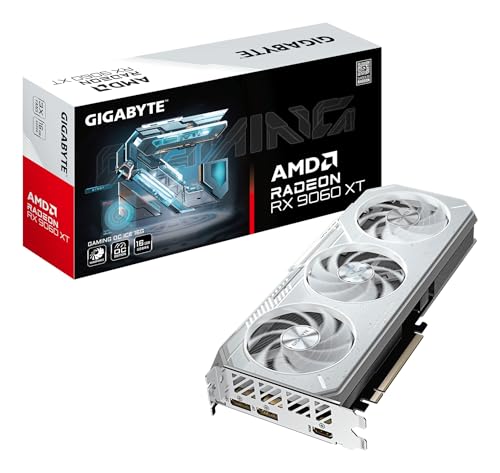
Sixteen gigabytes of memory, which is double what most of this list carries and the only way not to run tight at 1440p with high textures. In a year when memory is the scarce component, buying the card with the most of it is the decision that ages best. It is also the card that best illustrates the problem with this category: its own listing declares 256 bits in the title and 128 bits in the feature bullets two lines below.
- The contradiction takes ten seconds to check on the product page itself: the title says 256bit and the feature bullet says, word for word, 16GB 128bit GDDR6 memory interface. We are recommending it anyway, and telling you why: the memory is the argument and the memory is not in dispute.
- Those 16 GB are the difference between turning textures down and leaving them alone. It is the case for this card, and it does not need propping up with a bus width its own maker contradicts.
- AMD publishes a recommended system supply of 500 W for this chip, the lowest figure in this guide. The power supply check further up this page confirms it in one tap.
- 16 GB of memory, double what most of this analysis carries
- PCI Express 5.0 and a three-fan cooler
- Current AMD generation
- AMD's declared recommended supply is the lowest here, at 500 W
- Its listing declares two different bus widths on the same page
- The largest outlay of the mainstream cards here
- Ships in a few days rather than immediately
GIGABYTE RTX 5060 WINDFORCE OC 8G view ›
The card that publishes all three numbers and has nothing to hide: 8 GB of GDDR7, which is the fastest memory in this analysis, a 128-bit bus and PCI Express 5.0. For 1080p at high settings and sensible 1440p, it spreads the money better than anything else here. If 1440p with high textures is where you actually play, the 16 GB card above is the one that will not run out.
- GDDR7 is its quiet advantage: at the same 8 GB it moves data considerably faster than the GDDR6 in the AMD cards of its tier, and that is what holds up the 1440p that others start to choke on.
- NVIDIA recommends a 550 W system supply: a typical prebuilt tower already has one, and the check on this page confirms it in a tap.
- The same chip is sold by several board partners at different levels. The silicon is identical, so there is no case for paying for the sticker.
- GDDR7: the fastest memory here, and unusual in this tier
- PCI Express 5.0 and a current generation with modern upscaling
- Publishes memory type, bus width and recommended supply, which only three of the seven do
- 8 GB: for sustained 1440p with high textures, look at the 16 GB pair above
- It has gone up with the memory crunch, like almost everything else in this analysis
ASUS Dual Radeon RX 7600 EVO OC view ›
The lowest outlay in this guide that still plays 1080p properly, and ASUS puts its dual-fan cooler with ball bearings and a silent mode on it. The complaint is about the listing, not the card: it publishes neither the memory type nor the bus width, and in a category where those two numbers decide everything, that is a mark against it.
- A 2.5-slot design. Measure the gap in your case before buying, because in a compact tower that thickness covers the slot next to it.
- The zero-decibel technology stops the fans at low load, so on the desktop and playing video it is genuinely silent.
- AMD publishes a 550 W recommended system supply for this chip, the same as the two NVIDIA cards of its tier.
- The lowest outlay among the recent-generation cards
- Dual-fan cooling with ball bearings
- Zero-decibel mode at low load
- Auto-Extreme automated manufacturing
- Its listing publishes neither the memory type nor the bus width
- 2.5 slots thick: measure the case first
- One generation behind the current one
GIGABYTE GeForce RTX 5070 WINDFORCE OC SFF 12G view ›
The only one of the seven that widens the bus to 192 bits, and that is what separates one tier from another far more than the gigabyte count does. 12 GB of GDDR7 over a wider bus is the combination that holds 1440p without you having to think about it. It also costs roughly double the entry point of this guide, and it is worth saying so.
- 192 bits against the 128 of everything below it. That is the only change of bus width on this list, and it is the only genuine change of tier.
- NVIDIA-certified SFF format: it fits in small cases, which is exactly where three-fan cards do not.
- 12 GB is the comfortable figure for 2026: neither tight like 8 nor expensive like 16.
- 192 bits of bus, the only real step up in this analysis
- 12 GB of GDDR7
- Compact form factor certified for small cases
- Publishes all three numbers without hiding any of them
- Roughly double the entry point of this tier
- Wants a power supply with headroom: NVIDIA recommends 650 W
- Out of proportion for a 1080p machine
Well built, and MSI publishes something almost nobody publishes: the lane count, PCIe 5.0 x8, which is half. The problem is where it sits. It is a short step away from an RTX 5060, a whole tier above it, carrying GDDR7 instead of GDDR6. That is why it is here with a warning rather than on the podium.
View ›The point at which a graphics card stops being an ornament and starts doing something. It has 6 GB, which is little for 2026, but it is an architecture with ray tracing cores and support for AI upscaling, which nothing cheaper in this category has. It is also the only card here that takes no extra power connector at all.
View ›It is on this list because it teaches the lesson better than anything else does: it carries 8 GB over a 256-bit bus, twice as wide as the RX 9060 XT above, and it still does not compete with it. The chip is from 2017 on a 14 nanometre process, and AMD publishes its drivers on a separate line from the current cards. As proof that bus width decides things on its own, it fails completely.
View ›8, 12 or 16 GB? How much video memory you actually need
The short answer: it depends on the resolution and on the textures, not on the power of the chip.
8 GB is the 2026 minimum and it is comfortable at 1080p. It is what five of the seven cards here carry, including the one with the most complete spec sheet. It runs short when you move to 1440p and turn textures up, and the symptom there is not that things get slower: it is that they stutter.
12 GB is the comfortable figure, and only the RTX 5070 has it, which is also the only card that widens the bus. It is the combination that stops you thinking about memory for the next several years.
16 GB makes sense if you play at 1440p with high textures, edit 4K video, or want to run AI models locally, where memory outranks everything else. That is what the RX 9060 XT offers, and in a year when memory is the constrained component it is also the specification least likely to be matched cheaply next season.
And the detail no list mentions: when a card runs out of memory it does not degrade gradually, it stalls all at once. When it runs out of chip, it degrades smoothly. That is why being short of memory is more unpleasant than being short of power, and it is the single strongest argument for buying the capacity rather than the badge.
Every figure in this guide carries its source and its date. What we did:
- Availability and configurations were read through the Amazon API on 1 September 2026 from the shared European catalogue that m8d tracks. Nothing is typed by hand.
- The specifications come from the feature bullets each manufacturer publishes on its own listing. Where a figure is not published, the table says so instead of being filled in.
- We do not publish frames per second. It is the most searched figure and the most copied between lists without anyone measuring it, and here it is cited only from the source that publishes it.
- The criteria weight what can be checked above what is claimed, and penalise a card that hides data even when the card itself is good.
- What we do not know: which of the two bus widths on the RX 9060 XT listing is the correct one according to its own manufacturer, because it publishes both on the same page; and how these cards behave over years, because there is no public failure series to consult.
Availability and model variants differ from country to country, so the buttons take you to your own local Amazon store to check what is actually on the shelf where you are.
Questions about value graphics cards
What is the best value graphics card in 2026?›
The RX 9060 XT with 16 GB. In a year when memory is the component in short supply, the card carrying the most of it is the one whose position improves rather than decays, and 16 GB is what lets you play at 1440p without turning textures down. If you want the most complete spec sheet in the tier, the RTX 5060 publishes memory type, bus width and recommended supply, and carries GDDR7. On the tightest budget, the RX 7600 is the floor that still plays 1080p properly.
How many GB of graphics memory do I need in 2026?›
8 GB is the minimum and it is comfortable at 1080p. 12 GB is the comfortable figure for 1440p. 16 GB makes sense at 1440p with high textures, for 4K video editing, or if you are going to run AI models locally. The important detail is that running out of memory does not slow a game down gradually: it makes it stutter all at once.
What is the bus width on a graphics card and does it matter?›
It is the width of the path the memory uses to talk to the chip, measured in bits. The same gigabytes over a narrower path take longer to arrive. In this analysis everything below the RTX 5070 shares 128 bits and the RTX 5070 goes to 192, which is the only real change of tier on the list. But bus width does not decide anything on its own either: the RX 580 from 2017 has 256 bits and does not compete with any of them, because its memory is GDDR5. Read the three numbers together or none of them means anything.
Should I buy a graphics card now or wait for prices to fall?›
Nothing published points to a fall. AMD has told partners it will raise prices across its range because of the AI-driven DRAM supply crisis, NVIDIA is reported to be raising the price of the GPU and memory bundle sold to board partners, and the extra DRAM capacity coming online in 2026 is largely committed to AI and enterprise customers. The rule of this house: if you need it and it is within your budget, buy it today; if you do not need it, do not buy out of fear; and if your current card still drives the resolution you play at, keeping it is also a decision made with data.
Is it worth buying a second-hand graphics card in the UK?›
It depends entirely on who you buy from. From a trader, the Consumer Rights Act 2015 applies in full: the goods must be of satisfactory quality, judged taking age, price and description into account, you keep the short-term right to reject, and in the first six months a fault is presumed to have been there at delivery unless the trader proves otherwise. From a private seller almost none of that applies: they must not misdescribe the item, and that is broadly the extent of it. On a component that has run an unknown workload for an unknown number of hours, the protection you keep is usually worth more than the extra discount.
Is an RX 580 still worth buying in 2026?›
Only in one case: a 1080p machine, a budget that genuinely stops there, and an alternative of not upgrading at all. It carries 8 GB over a 256-bit bus, the widest path in this guide, and still does not compete with the cards above it, because the chip is from 2017 and the memory is GDDR5. And there is a check worth doing on any card this old: AMD publishes its Adrenalin release notes for Polaris and Vega as their own separate series, distinct from the notes covering its current range. A card served by its own driver line is one whose remaining life is a known quantity.
What power supply does a graphics card need?›
Use the recommended system supply that each chip maker publishes: 550 W for the RTX 5050 and RTX 5060, 650 W for the RTX 5070, 550 W for the RX 7600 and 500 W for the RX 9060 XT. The RTX 3050 with 6 GB takes no extra connector at all and runs off the slot. Those are recommendations for the whole machine rather than for the card alone. The check on this page turns it into one tap, and if you do not know what you have, the label on the side of the supply says so.
What are PCIe lanes and why do they show up on one card here?›
They are the number of connector lanes a card actually uses, out of the sixteen available. MSI publishes PCIe 5.0 x8 for the RTX 5050, meaning half. On a modern PCI Express 5.0 motherboard half the lanes of a fast generation still leave bandwidth to spare and you will not notice. On a PCI Express 3.0 board, which is exactly what a lot of people upgrading only the graphics card have, that half applies to a path that was already narrower. It is the scenario in which a card performs below what it should and nobody knows why. If the manufacturer does not publish the lane count, you cannot rule it out either, and that is one of the things this category hides out of habit.
If we had to pick one, the RX 9060 XT with 16 GB. Memory is what this year has made scarce, memory is what runs out first at 1440p and in a 4K timeline, and it is the one card here that has enough of it, even though its own listing contradicts itself about the bus. If you want the complete spec sheet instead, the RTX 5060 publishes all three numbers and carries the fastest memory in the guide. And on the tightest budget, the ASUS RX 7600 is the floor of the tier that actually works.
The reporting and the specifications behind this guide, with who publishes them and when they were consulted.
- Tom's HardwareAMD to raise graphics card prices by at least 10% in 2026, attributed to the AI-related DRAM supply crisisConsulted on 1 September 2026.
- PC GamerNVIDIA graphics card prices reported to rise by as much as 30% as the memory crisis deepensReported increase on the GPU and memory bundle sold to board partners, covering both GDDR6 and GDDR7. Consulted on 1 September 2026.
- Tom's HardwareRetailers begin rationing graphics cards, with 16 GB and above hardest to findConsulted on 1 September 2026. Cited as evidence that the constrained component is the memory itself.
- TechRadar ProWhy DRAM is expensive right now, and where the 2026 capacity is goingConsulted on 1 September 2026.
- AMDAMD Software Adrenalin Edition release notes for Polaris and Vega productsPublished as a separate release-note series from the notes covering AMD's current range. Consulted on 1 September 2026, and the basis for the RX 580 section.
- Official NVIDIA and AMD specificationsRecommended power supply by chipNVIDIA: 550 W for the RTX 5050 and 5060, 650 W for the RTX 5070. AMD: 550 W for the RX 7600 and 500 W for the RX 9060 XT. The RTX 3050 with 6 GB is sold without an external power connector.
- legislation.gov.ukConsumer Rights Act 2015Satisfactory quality, the short-term right to reject and the reversed burden of proof in the first six months. The basis for the second-hand section. Consulted on 1 September 2026.
- Manufacturer listingsDeclared specifications of the seven cardsMemory, memory type, bus width and generation as published by GIGABYTE, ASUS, MSI and maxsun on their own listings, read on 1 September 2026. Where a figure is not published, the table says so.
Comments
Be the firstNo sign-up: just a name. Every comment is reviewed before it is published.