Best mechanical keyboard 2026: which switch suits how you type, why hot-swap matters and how to tell it from membrane
 m8d.ioUpdated on

This guide contains affiliate links. As an Amazon Associate, m8d.io earns from qualifying purchases, at no extra cost to you.

The best mechanical keyboard is chosen by its switches first: linear, tactile or clicky, and whether they can be swapped later. Our pick is the Logitech G413 SE: tactile, from the only brand here selling a UK layout. For hot-swap sockets, the Redragon K668; for less desk and no cable, the 75% Redragon K673 Pro.
- The switch decides more than the brand. Red linear for quiet and speed, brown tactile for typing text, blue clicky for anyone who wants to hear it and works alone.
- A colour is a type, not a figure. Cherry, whose MX colours the rest copy, publishes 45 cN for Red, 55 cN for Brown and 60 cN for Blue; the keyboards here are sold by colour or type.
- With hot-swap sockets, the keyboard outlives its switches. Four of the five here have them; the Logitech G413 SE is the one that does not.
- A keyboard its maker does not call mechanical, is not. Logitech's G213 has Mech-Dome keys, which Logitech itself compares with a mechanical keyboard; its G413 SE has mechanical switches, and says so.
Keyboard switches explained: linear, tactile, clicky and silent, and which one suits what you do
The colour of a switch is not styling, it is behaviour, and the colours come from one maker: Cherry, whose MX switches set the code the rest of the category copies. Cherry's own figures (in its «MX switches at a glance», published in August 2017) are the reference.
Red, linear. It goes straight down, with no bump and no click: 45 centinewtons, and it actuates after 2 mm. It is the one that disturbs least whoever sits next to you, and the one many gamers prefer.
Brown, tactile. A small bump halfway through the travel that you feel in your finger, telling you the press has registered: 55 centinewtons and 2 mm of pre-travel. For typing text for hours, we recommend starting here.
Blue, clicky. The bump plus an audible click: 60 centinewtons, actuating after 2.2 mm. Pleasant to type on, and impossible in a shared office or on a video call. Cherry also makes Silent Red and Silent Black versions for quiet operation.
Three of the listings in this guide name a switch colour or a type and two name neither. The figures behind a colour are on the switch maker's page, not on the keyboard's.
«Red switches», «linear switches», «tactile switches»: the Redragon K668, the NEWSKILL Serike V2 and the Logitech G413 SE name a type, and the Redragon K673 Pro and the YINDIAO AK820 do not even do that.
Cherry defines its MX Red as linear, 45 cN, actuating after 2 mm; its MX Brown as tactile, 55 cN; its MX Blue as clicky, 60 cN, actuating after 2.2 mm; and guarantees each MX switch for over 50 million strokes. A red switch from another brand borrows the colour code, not the figures.
Cherry's «MX switches at a glance» article (August 2017), read on 27 September 2026, and the listings of the five keyboards, read through the Amazon API on 26 July 2026.
m8d rule: A switch colour tells you the type, not the weight: only a force in cN or grams on the switch maker's page tells you how heavy a key is. If the keyboard's page gives no force and no switch maker, treat red as linear, brown as tactile and blue as loud, and nothing more.
Hot-swappable keyboards: why the switches you choose today do not have to be final
On most keyboards the switches are soldered to the board: when one fails, the keyboard fails, and the switch type you bought is the one you keep. On a hot-swappable keyboard each switch sits in a socket and comes out by hand with a puller. Four of the five keyboards here have that: the Redragon K668 and K673 Pro, the NEWSKILL Serike V2 and the Ajazz AK820. Only the Logitech G413 SE has its switches fixed.
It changes two things. Repair: a failed switch is one part, not a new keyboard. And the decision: you can buy with red switches and move to tactile ones when you know what you prefer. The one check before buying spare switches is the pins: UK switch shops such as Mechboards sell switches in 3-pin and 5-pin versions, and the socket of your board decides which fit. Redragon's own pages say the sockets of the K668 and of the K673 PRO take both (read on 27 September 2026); NEWSKILL's store states 3-pin sockets for the Serike V2 TKL, and for the full-size model and for the AK820 it is the question to ask before ordering a set.
Can any switches go on any keyboard? No: only on a hot-swappable board, only with a switch whose pins fit its sockets, and only with the same style of stem as the keycaps. On a soldered keyboard, changing switches means desoldering, which is a job, not a swap.
Mechanical or membrane: how to tell from the spec sheet, in Logitech's own words
A mechanical keyboard has an independent switch under every key. A membrane keyboard has a shared rubber sheet with domes that collapse. And there is a third thing in between, sold on the same shelf.
The Logitech G213 Prodigy, a backlit gaming keyboard from the same catalogue as the G413 SE, which came up first in our search for «teclado mecánico» (mechanical keyboard) on Amazon Spain on 26 July 2026, ahead of eight keyboards with mechanical switches.
Logitech describes it with Mech-Dome keys, «specially tuned to deliver a superior tactile response and overall performance profile similar to a mechanical keyboard», with 4 mm of travel and 50 g of actuation force. Similar to mechanical is not mechanical. Its sibling, the G413 SE, is described with «tactile mechanical switches».
Logitech G's product pages for the G213 Prodigy and the G413 SE, read on 27 September 2026. What we cannot say is why a search engine puts it first: we do not know its ranking criteria and will not guess them.
m8d rule: If a keyboard does not have the word mechanical in its own name or in its maker's description, it is not. In this category the maker writes it whenever it can, because it is what justifies the price. The silence is the answer.
And the filter that is not this guide's subject, but decides whether the keyboard you receive is the one you wanted: the layout. The UK layout has an L-shaped Enter key and the pound sign on the 3 key; the US ANSI layout has a wide single-row Enter and no pound sign. The keyboards in this guide come from the Spanish catalogue: the two Redragons are listed with a Spanish layout, the NEWSKILL Serike V2 is sold in a Spanish layout only, the YINDIAO AK820 is the US layout and the Logitech G413 SE states none. Of the brands, only Logitech sells its keyboard here in English UK (QWERTY); Redragon lists the K668 in US-ANSI and four European ISO layouts and the K673 PRO in US QWERTY (brand sites read on 27 September 2026). Check the photo before you buy. The UK layout in detail is in our guide to the best keyboard for programming, and for play, in the gaming keyboards checked for a UK layout.
A mechanical keyboard at work in the UK: what the Display Screen Equipment Regulations ask of a keyboard
If the keyboard is for a job, there is a UK rule that most buying guides skip. The Health and Safety (Display Screen Equipment) Regulations 1992 set minimum requirements for the equipment of anyone who uses a screen at work, and their Schedule has a paragraph on the keyboard alone. Every line of it is a feature you can check before buying:
- «The keyboard shall be tiltable and separate from the screen»: a laptop's own keyboard is not separate from its screen, which is why a desk setup adds a separate keyboard, and why fold-out feet matter.
- «The space in front of the keyboard shall be sufficient to provide support for the hands and arms»: a mechanical keyboard sits taller than a laptop's, so the desk space in front, or a wrist rest, is part of the purchase.
- «The keyboard shall have a matt surface to avoid reflective glare»: keycaps that go shiny with wear work against that; the Logitech G413 SE lists PBT keycaps.
- «The symbols on the keys shall be adequately contrasted and legible»: a white backlight, like the G413 SE's, keeps legends readable; an RGB show is a matter of taste.
Best mechanical keyboards 2026 compared: size, switch, layout and hot-swap
| Mechanical keyboard | Size | Switch | Hot-swap | Layout of the listing | UK layout from the brand | |
|---|---|---|---|---|---|---|
| Redragon K668 RGB view › | Full-size, 105+4 keys | Red, linear | Yes, 3/5-pin sockets | Spanish (QWERTY) | No: US-ANSI and four EU ISO | View › |
 Logitech G G413 SE Full-Size view › Logitech G G413 SE Full-Size view › | Full-size | Tactile | No | not stated | Yes, English UK (QWERTY) | View › |
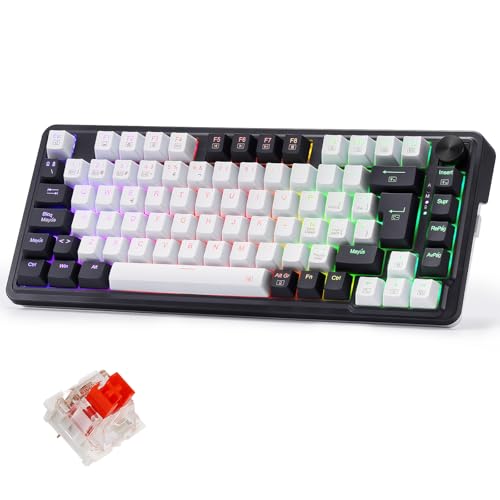 Redragon K673 Pro 75% Gasket view › Redragon K673 Pro 75% Gasket view › | 75%, 82 keys | not declared | Yes, 3/5-pin sockets | Spanish (QWERTY) | No: US QWERTY only | View › |
 NEWSKILL Serike V2 view › NEWSKILL Serike V2 view › | Full-size | Linear | Yes, hot-swap | Spanish layout only | No | View › |
 YINDIAO Ajazz AK820 75% view › YINDIAO Ajazz AK820 75% view › | 75%, 82 keys | not declared | Yes, hot-swap | US layout (ANSI), declared | not checked | View › |
What each maker declares in its listing, read through the Amazon API on 26 July 2026; where a cell says not declared, the listing does not give it and it has not been filled in by guesswork. The layout column is what each listing's title states on Amazon.co.uk (27 September 2026); the right-hand column is what each brand's own site offers in the UK, read on 27 September 2026 (Logitech G UK store, Redragon's shop, NEWSKILL's store). Check the Enter key and the pound sign on the 3 key in the photo before you buy.
Which mechanical keyboard for what you do, in one tap
Tactile switches, with the bump that confirms each press, on an aluminium top case with PBT keycaps; and Logitech sells it in a UK layout.
See it on Amazon ›Four mechanical keyboards, one by one, with the layout of each listing

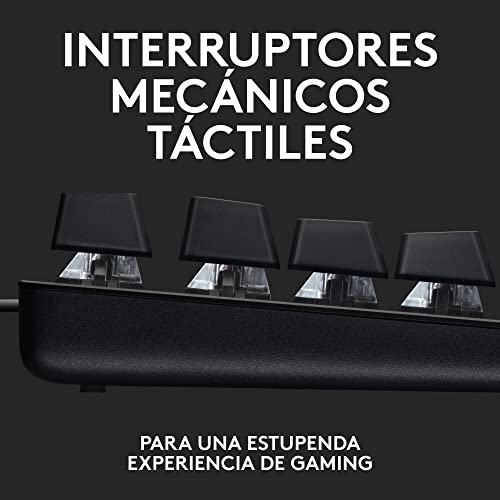

Logitech G G413 SE Full-Size view ›
A full-size keyboard from a big brand, with an aluminium top case and tactile switches. The interesting part is the contrast with its catalogue sibling: this one says mechanical in its name and in Logitech's own description, and the G213, sold as a gaming keyboard, does not. It leads this guide in the UK because Logitech sells it in English UK (QWERTY).
- Logitech lists a 5052 aluminium alloy top case and PBT keycaps: the top case is what stops a keyboard flexing when you type hard, and it stays as rigid three years on.
- Tactile mechanical switches: a noticeable bump halfway down that tells you the press has registered. It is the type people who type text for hours usually prefer.
- White backlighting, not RGB, and 6-key rollover with anti-ghosting, as Logitech lists them. For work, white legends are easier to read than a rainbow.
- Layout: the listing does not state a layout, and the button opens the search for the UK-layout version. Logitech sells the G413 SE in English UK (QWERTY) on its UK store, logitechg.com/en-gb (read on 27 September 2026).
- Aluminium alloy top case: rigid for years
- Tactile switches, good for typing
- PBT keycaps and a white backlight
- No hot-swap sockets
- White backlight only, no colour
- Its listing states no layout
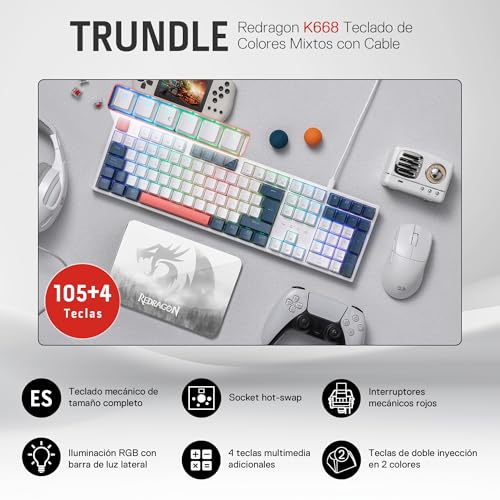
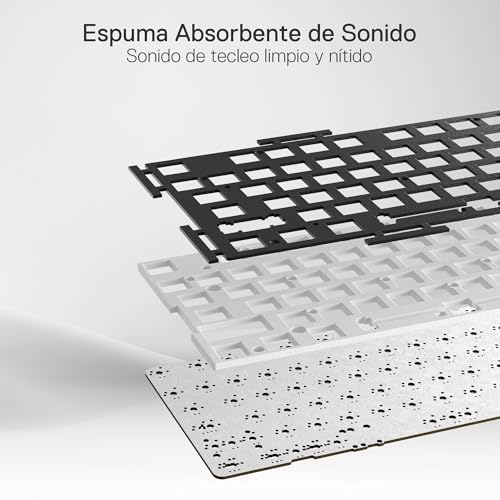

Redragon K668 RGB view ›
It brings together the three things that matter at its level: the full-size format, red linear switches and hot-swap sockets to change them without soldering. When a switch fails in three years, you change that one and carry on, and if you discover you prefer tactile switches, the keyboard stays and only the switches change. Redragon does not list a UK-ISO K668, so the layout is the thing to check before you buy.
- 105 plus 4 keys: the full-size ISO format, with the number pad and four extra media keys. If you work with figures, that pad is not negotiable.
- The hot-swap sockets are the difference between throwing the keyboard away and changing a switch, and Redragon's own page says they take 3-pin and 5-pin switches. It is the feature that most extends the life of a keyboard, and almost nobody looks for it.
- Red switches, which means linear, with no bump: the least noisy of the three classic types, and the one that disturbs least if you share a room.
- Layout: the listing we link is the Spanish-layout version, and the button opens the search for the K668 in UK layout on Amazon.co.uk. Redragon's own shop does not list a UK-ISO K668 (it sells US-ANSI, DE, ES, IT and FR ISO; read on 27 September 2026), so check the layout of what you open before you buy.
- Full-size with the number pad
- Hot-swap sockets: switches change without soldering
- Red linear switches, the quiet classic type
- Wired only, no wireless option
- RGB lighting by zones, not per key
- No UK-ISO version from Redragon


Redragon K673 Pro 75% Gasket view ›
A 75% format with a gasket mount, the construction that cushions each keystroke against the plate. It keeps the arrows and the function row, frees the space of the number pad for the mouse, goes wireless with its own receiver, and its switches come out by hand.
- Gasket mount means the plate sits on soft material instead of being screwed to the case, which is the construction found in enthusiast keyboards.
- The 75% format: 82 keys, no number pad, but the function row and the arrow keys stay. It is the most balanced compromise for a desk shared with a mouse.
- Wireless with a 2.4 GHz receiver and a volume knob, and hot-swap sockets that Redragon says take nearly all 3-pin and 5-pin switches.
- Layout: the listing we link is the Spanish-layout version, and the button opens the search for the K673 Pro in UK layout on Amazon.co.uk. Redragon's shop page for the K673 PRO lists US QWERTY only (read on 27 September 2026), so check the layout of what you open before you buy.
- Gasket mount and hot-swap sockets
- Wireless with its own receiver
- 75%: compact without losing the arrows
- No number pad
- No UK layout from Redragon
- Its listing does not name the switch type


YINDIAO Ajazz AK820 75% view ›
A 75% keyboard that states its layout in its own title: ANSI, the US one. For someone who wants that layout on purpose, it says so plainly; for a UK layout, the other keyboards here have to be checked in their photo.
- ANSI is the US layout: a wide, single-row Enter key and no pound sign on the 3 key. It is written in the title, so it is not a surprise: it is a figure you have to know how to read.
- If you code in English and want the US layout on purpose, ANSI is a legitimate choice. If you want the UK layout, this is not it.
- 75% with a volume knob and hot-swap switches, as AJAZZ describes the AK820: the same base model that is also sold with other layouts.
- Declares ANSI in its title
- 75% with a volume knob and hot-swap switches
- 82 keys with full arrows
- ANSI (US) layout, not UK
- Its listing does not name the switch type
After the keyboard: where to practise cyber security on it, with the Hack The Box plan selector
A keyboard bought for security work pays off with practice, and one place to do it is Hack The Box: machines and challenges with flags, solved from a terminal. What its help centre lists (article updated on 30 July 2026, read on 27 September 2026): for free, 20 active machines, more than 80 active challenges and a one-off 2-hour trial of Pwnbox, its attack machine in the browser; with the VIP+ subscription, all retired machines and challenges, personal instances on isolated servers and unlimited Pwnbox.
Plans and prices change with each renewal and are shown when you sign up, which is why the button leads to its site and not to a figure.
Hack The Box plan selector: free, subscription or Pwnbox, by how you will practise
The Hack The Box plan selector from m8d.io matches how you will practise to the access you need, with what Hack The Box documents on its own site. Free, no sign-up. Example: starting from zero, the free plan: 20 active machines and more than 80 active challenges.
How will you practise?

The free plan. 20 active machines, more than 80 active challenges and a one-off 2-hour Pwnbox trial, as Hack The Box's help centre lists it. Enough for the first months without paying anything.
Affiliate links: if you sign up from here, m8d.io receives a commission at no extra cost to you. It does not change our analysis.
Every figure in this guide carries its source and its date. What was done:
- The listings of the keyboards were read through the Amazon API on 26 July 2026, in one query, so the comparison between them is fair; three keyboards of the Spanish edition declare a Spanish layout in their title and are not in this one, and the layout of the five here is the one each listing's title states on Amazon.co.uk (27 September 2026).
- The features come from what each maker declares in its listing, and for Logitech and Redragon from their own product pages, read on 27 September 2026, which is also where the UK layout of each brand was checked. Where a listing does not declare the layout or the switch type, the table says so instead of deducing it.
- No sound figures in decibels and no key forces for these keyboards: those numbers are copied between lists without anyone measuring them. The only forces here are Cherry's, for its own switches.
- The criteria favour what can be checked and what extends the life of the keyboard, which is why hot-swap sockets weigh more here than in other lists.
- What is not known: why a search engine ranks a keyboard that is not mechanical first, and how long the switches of brands without a published rating really last. Availability changes from country to country, and the buttons take you to the Amazon store of yours.
Mechanical keyboard questions asked in the UK
Are mechanical keyboards actually worth it?›
For anyone who types every day, yes, for two reasons you can check: the switch type is a choice (linear, tactile or clicky) instead of whatever a membrane gives, and with hot-swap sockets a failed switch is one part, not a new keyboard. Cherry guarantees its MX switches for over 50 million strokes.
What's better, blue, brown or red switches?›
It depends on where you type. Red is linear and the least noisy of the three, 45 cN on Cherry's figures; brown is tactile, 55 cN, with the bump that suits typing text for hours; blue is clicky, 60 cN, pleasant alone and impossible in a shared office or on calls.
Can any switches go on any keyboard?›
Only on a hot-swappable keyboard, and only with switches whose pins fit its sockets: switches are sold in 3-pin and 5-pin versions. Of the five keyboards here, four are hot-swap: the Redragon K668 and K673 Pro, the NEWSKILL Serike V2 and the Ajazz AK820. On the Logitech G413 SE, changing a switch means desoldering.
What is the lifespan of a mechanical keyboard?›
The switch sets it. Cherry guarantees each MX switch for over 50 million strokes; most other brands publish no rating, so there is no public figure for them. With hot-swap sockets, the lifespan stops being the weakest switch's.
What are the downsides of using a mechanical keyboard?›
Noise, if the switches are clicky; height, since it sits taller than a laptop keyboard and may need a wrist rest; and weight. At work in the UK, the DSE Regulations also ask for a tiltable keyboard with a matt surface and legible symbols, which rules out some glossy designs.
Why are 75% keyboards so popular?›
Because they drop the number pad and keep the arrows and the function row: the pad is four keys wide, about 8 cm at the standard 19.05 mm key spacing, and that space goes back to the mouse. The Redragon K673 Pro and the YINDIAO AK820 here are 75%.
How can you tell if a keyboard is really mechanical?›
Its maker says so, in the name or in its own description. In this category the word is used whenever it can be, because it justifies the price. Logitech describes its G213 as having Mech-Dome keys «similar to a mechanical keyboard», and its G413 SE as having mechanical switches.
If we had to choose one, we would choose the Logitech G G413 SE Full-Size view ›: tactile switches for typing all day, an aluminium top case, and a keyboard Logitech sells in English UK (QWERTY). For switches you can change later, the Redragon K668 RGB view ›, whose sockets Redragon says take 3-pin and 5-pin switches. And for less desk and no cable, the 75% Redragon K673 Pro 75% Gasket view ›, hot-swap too. Whatever you open, check the layout in the photo before you buy: the UK one has an L-shaped Enter and the pound sign on the 3 key.
m8d pick · tactile, and Logitech sells it in a UK layoutLogitech G G413 SE Full-SizeSee it on Amazon ›The ones behind the specific figures on this page, with the date each was read.
- CherryCHERRY MX switches at a glanceMX Red 45 cN linear, 2 mm; MX Brown 55 cN tactile; MX Blue 60 cN clicky, 2.2 mm; over 50 million strokes per switch. Published August 2017, read on 27 September 2026.
- Logitech GG213 Prodigy gaming keyboardMech-Dome keys «similar to a mechanical keyboard», 4 mm travel, 50 g actuation. Read on 27 September 2026.
- Logitech GG413 SE mechanical gaming keyboardTactile mechanical switches, 5052 aluminium alloy top case, PBT keycaps, white LED lighting, 6-key rollover. Read on 27 September 2026.
- legislation.gov.ukThe Health and Safety (Display Screen Equipment) Regulations 1992, ScheduleThe keyboard paragraph: tiltable and separate from the screen, space in front, matt surface, legible symbols. Read on 27 September 2026.
- Logitech G UKG413 SE mechanical gaming keyboard, UK storeLayouts offered, English UK (QWERTY) among them; tactile switches and PBT keycaps. Read on 27 September 2026.
- RedragonTRUNDLE K668Layouts US-ANSI, DE-ISO, ES-ISO, IT-ISO and FR-ISO; hot-swappable sockets for 3/5-pin switches; red linear switches. Read on 27 September 2026.
- RedragonUCAL K673 PRO 75% wireless gasket keyboard81 keys, US QWERTY layout on this page. Read on 27 September 2026.
- NEWSKILLSerike V2 TKLES (QWERTY/ISO) layout with the Ñ key; 3-pin hot-swap sockets. Read on 27 September 2026.
- Mechboards (UK switch shop)Keyboard switchesSwitches sold in 3-pin and 5-pin versions, and by linear, tactile and clicky type. Read on 27 September 2026.
- Hack The Box help centreHTB Labs subscriptionsFree: 20 active machines, more than 80 active challenges, a one-off 2-hour Pwnbox trial. VIP+: retired machines and challenges, personal instances, isolated servers, unlimited Pwnbox. Updated on 30 July 2026, read on 27 September 2026.
- Amazon, via APIListings of the five keyboards on AmazonTitles and listing details read on 26 July 2026 in one query.
Comments
Be the firstNo sign-up: just a name. Every comment is reviewed before it is published.