Printer with the cheapest ink 2026: ink tank, cartridges or laser for home, and what every page really costs in the UK
 m8d.ioUpdated on

This guide contains affiliate links. As an Amazon Associate, m8d.io earns from qualifying purchases, at no extra cost to you.
The printer with the cheapest ink is an ink tank. An Epson 104 black bottle declares 4,500 pages, an HP 308 black cartridge 160, and HP's UK ink subscription runs from 4.1p to 17.9p a page used (27 September 2026). Our pick is the Epson EcoTank ET-2862, with 3,600 black pages of ink in the box.
How many pages you print a month: the figure that decides between cartridges, an ink tank and a laser, with the cost per page calculator
The question people arrive with is which one to buy. The useful answer starts with another: how many pages you print a month. With that number, the three technologies sort themselves out and there is no need to argue about brands.
Fewer than ten pages a month is a home that prints boarding passes, receipts and the odd school project. Between twenty and a hundred is a home with students or paperwork. Above a hundred is a small office in the living room. The three buy different things, and the one that gets it wrong does not notice on day one: it notices at the first refill.
Printer cost per page calculator
A printer's price does not tell you what printing with it costs: that comes from dividing the pages the maker declares for your cartridge, bottle or toner by what you pay for it. The same division, turned round, says how often you will replace it, which is what decides whether an ink printer suits you or dries out first. The default example: an HP 308 black cartridge of 160 declared pages at £16.95 and 20 pages a month comes to 10.6p a page, about £25 a year in ink and a new cartridge every eight months. A tool from m8d.io: free, no account and no ads.
Above 5p a page, the ink outweighs the machine: at 240 pages a year that is £76 over three years, and that is only the consumable. That is the sum that decides this purchase, not the price on the box.
The pages are the ones each maker declares, read on 4 September 2026 and checked on the UK and Irish sites on 27 September 2026. They are measured printing non-stop, and the maker itself warns that real yield varies: HP's spec sheet for the DeskJet 4320 puts it in these words, “Actual yield varies considerably based on content of printed pages and other factors”. The default division up here gives 10.6p per black page, against the 4.1p to 17.9p a page that HP's own Instant Ink subscription works out at in the UK, from the 700-page plan to the 10-page one with every page used (HP UK, 27 September 2026).

The calculator divides two figures you supply: the yield on the consumable's spec sheet and what it costs you in the shop. It is not a lab measurement and it leaves out paper and electricity. The yields come from the official Canon, HP, Epson and Brother spec sheets read on 4 September 2026 and linked in the sources; the price steps are UK shelf prices read on 27 September 2026 at Epson's UK store and at a UK HP supplies retailer. The count of 32 listings is our own sweep of the Amazon Spain catalogue on 4 September 2026.
Its maker declares 3,600 black pages with the ink supplied in the box.
See it on Amazon ›Which printer has the cheapest ink? The pages each cartridge, bottle and toner declares, and why the printer's listing leaves them out
m8d rule: If a printer's listing does not say how many pages its ink prints, look it up on the cartridge's spec sheet: the difference between 100 and 4,500 pages is there, not in the price of the machine.
“Which printer has the cheapest ink cartridges?” has a short answer: a cheap cartridge is not one that costs little, it is one that costs little per page. The two rarely coincide, because a range's standard cartridge costs less than its XL and yields a quarter of the pages.
The check can be done from this page. Below each printer sits its consumable, among them the HP 308 cartridge pack view ›, with the pages its maker declares, and each one's button leads to your Amazon shop. Put the price of the consumable next to the price of the printer that uses it.
The seven home printers compared by what each consumable's spec sheet declares
| Printer | Technology | Black consumable | Pages declared | Scan and copy | Replaced at 20 pages a month | |
|---|---|---|---|---|---|---|
| Epson EcoTank ET-2862, with 3,600 pages of ink inside view › | Ink tank | Epson 104 bottle | 3,600 supplied | Yes, no feeder | Every 15 years | View › |
 HP Smart Tank 5105, HP's ink tank view › HP Smart Tank 5105, HP's ink tank view › | Ink tank | HP bottles | Up to 6,000 supplied, colour or black (HP Italy) | Yes, no feeder | Every 25 years | View › |
 Brother HL-L2400DWE, laser with a 1,200-page toner view › Brother HL-L2400DWE, laser with a 1,200-page toner view › | Mono laser | TN-2510 toner | 1,200 (ISO/IEC 19752) | No | Every 5 years | View › |
 Brother DCP-L2627DWE, the same laser with scanner and copier view › Brother DCP-L2627DWE, the same laser with scanner and copier view › | Mono laser | TN-2510 toner | 1,200 (ISO/IEC 19752) | Yes, 3-in-1 | Every 5 years | View › |
 HP DeskJet 4320, cartridges with a document feeder view › HP DeskJet 4320, cartridges with a document feeder view › | Cartridges | HP 308 | 160 (320 high capacity) | Yes, with feeder | Every 8 months | View › |
 Canon PIXMA TS3751i, the basic one with a scanner view › Canon PIXMA TS3751i, the basic one with a scanner view › | Cartridges | Canon PG-575 | 100 (400 XL) | Yes, no feeder | Every 5 months | View › |
 HP DeskJet 2920, HP's basic one with the 160-page cartridge view › HP DeskJet 2920, HP's basic one with the 160-page cartridge view › | Cartridges | HP 308 | 160 (320 high capacity) | Yes, no feeder | Every 8 months | View › |
Every page figure is the one each maker's spec sheet declares, read on 4 September 2026. The last column is a division with those pages and twenty pages a month, not a measurement: it shows the order of magnitude, months for cartridge printers and years for the rest. The Smart Tank 5105's figure is the one on HP's Italian store page, a single number for colour or black.
Why does my printer run out of ink so quickly? The setup ink the makers declare, and the first set that yields less
“Why does my printer run out of ink so quickly?” is another question Google puts to British shoppers, and part of the answer is written by the makers themselves. The first ink a printer receives does two jobs: it prints, and it fills the channels between the cartridge or tank and the printhead. Epson puts numbers on it: its ET-2862 spec sheet declares 3,600 black and 6,500 colour pages with the ink supplied (read on 4 September 2026), and its UK store declares 4,500 and 7,500 for a set of replacement 104 bottles (27 September 2026). HP says the same in words in its page-yield documentation, that part of the ink in the supplied cartridges is used to start the printer up, and its spec sheet for the DeskJet 4320 lists the cartridges in the box as an “HP 308 Setup Black Cartridge” and an “HP 308 Setup Tri-Color Cartridge”.
The other part is the pace the yield is measured at. Cartridge yields under ISO/IEC 24711 come from printing a standard page continuously; a home printer wakes up a few times a week and runs a short clean each time, and that ink never reaches the paper. So the 160 pages of an HP 308 are a ceiling you approach printing in batches, not a promise for a page a day.
HP Instant Ink in the UK: what a page costs on each plan, and what happens to the cartridges when you cancel
m8d rule: Divide the monthly fee by the pages you really print before signing up, and compare it with what a page costs on your printer with bought cartridges. Below about fifty pages a month, the small plans rarely beat bought cartridges.
How long can an ink printer sit unused? Laser or ink for a home that prints in bursts
Among the questions Google shows British shoppers for ink tank printers are “How long can an ink tank printer sit unused?” and “Does printer ink dry out if you don't use it often?”. They are the question underneath the whole search, and the answer is not in print quality, it is in the calendar.
An inkjet printer has a printhead with extremely fine channels full of liquid, and if it goes weeks without printing, that liquid thickens and blocks them. The calculator on this page flags it when a consumable would last more than two years at your pace: at that point the sum stops being about pages and becomes about dates.
Compatible cartridges in the UK: what third-party ink saves, and which printers only take originals
“What is the cheapest place to get printer ink?” and “How can I save money on printer ink?” are the other two questions under this search in the UK, and the first answer people reach is compatible cartridges from a third party. The saving is real: in its July 2021 investigation, Which? calculated that original cartridges could cost up to 286% more than the best-rated third-party alternatives, with one maker's original colour ink working out at more than £2,400 a litre.
Two things decide whether that route is open. The first is the printer: HP's own UK terms separate HP+ printers, which after an Instant Ink plan take HP original cartridges, from non-HP+ printers, which can also take compatible third-party ones, so it is worth knowing which kind you are buying before counting on cheap refills. The second is the consumable itself: on an ink tank like the ET-2862, the original bottles already declare 4,500 black pages, so the gap that compatible cartridges exploit on a 160-page cartridge is much smaller.
The seven home printers, one by one, with the ink or toner each one takes underneath
Epson EcoTank ET-2862, with 3,600 pages of ink inside view ›
It is here because its maker publishes, on its own spec sheet, how many pages the ink in the box prints, black and colour separately, and because each 104 replacement bottle declares 4,500 black pages. It is not the cheapest to buy or the fastest; it is the one that stops charging you every time you print.
- Epson declares on its official spec sheet 3,600 pages in black and 6,500 in colour with the ink in the box, and 4,500 and 7,500 with a set of 104 replacement bottles. The difference is not a mistake: part of the first ink goes into filling the printhead's channels, which is why the first set always yields less than the second.
- OCU, Spain's consumer organisation, analysed it in its lab in June 2024 and scored it 68 out of 100. In its article on ink plans, the same organisation places EcoTank printers among the cheapest to run per page against entry-level cartridge multifunctions, which is the finding this purchase rests on.
- Its spec sheet declares 10 pages per minute in black and 5 in colour under ISO/IEC 24734, the standard used to compare speeds across brands. In practice: a twenty-page job comes out in about two minutes, a normal pace for a home machine, not an office one.
- What it lacks and is worth knowing first: double-sided printing is manual (you turn the sheet yourself) and there is no automatic document feeder, so scanning twenty pages means placing twenty pages. If that matters, the laser with a scanner in this guide covers it.
- Its maker publishes the pages its supplied ink prints, exactly what almost no listing in the category publishes
- Replacement bottles are declared in thousands of pages, so ink stops being a recurring purchase
- 10 black pages per minute under ISO/IEC 24734
- An ink tank costs more to buy than a cartridge printer: printing little, the ink saving takes years to pay that back
- Manual double-sided printing and no automatic feeder for the scanner
- It is inkjet: printing five pages a month, the printhead dries before the ink runs out
HP Smart Tank 5105, HP's ink tank view ›
One of the ways to stop buying cartridges, and that is why it is on the list. HP sells it on “3 years of ink included”, and its Italian store page gives the figure behind the promise: up to 6,000 pages, in colour or black and white, from the bottles in the box.
- HP sells it with the line “3 years of ink included”, a promise of time rather than pages. The page figure behind it is on HP's Italian store page, read on 27 September 2026: with the ink bottles included you can print up to 6,000 pages, in colour or in black and white. That is the number to compare with Epson's 3,600 black pages for the ink in its box.
- It is a refillable tank, and that part can be stated: OCU, Spain's consumer organisation, writes for the whole category that per page an ink tank costs well below a cartridge printer. What changes between models is by how much, not the direction.
- Its listing and distributor spec sheets declare 12 pages per minute in black and 5 in colour, with scanning and copying. It has no automatic document feeder, like the EcoTank in this guide.
- Next to the EcoTank, the two makers declare the ink in the box on different terms: Epson gives black and colour separately, HP Italy one figure of up to 6,000 pages for colour or black. Either way it is years of printing at a home's pace, so the choice between them comes down to the rest of the machine.
- A refillable tank, with the per-page advantage of the whole category
- Scanner and copier, and 12 black pages per minute declared
- Sold in the UK on “3 years of ink”; the page figure behind it, up to 6,000, is on HP's Italian page, not split into black and colour
- No automatic document feeder and no automatic double-sided printing
Brother HL-L2400DWE, laser with a 1,200-page toner view ›
The answer to a question British shoppers keep asking: what to buy if you print little and in bursts. Toner is powder, not liquid, so it does not dry in the printhead after two months unused. Brother declares 1,200 pages per toner under ISO/IEC 19752, twelve times what an entry-level ink cartridge declares.
- Brother declares 1,200 pages for the TN-2510 toner and 3,000 for the TN-2510XL, and in both cases says which standard: ISO/IEC 19752. That the standard is written down matters as much as the figure: it is what lets you compare that number with another brand's instead of with a promise.
- The underlying reason to choose it is not cost per page, it is the calendar. “Does printer ink dry out if you don't use it often?” is one of the questions Google shows British shoppers, and toner answers it: it is powder, so it does not dry in a printhead after two months without use.
- It prints double-sided automatically, and it does not print in colour. In practice: it is for pages of text, contracts, boarding passes, notes and invoices. For summer photos it will not do.
- Toner is powder: it does not dry even if the printer sits for weeks
- 1,200 pages declared per toner with ISO/IEC 19752 written next to it, and 3,000 in the XL version
- Automatic double-sided printing
- Black only: no photos or colour work
- It does not scan or copy, so it is a printer and nothing else
- A replacement toner costs more than an ink cartridge, even though it yields many times the pages
Brother DCP-L2627DWE, the same laser with scanner and copier view ›
The one above with a scanner and copier on top, and it solves the most common case of a home that does not print photos: paperwork. It uses the same TN-2510 toner of 1,200 declared pages, so it inherits the whole advantage of powder that does not dry, and adds what you need to send back a signed document.
- It shares its toner with the HL-L2400DWE in this guide, the 1,200-page TN-2510 and the 3,000-page TN-2510XL, both declared under ISO/IEC 19752. A consumable shared across a range is a practical advantage that is rarely mentioned: the refill is easy to find and does not depend on your exact model staying in production.
- It is 3-in-1: it prints, scans and copies. For a home where what gets printed is receipts, contracts and notes, this is the complete machine, and colour is left out on purpose.
- The sum is in its toner: with 1,200 pages per toner against 100 for an entry-level cartridge, the extra it costs to buy comes back sooner than it looks if you really print. The calculator on this page does that division with your numbers.
- It does not print in colour, so if there are children with craft projects or homework with charts at home, this is not the one. For that there is the ink side of this guide, with the cartridge sum in front of you.
- Prints, scans and copies with the advantage of toner that does not dry
- Same toner as the rest of the range, with 1,200 and 3,000 pages declared under a standard
- Double-sided printing for a home's paperwork
- Black and white only
- Takes noticeably more room than an entry-level ink printer
HP DeskJet 4320, cartridges with a document feeder view ›
Of the cartridge printers it publishes the best numbers, and here the improvement goes the right way: its black cartridge declares 160 pages against 120 for the previous generation's. It is on the list for that and for its automatic feeder. With the warning from HP's own spec sheet: the maker recommends it for 100 to 300 pages a month, and its black cartridge declares 160.
- What changed from the previous model: the DeskJet 4120 took HP 305 cartridges, which HP declares at 120 black and 100 tri-colour pages. The 4320 takes HP 308, declared at 160 black and 120 tri-colour, and HP itself sells it as 33% more black yield. The sum adds up: 160 divided by 120 is exactly those 33 points. The cartridges are not interchangeable between the two generations.
- HP's official spec sheet for this printer says two things that together make a very useful reading: the recommended monthly volume is 100 to 300 pages and its black cartridge declares 160 pages. On your desk: at the midpoint of the use the maker recommends, you change the black cartridge once a month.
- It declares 8.5 pages per minute in black and 5.5 in colour under the ISO standard, and has an automatic document feeder and dual-band Wi-Fi. The feeder is the real difference from the basic models: scanning several pages in a row stops being a chore.
- 160 pages declared for the black cartridge, the highest of the cartridge printers in this guide
- Automatic document feeder and dual-band Wi-Fi
- The new generation yields a third more than the old one, and HP declares both figures
- HP recommends it for 100 to 300 pages a month and its black cartridge declares 160: at that pace the change is monthly
- The tri-colour cartridge is a single unit, so it runs out whole when one colour does
- It is inkjet: not the choice for a home that prints in widely spaced bursts
Canon PIXMA TS3751i, the basic one with a scanner view ›
The category's entry point, here with its label on: it prints, scans and copies, and its cartridges are the PG-575 and CL-576 of 100 declared pages. It makes sense in a home that prints a boarding pass a month and a school project now and then. It stops making sense as soon as you really print.
- It takes the cartridges of Canon's entry PIXMA range: PG-575 black with 100 declared pages and CL-576 colour with 100, or the XL versions of 400 and 300. When printers at different prices share one consumable, what you pay for in this band is the casing and the extras, not the cost of printing.
- No automatic document feeder and no automatic double-sided printing. In practice: scanning five pages is lifting the lid five times, and printing on both sides is turning the paper by hand. At this level that is to be expected, and worth knowing first.
- It is the right machine for the case the calculator on this page flags in green and red at once: at five pages a month the cost per page hardly matters because you barely print, but at that pace a 100-page cartridge lasts over a year and a half, and an inkjet printhead does not cope well with that neglect. If that is your case, the laser in this guide is the better buy even though it costs more.
- Prints, scans and copies in a compact body
- Uses Canon's most widespread cartridges, with an XL version of 400 declared pages
- Takes little room and sets up from the phone
- No automatic feeder and no automatic double-sided printing
- 100-page standard black cartridge: the highest cost per page in the guide
- Printing little and in bursts, the inkjet printhead is the weak point of this purchase
HP DeskJet 2920, HP's basic one with the 160-page cartridge view ›
The feeder-less version of the DeskJet 4320, with the same HP 308 cartridge of 160 declared pages. Among basic printers it publishes the best number, which is why it is here rather than any other. It is still a printer for printing little, and its cartridge is still a noticeable share of what the printer itself costs.
- It takes the HP 308 cartridge, the same as the DeskJet 4320: 160 black and 120 tri-colour pages declared by HP, or 320 black in the high-capacity version. It is the entry cartridge that declares the most pages of those in this guide, and that is the whole reason it is on the list.
- It prints, scans and copies, with no automatic document feeder. Against the 4320, what you lose is the feeder and dual-band Wi-Fi, so the choice between the two is literally whether you will scan several pages in a row.
- Its tri-colour cartridge is a single unit, not three separate tanks. In practice: when the magenta runs out, you replace the whole cartridge even if the cyan and yellow are half full, one of the reasons ink tanks win the sum in the long run.
- It is the right printer for a home that prints fewer than ten pages a month and needs colour now and then. With one condition worth knowing: at that pace the declared cartridge lasts more than a year, and the problem then stops being the price of ink and becomes the printhead.
- HP 308 cartridge with 160 declared pages, the highest figure in its class
- Prints, scans and copies
- Compact and easy to set up from the phone
- No automatic document feeder
- Single tri-colour cartridge: replaced whole even if only one colour runs out
- At very low volume the cartridge lasts so long that the risk becomes a dried printhead
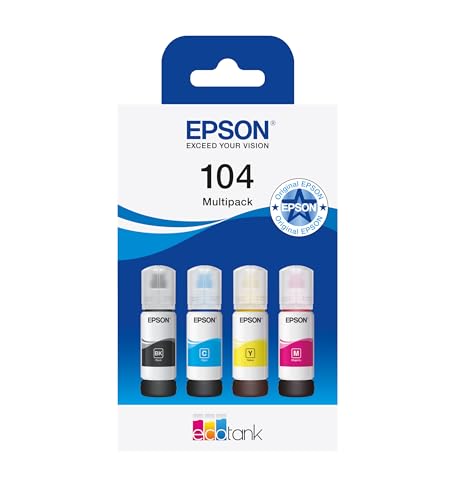
The consumable of the EcoTank in this guide and the other half of the comparison. Epson declares 4,500 black and 7,500 colour pages for a set of these bottles. Next to the XL cartridge set, which declares 400 and 300, the difference stops being an opinion and becomes a division.
View ›
The refill for the DeskJet 2920 and 4320 in this guide, with the two figures HP declares: 160 black and 120 tri-colour pages. It is on the list for the same reason as the Canon set, so that the consumable and the printer sit together and the sum does itself.
View ›
Not a purchase recommendation but the proof of this guide's argument on the same page: the original XL cartridge set of the entry PIXMA printers, one tap from the printer that uses it. Look at both prices at once before deciding. Canon declares 400 black and 300 colour pages for this set.
View ›Printer questions asked in the UK before buying for home
Which printer has the cheapest ink for home use?›
An ink tank. Epson declares 4,500 black pages for a 104 bottle and 3,600 for the ink supplied with the EcoTank ET-2862, against 160 for an HP 308 cartridge and 100 for a Canon PG-575. If you print little and only in black, a laser like the Brother HL-L2400DWE is the other cheap route, because its 1,200-page toner does not dry out.
Is it cheaper to buy a new printer or new ink?›
Sometimes the set of original cartridges costs more than the printer that takes it, which is the sign that the price of that purchase is in the ink. The way out is not a new printer each time but a lower cost per page: a tank or a laser, or the XL version of your cartridge, which yields four times the standard one in Canon's figures.
Why does my printer run out of ink so quickly?›
Two reasons the makers themselves write down. The first ink also primes the printhead: Epson declares 3,600 black pages for the ET-2862's supplied ink and 4,500 for a replacement set. And yields are measured printing continuously under ISO/IEC 24711, while a home printer spends ink on short cleans every time it wakes up.
How much does it cost to print a page at home?›
Divide what you pay for the consumable by the pages its maker declares. An HP 308 black cartridge of 160 pages at £16.95 comes to about 10.6p a page. HP's UK ink subscription works out at 4.1p to 17.9p a page depending on the plan, with every page used. The calculator on this page does the division with your two figures.
Is HP Instant Ink worth it in the UK?›
It depends on volume. HP's UK plans, read on 27 September 2026, run from £1.79 a month for 10 pages to £28.99 for 700. The 10-page plan comes to 17.9p a page if you use them all, more than buying the cartridge; the big plans fall to about 4p. And the plan's cartridges belong to the plan: after cancelling, HP's terms point you to cartridges you buy.
How long can an ink tank printer sit unused?›
No spec sheet in this guide gives a single figure, and the risk is the printhead, not the tank: the channels are very fine and ink thickens after weeks without printing. Printing regularly keeps it moving. If your home prints in long gaps, a laser avoids the problem entirely, because toner is powder and does not dry.
What is the cheapest place to get printer ink?›
Compatible third-party cartridges are the cheapest refill for most cartridge printers: Which? calculated in July 2021 that originals could cost up to 286% more. Check the printer first: HP's UK terms say HP+ printers take HP original cartridges after an Instant Ink plan, while non-HP+ models can take compatible ones too.
What is the downside of an ink tank printer?›
The purchase price, which is higher than a cartridge printer's, and the fact that it is still inkjet: printing very little, the printhead can dry before the tank empties. The ET-2862 also has manual double-sided printing and no document feeder, according to Epson's spec sheet.
m8d's pick · The one that takes ink out of the sumEpson EcoTank ET-2862, with 3,600 pages of ink insideSee it on Amazon ›For printing little, in black, with no surprisesBrother HL-L2400DWE, laser with a 1,200-page tonerSee it on Amazon ›The cartridge printer that declares the most pagesHP DeskJet 4320, cartridges with a document feederSee it on Amazon ›The ones behind the specific figures in this piece, with the date they were read.
- Epson UK, maker's spec sheetEcoTank ET-2862 A4 multifunction Wi-Fi ink tank printerOne set of ink bottles delivers up to 4,500 black and 7,500 colour pages; up to 3 years of ink included in the box; up to 10 pages per minute. Read on 27 September 2026.
- Epson UK store104 EcoTank black ink bottleUp to 4,500 black pages per bottle; £9.45 per bottle and £34.20 for the four-colour set (the calculator's price steps). Read on 27 September 2026.
- HP Store UKHP Instant Ink plans£1.79 (10 pages), £4.49 (50), £6.49 (100), £13.49 (300) and £28.99 (700) a month; Pay As You Print £4.99 per 20-page set. Read on 27 September 2026.
- HP UKHP Instant Ink: terms on rollover and cancellingRollover up to three times the monthly pages; after cancelling, HP original cartridges, and third-party ones for non-HP+ printers. Read on 27 September 2026.
- Ink Jungle, UK retailer of original HP suppliesHP 308 black ink cartridge and HP 308 black and colour packOriginal HP 308 black, up to 160 pages, £16.95; black and colour pack £29.95 (the calculator's price steps). Read on 27 September 2026.
- HP Store Italy, maker's pageStampante multifunzione HP Smart Tank 5105Translated from the Italian: “with the included ink bottles you can print up to 6,000 pages in colour or in black and white”. Read on 27 September 2026.
- Which? investigation, as reported on 23 July 2021Printer ink costs more than high-end champagneOriginals up to 286% dearer than the best-rated third-party alternatives; one original colour ink at £2,410 a litre. Read on 27 September 2026.
- Epson, maker's spec sheetEcoTank ET-2862, official spec sheet (Spain)3,600 black and 6,500 colour pages with the ink supplied, 104-series bottles, 10 pages per minute under ISO/IEC 24734 and manual double-sided printing. Read on 4 September 2026.
- Canon, maker's spec sheetCanon PIXMA TR4755i series, official specificationsPG-575 and CL-576 cartridges with 100 declared pages; PG-575XL and CL-576XL with 400 and 300. Read on 4 September 2026.
- HP, maker's spec sheetHP DeskJet 4320, official product specificationsHP 308 black about 160 pages and tri-colour about 120, 308e black about 320; recommended monthly volume 100 to 300 pages; up to 8.5 black pages per minute; HP 308 setup cartridges in the box; actual yield varies considerably. HP Ireland page for the same model, read on 27 September 2026.
- HP, maker's documentationHP page-yield information per cartridgeYields are an average based on ISO/IEC 24711 and continuous printing, real yield varies, and part of the ink in supplied cartridges is used to start up the printer. Read on 4 September 2026.
- Brother, maker's spec sheetBrother TN-2510 original black toner1,200 pages declared under ISO/IEC 19752, and 3,000 for the TN-2510XL. Read on 4 September 2026.
- OCU, Spain's consumer organisationLab analysis of the Epson EcoTank ET-2862Analysed in its lab in June 2024, 68 points out of 100. Read on 4 September 2026.
- OCU, Spain's consumer organisationWhich printer to buy: buying guideLaser or a cartridge with a built-in printhead for people who print very little. Read on 4 September 2026.

Comments
Be the firstNo sign-up: just a name. Every comment is reviewed before it is published.