Best PS5 monitors 2026: which to buy for its HDMI version, and how many hertz the console actually gives
 m8d.ioUpdated on

This guide contains affiliate links. As an Amazon Associate, m8d.io earns from qualifying purchases, at no extra cost to you.
The best PS5 monitor right now is the Lenovo Legion 27Q-10, and not because of its hertz: it is a 1440p panel that declares HDMI 2.1, which is the connection that gets the console to 120 Hz at that resolution and switches VRR on. The figure that decides this purchase is never the big one on the box. Every gaming monitor advertises 144, 165, 180 or 240 hertz; the console stops at 120.
What a PS5 actually sends to a monitor, and the single line that decides it
A monitor and a console negotiate three things the moment you plug them together: how many pixels, how many times a second, and whether the screen can follow the game's variable pace. All three travel down the same cable, and what fits is set by the version of the port. Which is why the big number on the box, the hertz, is the one that decides least.
m8d rule: On a PS5, every hertz above 120 is money on your desk that never reaches your eyes. What decides is the port version, and it is the line most listings leave out.
Translated into what you will see sitting in front of it: with HDMI 2.0, games that offer a performance mode run smoothly at 1080p or 1440p, which is where the console puts its 120 frames a second, and in the scenes where the game struggles the picture tears across the middle for an instant. With HDMI 2.1 those scenes stop tearing, because the screen waits for the console instead of the other way round. And with HDMI 1.4 the ceiling is 1080p: a perfectly usable monitor, and not the one that gets the most out of the console.
The 1440p belief that predates September 2022, and what it still costs people
This is the most expensive confusion in the whole purchase, because it pushes people towards a cheap 1080p or an expensive 4K and rules out exactly the resolution that suits the console best.
m8d rule: If you read that a PS5 does not do 1440p, that text predates 7 September 2022. Check it yourself in Settings, Screen and Video, Test 1440p Output.
PS5 monitor compatibility checker: what resolution, how many hertz and whether you get VRR
PS5 monitor compatibility checker: resolution, hertz and VRR from the port it declares
It is the sum no spec sheet does for you, because it needs three figures that almost never appear together: the version of the port, the resolution of the panel and the hertz on the box. Free, no account and no ads. Example, and it is the commonest case in any catalogue: a 1440p panel advertised at 180 Hz whose listing never says which HDMI version it carries can end up doing three different things, and 60 of those hertz are not coming out of the console in any of them.
- Resolution1440p
- Hertzunknown
- VRRunknown: only HDMI 2.1 gives it
The listing sells 180 Hz and the console goes out at 120 Hz at most: 60 hertz you pay for and never see.
A 1440p panel advertised at 180 Hz can end up doing three different things on the same console, and which one depends on a line this listing does not carry. It is the commonest gap there is: the HDMI version is the figure that decides the purchase, and it is the one a shop title leaves out.
Look for "HDMI" on the maker's own spec sheet rather than in the shop's title: that is usually where it is.

The 120 Hz ceiling, the 1440p output with VRR and the 4K at 120 Hz over HDMI 2.1 are what PlayStation support publishes, read on 16 September 2026 and cited in the sources below. The port version, the resolution and the declared refresh of each monitor come from each maker's own spec sheet. A checker does not replace a spec sheet: if a listing does not state the version of its port, neither can we.
The HDMI 2.1 monitor that still will not do 4K at 120: it is the cable, and Sony says so
You can buy the right monitor and still not get what you paid for, because of a cable you already own. It is the last thing anybody checks and PlayStation publishes it plainly on the same UK support page as everything else: "The HDMI cable included with the PS5 console is recommended. Otherwise, an Ultra-High-Speed HDMI Cable that supports HDMI 2.1 should support ALLM".
Read that as a shopping instruction. The console ships with a cable that carries the full HDMI 2.1 bandwidth. If you unbox the monitor, reach behind the telly for the cable that used to run the set-top box and plug that in instead, the two ends of the chain can both be HDMI 2.1 and the middle will not be. What you lose is exactly the two things you paid the premium for: 4K at 120 Hz, and VRR.
So before you spend on a port version: use the cable that came in the console box, and if it will not reach, the replacement is labelled Ultra High Speed, not just HDMI 2.1. That label is a certification of the cable, and it is printed on the packaging. We would buy the shorter monitor and keep the console's own cable before we would buy a longer cable to reach a monitor across the room.
The chain has three links: the console, the cable and the display. Listings compare the third and assume the second. Sony documents it and nobody reads it.
m8d rule: Use the cable that came in the console box. If you need a longer one, the words to look for on the packaging are Ultra High Speed, not the number 2.1 on its own.
A PS5 has no analogue audio output, so the monitor's spec sheet decides whether you hear anything
The console sends its sound down the HDMI cable and has no analogue output of its own. If the monitor you buy has neither speakers nor a headphone socket, the picture arrives and the sound does not, and the only two ways out are the 3.5 mm jack on the DualSense controller and a separate pair of speakers or a soundbar.
That turns one line of a spec sheet into a purchase decision, and it is a line most gaming monitors leave out: speakers are rare in this family, and rarer still on the panels that also declare a modern HDMI port. Which is why the two monitors here that declare both are worth knowing about before you compare anything else, and why the cheapest panel on this page is also one of the few with speakers in it.
If you were always going to wear a headset, none of this matters and you can ignore the speaker column entirely. If you were not, read it before the hertz.
The nine PS5 monitors in this guide, ordered by what their port lets the console do
| Monitor | Panel | Declared port | What it gives on a PS5 | VRR | |
|---|---|---|---|---|---|
| Lenovo Legion 27Q-10 view › | 1440p, 27in | HDMI 2.1 | 1440p at 120 Hz | Yes | View › |
 MSI MAG 272URDF E16 view › MSI MAG 272URDF E16 view › | 4K, 27in | HDMI 2.1 | 4K at 120 Hz | Yes | View › |
 Gigabyte G27U view › Gigabyte G27U view › | 4K, 27in | HDMI 2.1 | 4K at 120 Hz | Yes | View › |
 Dell 27 Plus S2725QS view › Dell 27 Plus S2725QS view › | 4K, 27in | HDMI 2.1, in the spec sheet | 4K at 120 Hz | Yes | View › |
 AOC Q27G42XE view › AOC Q27G42XE view › | 1440p, 27in | 2 x HDMI 2.0 | 1440p at 120 Hz | No | View › |
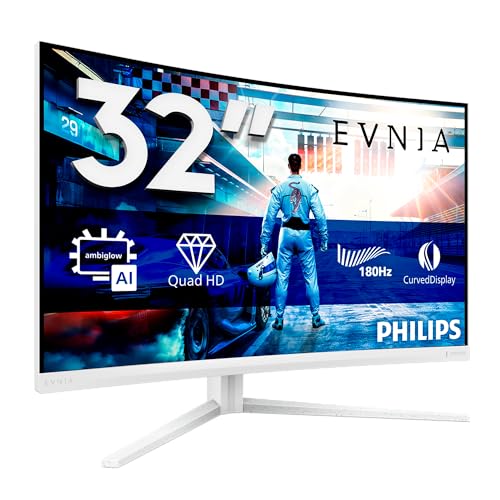 Philips Evnia 32M2C5501 view › Philips Evnia 32M2C5501 view › | 1440p, 32in | 2 x HDMI 2.0 | 1440p at 120 Hz | No | View › |
 MSI G255F view › MSI G255F view › | 1080p, 24.5in | HDMI 2.0b | 1080p at 120 Hz | No | View › |
 Philips Evnia 24M2N3200AM view › Philips Evnia 24M2N3200AM view › | 1080p, 24in | 2 HDMI, version cut off | 1080p at 120 Hz | No | View › |
 Philips 24E1N1100A view › Philips 24E1N1100A view › | 1080p, 24in | HDMI 1.4 | 1080p, hertz to confirm | No | View › |
The port column records what each maker declares, read on 16 September 2026. The VRR column applies PlayStation's own requirement: a VRR-compatible display over HDMI 2.1. Availability and model names vary by country, so what your local Amazon lists may not match this table unit for unit.
Lenovo Legion 27Q-10 view ›
A 1440p panel that declares HDMI 2.1, which is the connection that gets a PS5 to 1440p at 120 Hz and switches VRR on as well. Very few 1440p monitors declare that port at all, and that is the whole reason this one is the pick. Its 240 Hz are surplus on the console and earn their keep only if the monitor is shared with a PC.
- Lenovo declares HDMI 2.1 and DisplayPort 1.4 on its own product page, read on 16 September 2026. It is the figure that decides this purchase, and the one most gaming monitor listings never print.
- 1440p is the resolution the console supports at 60 and at 120 Hz and with VRR, on PlayStation's own support page. On 27 inches it is where the step up from 1080p shows without asking the console for the effort of 4K.
- The panel's 240 Hz are not going to be used by a PS5, which goes out at 120 at most. The number makes sense if the same monitor also plugs into a PC, and none at all if it is console-only.
- Its listing does not declare speakers. With a PS5 that means headphones in the controller's jack or a separate pair of speakers: the console has no other analogue audio output.
- Declares HDMI 2.1, which is what switches the PS5's VRR on
- 1440p at 120 Hz, the combination the console can deliver in full
- A 27-inch IPS panel with declared tilt adjustment
- G-Sync and FreeSync Premium declared for when it is used with a PC
- Its 240 Hz go unused on the console, which stops at 120
- Its listing does not declare speakers
- 1440p on 27 inches is not the sharpness jump a 4K panel gives
The next two are the two ways of spending the least without buying blind: one states the version of its port in its own title, and the other packs speakers and a height-adjustable stand into the cheapest tier, with the line about its port hiding in the maker's spec sheet rather than in the listing.
MSI G255F view ›
If the budget is what decides, this is the one we would buy: it says HDMI 2.0b in its own title, and with HDMI 2.0 the console delivers 1080p at 120 Hz with no conditions attached. There is no VRR, and at this end of the market there is none anywhere.
- MSI writes HDMI 2.0b in the title it sells under, read on 16 September 2026. Very few 1080p listings do that: the rest say HDMI 1.4 or say nothing about the version at all.
- Its 180 Hz are aimed at a PC. On a PS5 the ceiling is 120, so 60 of those hertz are never going to appear on the screen if the console is the only thing plugged in.
- 24.5 inches at 1080p is the long-standing density of a desk monitor, and at desk distance it looks sharp. In a living room, more than a metre away, the resolution starts to run short.
- It declares neither speakers nor height adjustment. For a PS5 the sound comes out of the controller's jack, so the missing speakers are solved by headphones you already own.
- Declares HDMI 2.0b, which is enough for 1080p at 120 Hz on the console
- The lowest price here among the monitors that state their port version
- A 24.5-inch panel, the desk size almost everyone recommends
- Adaptive-Sync and DisplayPort 1.2a declared for PC use
- Without HDMI 2.1 there is no VRR on a PS5
- 60 of its 180 Hz will not be used by the console
- It declares neither speakers nor height adjustment
Philips Evnia 24M2N3200AM view ›
The most complete 1080p panel on this list: speakers, height adjustment and a Fast IPS panel at the bottom of the range. And with a catch that sums up the whole guide: its title stops just as it was about to say which version its HDMI ports are.
- In the title of its listing, read on 16 September 2026, you can read 1920 by 1080 and two HDMI inputs of the 2 series, and the text stops before the decimal. It is one of those listings where the title ends before you can know: the line is in Philips's spec sheet, not in the shop.
- What can be stated either way: a 1080p panel at 180 Hz does not reach that figure over an HDMI 1.4 port, because the bandwidth is not there. And for what the console asks, 1080p at 120 Hz, HDMI 2.0 is more than enough.
- It declares speakers and height adjustment, which in the 1080p tier is unusual: the ones that declare speakers usually declare HDMI 1.4 as well, and the ones that declare HDMI 2.0 tend not to declare speakers.
- A Fast IPS panel with G-Sync Compatible and HDR10 declared. The HDR10 here is the format label, not a promise of brightness.
- Speakers and height adjustment declared in the cheapest tier
- Fast IPS panel with 0.5 milliseconds declared
- A real 180 Hz for when it is shared with a PC
- The lowest outlay here among the panels with speakers
- Its title is cut off before it says the HDMI version
- Without HDMI 2.1 there is no VRR on the console
- 1080p on 24 inches runs short at sofa distance
MSI MAG 272URDF E16 view ›
The cheapest 4K panel on this list that declares HDMI 2.1. It is the point at which the console delivers its most ambitious mode in full: 3840 by 2160 at 120 Hz, with VRR, giving nothing up.
- MSI declares HDMI 2.1 and DisplayPort 1.4a in the title of its own listing, read on 16 September 2026. Without that version, a 4K panel stops at 60 Hz on this console for bandwidth reasons.
- PlayStation support puts it in these words: the PS5 console supports the HDMI 2.1 specification, and it also supports 4K 120Hz video output. The two go together and there is no shortcut.
- The panel's dual mode swaps between 4K and a lower resolution with more hertz. That second half is for a PC: the console does not go past 120 Hz at any resolution.
- On 27 inches, 4K shows itself mostly in menu text and at close range. Sitting more than a metre and a half away, the gap with 1440p narrows a long way.
- Declares HDMI 2.1: 4K at 120 Hz and VRR on the console
- Rapid IPS panel with DisplayHDR 400 declared
- Tilt and height adjustment declared by the maker
- The cheapest 4K panel here that declares the port
- Costs several times what a 1080p panel that already does 120 Hz costs
- DisplayHDR 400 is the entry certification, not a television's HDR
- On 27 inches and at sofa distance, 4K delivers less than it promises
Dell 27 Plus S2725QS view ›
The 4K panel on this list that does come with speakers, and at the same time the best illustration of what this guide is about: its shop listing says 120 Hz and two HDMI ports, and never says the version. It is in the maker's spec sheet, not in the shop.
- The shop listing says 4K, 120 Hz, FreeSync Premium and two HDMI ports, and nowhere the version of the port. Dell's own spec sheet does give it: both HDMI inputs reach 3840 by 2160 at 120 Hz with FRL, HDR and VRR per the HDMI 2.1 specification (dell.com, read 16 September 2026).
- Dell also declares two 5 W speakers. Speakers are rare in this family at all, and rarer still alongside a 4K resolution.
- The panel's 120 Hz match the console's ceiling exactly, so here you are not paying for hertz you will never see: it is the only one on this list where the number in the listing and the number the PS5 delivers are the same.
- It is the dearest in the selection. The gap against the 4K MSI buys you speakers, height adjustment and the finish of an office range.
- Dell declares HDMI 2.1 with VRR on both of its inputs
- Two 5 W speakers declared, which is unusual on a 4K panel
- Its 120 Hz are exactly what the console delivers
- Height adjustment and 99 per cent of sRGB declared
- The shop listing does not state the port version and you have to go to the spec sheet
- The most expensive in this selection
- 4 milliseconds of declared response, above the gaming panels here
AOC Q27G42XE view ›
The honest shortcut to 1440p: its two HDMI 2.0 inputs give the console its 120 Hz at that resolution, and the only thing left out is VRR. With speakers declared, which at 1440p almost nobody fits.
- AOC writes the connection into the title: 2560 by 1440, two HDMI 2.0 and one DisplayPort 1.4. With HDMI 2.0 the console reaches 1440p and 120 Hz; what it does not reach is VRR, which PlayStation reserves for HDMI 2.1 VRR-compatible displays.
- It declares speakers, and stating both the port version and the presence of speakers is a rare combination in this family. This is one of the few that does both.
- Its 180 Hz are for a PC. On the console you will see 120, so 60 hertz from the listing do not exist while it is the only thing plugged in.
- A 27-inch Fast IPS panel with G-Sync Compatible declared, which is useful if the same monitor moves to a computer when the console is resting.
- Two HDMI 2.0 inputs declared: 1440p at 120 Hz on the console
- Speakers declared, unusual at 1440p
- Fast IPS panel with 0.5 milliseconds declared
- Costs considerably less than the 1440p panel with HDMI 2.1
- Without HDMI 2.1 there is no VRR on a PS5
- 60 of its 180 Hz go unused by the console
- The HDR10 on the spec sheet is a format label, not real brightness
When the PS5 is not on a desk but facing a sofa, 27 inches start to feel small and this solves the size without going up to 4K. Two HDMI 2.0 inputs declared: 1440p at 120 Hz, with VRR left out.
View ›The same thesis as the 4K MSI and the same declared connection, on a panel that climbs to 160 Hz with a declared brightness of 350 candelas. It holds its place here as the alternative route to the same output, rather than as a recommendation: availability on this one moves about.
View ›It is one of the first results when you search for a PS5 monitor and it hides nothing: it says 120 Hz and it says HDMI 1.4, both in the same title. What you need to know is what ceiling that port puts on a console.
View ›4K at 120 Hz with VRR needs HDMI 2.1, and this one declares it at the lowest price of those that do.
See it on Amazon ›How these PS5 monitors were assessed and where each figure on this page comes from
With what the console maker declares, what the monitor maker declares, and the catalogue counted, rather than with the brand name. (1) The requirements, from the source: the 120 Hz ceiling, the 1440p output with VRR and the HDMI 2.1 condition for 4K at 120 Hz and for VRR all come from PlayStation's UK support pages and its own blog, quoted and linked at the foot. (2) Each maker's spec sheet for the port version, the speakers and the stand adjustment of every monitor in the line-up. (3) The catalogue counted: this guide began as a count of 52 distinct listings across eight searches of the family on Amazon Spain, read on 3 September 2026, which is where the finding that the port version is missing from about half of them comes from. That population is Spanish and it is named here rather than implied. (4) The limits, stated: where a listing stops short of naming its port version, this page says so instead of guessing, and where a figure comes from the maker's spec sheet rather than the shop, the table says which.
Availability, model names and variants change from one country to another, so what your local Amazon lists may not match this page unit for unit. One monitor in the line-up has stopped being listed in the catalogue our register reads: it keeps its row in the table because the argument still holds, and it is not the recommendation anywhere on this page.
PS5 monitor questions: hertz, 1440p, HDMI 2.1, sound and screen size
How many hertz does a PS5 output to a monitor?›
120 at most. PlayStation's own setting is called 120 Hz Video Output and there is nothing above it, so a 144, 180, 200 or 240 Hz panel delivers 120 when the console is the only thing plugged in. Those extra hertz are worth something only if the same monitor also connects to a PC.
Does the PS5 work at 1440p?›
Yes. Sony added 1440p output in the global update of 7 September 2022 and VRR at that resolution on 2 February 2023. Its UK support page puts it this way: if your TV supports 1440p output, you can test for SDR/HDR 60 Hz/120 Hz and VRR video output. You switch it on in Settings, Screen and Video, Test 1440p Output.
Do I need HDMI 2.1 to play on a PS5?›
Only for two things, and they are important ones: 4K at 120 Hz, and VRR. For 1080p or 1440p at 120 Hz, HDMI 2.0 is plenty. With HDMI 1.4 the practical ceiling on this console is 1080p.
Is a 180 or 240 Hz monitor any use with a PS5?›
On the console, no: it stops at 120. It is useful if the same monitor is also plugged into a PC, and there those hertz do get used. If the console is the only thing connected, everything above 120 is money spent on a number you will not see.
Will a PS5 have sound on a monitor with no speakers?›
Not on its own. The console sends audio down the HDMI cable, and if the monitor has neither speakers nor a headphone output there is no sound. The two outputs that do exist are the 3.5 mm jack on the DualSense controller and a separate pair of speakers or a soundbar.
Is 1440p or 4K better for a PS5?›
It depends how far away you sit and how much you want to spend. At desk distance on 27 inches, 1440p with HDMI 2.1 gives the same 120 Hz and the same VRR as a 4K panel for considerably less. 4K shows itself in menu text and on panels of 32 inches or more, and it needs HDMI 2.1 or it stops at 60 Hz.
Does a monitor's FreeSync work with a PS5?›
Not by virtue of being FreeSync. PlayStation's wording is that VRR works on HDMI 2.1 VRR-compatible TVs and PC monitors. A monitor with FreeSync over DisplayPort and only HDMI 2.0 gives it to a PC and not to the console.
Do I have to use the HDMI cable that came with the PS5?›
It is the safest choice, and PlayStation says so: the HDMI cable included with the console is recommended, and otherwise an Ultra High Speed HDMI cable that supports HDMI 2.1. An older cable can cap a perfectly good HDMI 2.1 monitor, and that is where 4K at 120 Hz and VRR quietly disappear.
24, 27 or 32 inches for playing on a PS5?›
Distance decides. On a desk, at a bit over half a metre, 24 or 27 inches are taken in at a glance. Beyond a metre, which is normal if the console faces a sofa, 32 inches stop looking excessive. And at the same resolution, the bigger the panel the less sharp it looks: 1440p on 32 inches has a density close to 1080p on 24.
If you take one idea away from this page, make it this one: on this console the number that decides is not the hertz, it is the port. HDMI 2.0 already gives you the 120 Hz the PS5 can produce at 1080p and at 1440p; what HDMI 2.1 adds is 4K at that speed and VRR, which is what stops the picture tearing when the game strains. Everything above 120 Hz in the listing is money that stays on the desk.
So the pick is the Lenovo Legion 27Q-10: a 1440p panel that declares HDMI 2.1, which makes it the cheapest way to get all three things at once. If the budget will not stretch, the MSI G255F states its port version in its own title and that is enough for 120 Hz at 1080p. And if you want 4K at 120 Hz, the MSI MAG 272URDF E16 is the way in. Whichever you choose, we would plug it in with the cable that came in the console box.
Every console requirement comes from the console maker, and every monitor specification comes from that maker's own spec sheet. These are the exact pages behind the figures above, each with the date it was read.
- PlayStation UK support (Sony Interactive Entertainment)How to change the resolution of your PS5 console"The PS5 console supports the HDMI 2.1 specification, and it also supports 4K 120Hz video output"; the 120 Hz Video Output setting; "If your TV supports 1440p output, you can test for SDR/HDR 60 Hz/120 Hz and VRR video output"; and the cable line: "The HDMI cable included with the PS5 console is recommended. Otherwise, an Ultra-High-Speed HDMI Cable that supports HDMI 2.1 should support ALLM". Read 16 September 2026.
- PlayStation.BlogVariable Refresh Rate support for PS5 is rolling out this week"On HDMI 2.1 VRR-compatible TVs and PC monitors, VRR dynamically syncs the refresh rate of the display to the PS5 console's graphical output", and what it is for: minimising or eliminating frame pacing issues and screen tearing. 25 April 2022.
- PlayStation.BlogNew PS5 system software update is out globally todayThe update that added 1440p output, with its display requirements. 7 September 2022.
- PlayStation.BlogPS5 beta introduces Discord voice chat, VRR support for 1440p and more"Variable Refresh Rate support for 1440p. You can now enjoy smoother visual performance when using a VRR-compatible HDMI 2.1 display at 1440p resolution". 2 February 2023.
- NotebookcheckMSI addresses the PlayStation 5's 1440p woes with console mode scalingWhere the 1440p belief comes from, at a point when it was still true. 14 November 2020.
- Dell UKDell 27 Plus 4K Monitor S2725QS, specificationsTwo HDMI inputs up to 3840 by 2160 at 120 Hz with FRL, HDR and VRR per HDMI 2.1, and two 5 W speakers. The line the shop listing leaves out. Read 16 September 2026.
- The makers of the monitors in this guideProduct pages from Lenovo, MSI, AOC, Philips and GigabyteHDMI port version, resolution, declared refresh rate, speakers and stand adjustment for each model, as each maker publishes them. Read 16 September 2026.
- m8d's own registerCatalogue count52 distinct listings across eight searches of the family on Amazon Spain, read on 3 September 2026, which is the population behind the finding that about half of them do not state the version of their HDMI port.

Comments
Be the firstNo sign-up: just a name. Every comment is reviewed before it is published.