Best gaming headset 2026 for PC, PS5 and Xbox: nine compared by connection, weight and what the box actually claims
 m8d.ioUpdated on
This guide contains affiliate links. As an Amazon Associate, m8d.io earns from qualifying purchases, at no extra cost to you.

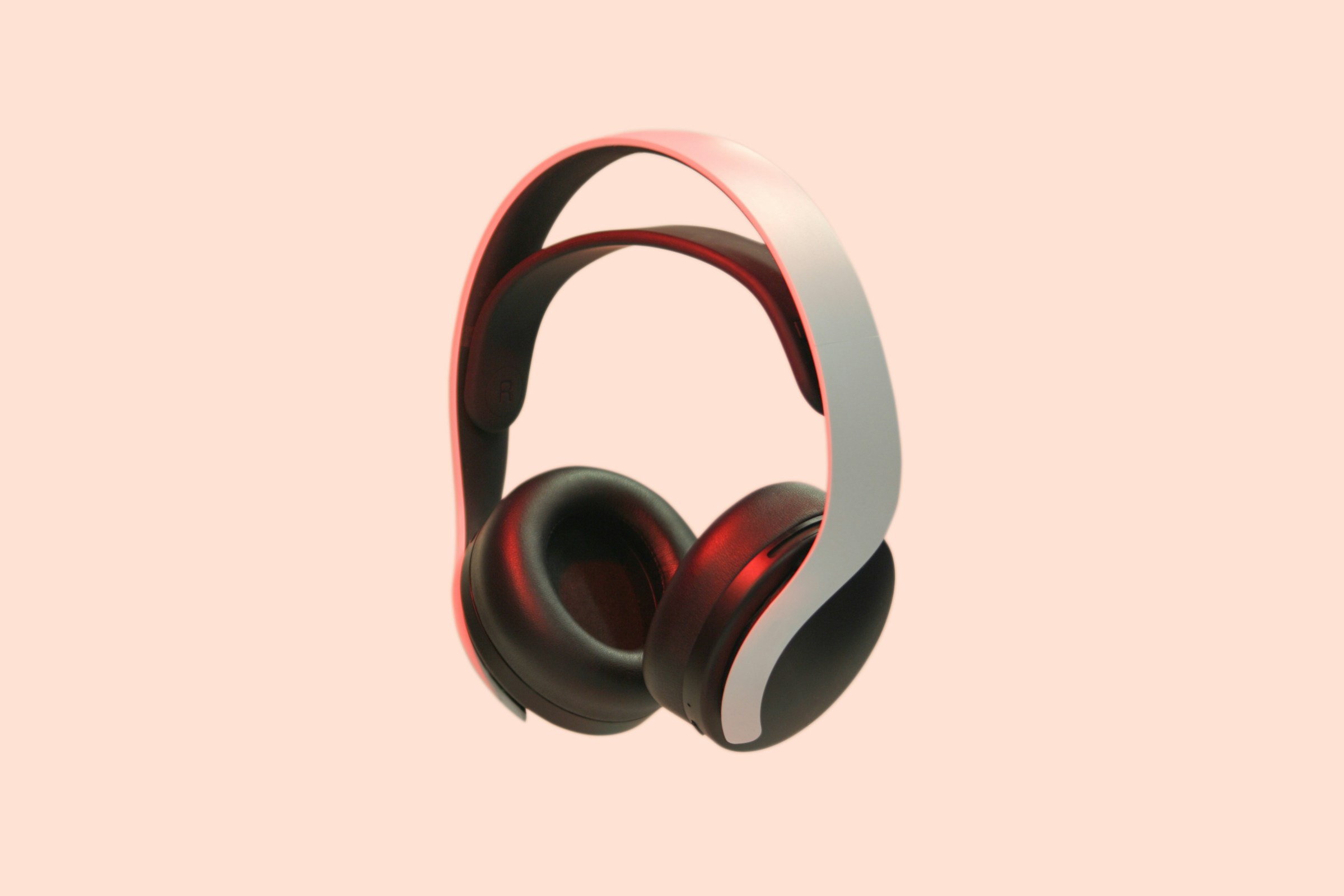
The best gaming headset for most people in 2026 is the Logitech G G321 Lightspeed: its own 2.4 GHz adapter for playing, separate Bluetooth for the phone, and the lowest weight of anything here that publishes one. Before you compare anything else, settle the connection: an Xbox will not talk to a generic 2.4 GHz dongle, and that single fact rules out most of this page if that is your console.

A cable, a microphone that mutes when you flip it up, and the reference brand at this level. It does not promise channels it does not have.
See it on Amazon ›Which connection your platform needs, and why the same headset will not do PC and Xbox
This is the decision that actually ruins a purchase, and it is the one every round-up in this category leaves until last, if it mentions it at all. It is first here because getting it wrong means a headset that plays sound but cannot be heard, or one that will not connect to your console at any price.
No outside source is needed for any of this. The whole argument sits inside the manufacturers' own product pages, and each of the three connections takes one line to state.
Works everywhere: tower, laptop, the PS5 controller, the Xbox controller and a phone. No pairing, no battery, no latency argument. Its limits are the length of the lead and the fact that many laptops no longer have the socket at all.
A dongle that talks only to your headset, so it is not competing with the mouse or the phone. This is the one thing on this page genuinely worth moving up the range for: sound stays glued to the picture and does not drop out mid-match. It works on PC and on PlayStation. It does not work on Xbox.
Convenient and needs no adapter, and the manufacturers themselves tell you what it is for. The headsets that carry both keep the adapter for the console and the computer and leave Bluetooth for the phone. A headset that only has Bluetooth is the wrong buy for gaming, and no fault of Bluetooth: it was never the point.
m8d rule: If a wireless headset does not name Xbox on its own product page, it will not work wirelessly on an Xbox. That is not a stock issue or a firmware update away: the console uses a licensed radio of its own.
The proof of the Xbox rule is written on the shelf, not in a forum. HyperX sells the Cloud Stinger Core and, separately, the CloudX Stinger Core for Xbox Series X, S and One. The letter marks the version with the licensed radio. That two versions of the same headset exist at all is the whole argument: if a generic dongle worked, there would be one. Razer does the same thing with a separate Xbox range, which is why its Barracuda X page lists PC, PS5, Switch and mobile and stops there.
| Headset | Connection | Published weight | How it writes 7.1 | Platforms it declares | |
|---|---|---|---|---|---|
| HyperX Cloud Stinger 2 Core view › | 3.5 mm cable | does not publish it | "surround audio", no figure | PC and anything with a jack | View › |
 JBL Quantum 100M2 view › JBL Quantum 100M2 view › | 3.5 mm cable | does not publish it | "QuantumSOUND", no figure | PC, consoles and mobile | View › |
 NEWSKILL Sobek 7.1 V2 view › NEWSKILL Sobek 7.1 V2 view › | Cable and USB | does not publish it | "virtual 7.1 sound" | PC | View › |
| Logitech G G321 Lightspeed view › | 2.4 GHz + Bluetooth + USB-C | 210 g | does not mention it | PC, PS4, PS5, Switch, Mac, mobile | View › |
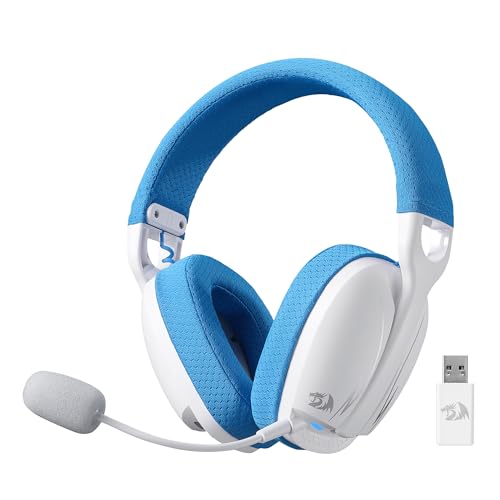 Redragon H878 view › Redragon H878 view › | 2.4 GHz + Bluetooth + cable | does not publish it | "7.1", nothing more | PC and consoles | View › |
 Corsair HS65 SURROUND view › Corsair HS65 SURROUND view › | 3.5 mm cable | 282 g | "Dolby 7.1 on PC and Mac" | PC, PS4, PS5, Xbox, mobile | View › |
 HyperX CloudX Stinger Core for Xbox view › HyperX CloudX Stinger Core for Xbox view › | Xbox radio | does not publish it | does not mention it | Xbox Series X, S and One | View › |
 Razer Barracuda X view › Razer Barracuda X view › | 2.4 GHz + Bluetooth | 250 g | does not mention it | PC, PS5, Switch and mobile | View › |
 Razer BlackShark V2 HyperSpeed view › Razer BlackShark V2 HyperSpeed view › | 2.4 GHz | 280 g | does not mention it | PC | View › |
Taken from each manufacturer's specification sheet and product title, read on 1 September 2026. Cells in italics are empty because the maker does not publish the figure, not because we did not look. Availability and model names differ between country stores.
Why weight is up here rather than in the small print. A gaming headset is worn for hours at a time, and the difference between 210 and 282 grams is the difference between forgetting it is on and taking it off to rub your ears. It is also the specification with the clearest pattern in this whole category: the sets that publish it are the ones that are comfortable, and the ones that stay quiet are quiet for a reason.
What each word on a gaming headset box actually means
A headset has two speakers, one per ear. That is not a limitation of the cheap ones, it is what a headset is. So the seven channels of a 7.1 do not physically fit inside: a program calculates them and serves them through those two speakers. It works, it genuinely helps you tell whether a shot came from behind, and it costs nothing, because it is software.
Everything below is product titles and specification sheets, read on 1 September 2026. The claim is identical in all three cases: what changes is how much of the explanation each maker chose to print next to it.
The NEWSKILL Sobek puts "virtual 7.1 sound" in its own title. That one extra word is the difference between informing and decorating, and it is written by one of the cheapest headsets here.
The Redragon H878 title reads "7.1" and stops. Nothing is untrue about it, and nothing explains it either. The same brand writes it that way across most of its range.
Corsair goes furthest: its HS65 title says "Dolby Audio 7.1 surround sound on PC and Mac", and its sheet finishes the sentence by explaining that the effect needs the brand's software on a computer. It is the only headset here that tells you where its own feature works.
m8d rule: If a headset writes "virtual" next to its 7.1, it is telling you the truth about which technology is inside. If it writes 7.1 on its own, the seven channels are still software: only the wording changed.
Six words appear in almost every gaming headset title on the shelf. Tap one and we will tell you what it actually is, whether it is worth paying for, and which headset in this guide answers it. Three of the six answers are that you should not pay for it.
A headset has two speakers, one per ear. Seven channels do not fit inside: a program on the computer works them out and serves them through those two speakers. It works, it helps you tell whether a shot came from behind, and it costs nothing, because it is software. You can see it in how each brand writes it, because the ones doing it properly say so: virtual, digital, or the name of the system they use.
The three answers that tell you not to pay have no product attached on purpose: if something does not change what you are going to hear, this guide is not selling you anything for it. This edition carries no prices in any form, so the buttons take you to your own local store to see what is there today.
The volume limit you assume protects you is a standard about music players
Most people believe headphones sold in this country are capped at a safe volume. That belief comes from a real standard, and the standard's own title is the reason it may not apply to the thing on your head right now.
This is the part no gaming headset round-up covers, and it is not a general warning about volume. It is one British Standard whose own title decides whether it applies to the thing on your head.
The British Standard is BS EN 50332, and BSI publishes its title in full: Sound system equipment: headphones and earphones associated with personal music players. Maximum sound pressure level measurement methodology. The scope is in the name.
A gaming headset is sold on its own and plugged into a computer or a console, which supplies the level. It is not a music player supplied with headphones. The comfortable assumption that a ceiling has been applied on your behalf is doing a lot of work here.
Setting the level yourself, and knowing that the software chain matters as much as the headset: a surround effect, an equaliser preset and a game's own volume all stack. This page publishes no decibel figure: the sound pressure at your ear depends on the source, the equaliser preset and the fit. What we can tell you is where to look.
m8d rule: The volume ceiling people assume applies to all headphones is written for headphones supplied with a personal music player. A gaming headset bought on its own, driven by a computer, is not the product that standard describes.
The practical version, and it takes one minute. Set the game and the computer to a comfortable level with the surround processing off, then turn the processing on and listen to whether it got louder. Virtual surround usually adds gain along with the effect, and that gain is the part nobody warns you about. If it did get louder, take the system volume back down rather than leaving the difference in.
What you get at the way in, and what you genuinely give up
At this level everything is wired, and that is not a bad thing: the 3.5 mm plug works on a tower, a laptop, a PS5 controller, an Xbox controller and a phone, with no pairing and no battery. What you give up is the adapter, the lighting and, usually, the published weight.
HyperX Cloud Stinger 2 Core view ›
Much the same as the JBL, with the microphone that mutes when you flip it upwards, which is the single most useful gesture a gaming headset has. The brand has been the reference at this level for years and it shows.
- HyperX writes surround audio in the title and, once again, with no channel figure. Two of the three cheapest headsets in this guide decline to put 7.1 on the box, and both are recognised brands.
- The microphone folds and mutes when you swing it upwards. It sounds like a detail and it is not: it is the difference between going quiet in one second and hunting for a button while your team listens.
- 40 mm drivers, the same size as the mid-priced wireless set on this list. Useful as a reminder that millimetres are not price.
- Watch the listing before you plan on it: stock has been down to a handful of units in the catalogue we monitor. If the button says it is unavailable, that is not a page fault, and the JBL covers exactly the same ground.
- The lowest point of entry here
- A microphone that mutes when you flip it up
- Does not advertise channels it does not have
- 40 mm drivers, the same as dearer wireless sets
- Stock has been very short in the catalogue we track
- Does not publish its weight
- Wired only
JBL Quantum 100M2 view ›
The headset that does its job and promises nothing it cannot deliver: a cable, a microphone and a company that answers the phone. It is the sensible purchase if all you want is to stop gaming through the monitor's speakers.
- JBL calls its processing QuantumSOUND Signature, a name of its own, and writes no channel figure in the title at all. That is the straight way to sell this, and it is worth noticing, because cheaper headsets on the same shelf advertise 7.1.
- It is over-ear, meaning the pad surrounds the ear instead of pressing on it. Over a long session that is the difference between your cartilage aching and not.
- A 3.5 mm plug, which is the connector that works on everything: tower, laptop, PS5 controller, Xbox controller and phone. No adapters, no pairing and no battery to die mid-match.
- What to bear in mind: like every wired set here, the cable is a little over a metre. If your tower is on the floor, look at the extension in the extras section, and read the detail there, because the wrong extension ruins the purchase.
- Does not advertise channels it does not have
- Over-ear: the pad goes around the ear rather than on it
- A 3.5 mm plug, which works with everything
- No battery to run flat
- A short cable if the tower is on the floor
- Does not publish its weight
- No wireless and no Bluetooth
And the third at this level is here for a different reason. It is the one that proves the point of the section above: it is the cheapest headset in the guide, it has lighting, and it is the only one that writes the word virtual next to its 7.1. Cheaper does not mean vaguer, and this is the evidence.
NEWSKILL Sobek 7.1 V2 view ›
It is in this guide for a reason that has nothing to do with how it sounds: it is the one that writes the truth on its own box. If you want lighting and channel processing over USB, this is the one that does not sell it to you as though it were hardware.
- Its title says, in as many words, virtual 7.1 sound. That extra word, virtual, is the whole difference between informing and decorating, and very few write it. On the same shelf there are headsets that print 7.1 with nothing after it and cost more than this one.
- It has RGB, and it is worth knowing what that buys: the lights are on the outside and you are wearing the thing, so the only person who will see them is you in a mirror, or your camera if you stream.
- Channel processing of this kind needs a computer's USB port, not the 3.5 mm jack. That is why it almost never behaves the same way on a console as it does on a PC.
- It is sold by a smaller European brand rather than one of the giants, which in practice means the warranty is handled locally rather than through a global support queue.
- Declares that its 7.1 is virtual, which almost nothing else does
- RGB lighting, if that is what you are after
- The entry level of the category
- The channel processing needs a computer's USB port
- The lights use power and you cannot see them while wearing it
- Does not publish its weight
The step you actually hear: a headset with an adapter of its own
This is the one change in this guide that is paid for with hardware rather than with software. A dongle that belongs to your headset and talks only to it is what keeps sound glued to the picture and stops the drop-outs. Everything else at this level is a variation on it.
Logitech G G321 Lightspeed view ›
It is the only headset here that gets both of the things worth paying more for right: its own 2.4 GHz adapter for playing and separate Bluetooth for the phone, at the lowest weight of anything on this page that publishes the figure. It does not have 7.1 written on the box, and you do not miss it.
- Its specification sheet publishes 210 grams, the lowest weight of the four headsets in this guide that dare to give a figure. It is the variable that decides whether you still notice the thing three hours in, and almost nobody publishes it.
- It carries both wireless connections and uses each for what it is good at: Lightspeed at 2.4 GHz with its own adapter for the game, and Bluetooth 5.2 for the phone. That is exactly the split the connections section explains, done by the manufacturer itself.
- Up to 20 hours per charge and USB-C charging, according to its sheet. In practice that is a week of two-hour sessions without thinking about a cable.
- And now the small print: its official platform list is PC, PS4, PS5, Nintendo Switch, Mac and mobiles. Xbox does not appear, and that is not an oversight: that console needs something else, and it has its own section.
- The lowest weight of anything here that publishes the figure: 210 grams
- A 2.4 GHz adapter for playing and Bluetooth for the phone, kept separate
- Up to 20 hours per charge, over USB-C
- Does not sell you surround sound it does not have
- No good on Xbox: the maker does not list it
- 40 mm drivers, below the 50 mm of the dearer wired sets
- No lighting, if that matters to you
Redragon H878 view ›
It is the cheapest headset here that brings all three connections: a 2.4 GHz adapter, Bluetooth and a cable. If your situation is that you play on the PC, talk on the phone and occasionally plug into a console, this covers it without going far up the range.
- Three modes means its own 2.4 GHz adapter, Bluetooth and a 3.5 mm cable in the same headset. That is real flexibility, and the cable doubles as the plan for the day you forget to charge it.
- Its title reads 7.1 with nothing after it, no word explaining what that is, which makes it the perfect illustration of the section above: the same brand writes it that way across most of its range.
- Redragon is the brand that usually gives you a dearer model's specification sheet for much less. Here the pattern repeats in the connections rather than in the sound.
- Watch the listing before you plan on it: stock has been down to a handful of units in the catalogue we monitor. If it disappears, the Barracuda X further down covers the same ground and sits well above it.
- All three connections without going far up the range
- The cable as a fallback when the battery dies
- A lot of connectivity for where it sits
- Writes 7.1 without declaring that it is virtual
- Stock has been short in the catalogue we track
- Does not publish its weight
Corsair HS65 SURROUND view ›
The best documented wired headset on the list. Corsair publishes the weight, publishes the driver size and, above all, publishes the conditions under which its surround actually works, which is precisely what guides in this category do not tell you.
- It is the only headset here that says where its 7.1 works, and it says it in the title: on PC and Mac. Its own specification sheet finishes the job: the Dolby Audio is only available through the brand's software on a computer.
- Corsair publishes 282 grams and 50 mm drivers. It is the heaviest of the four that give a figure, and 50 mm is the large end at this level.
- The microphone is omnidirectional, which picks up from every direction. Better for being heard without positioning it carefully, worse if you have a loud keyboard next to you.
- It declares compatibility with PC, PS4, PS5, Xbox and mobile, because it runs over a 3.5 mm cable. Do not confuse that with the surround, which stays on the computer.
- States which platforms its surround works on
- Publishes weight and driver size
- 50 mm drivers
- Works over cable on PC, PS5 and Xbox
- The heaviest of those that publish a figure: 282 grams
- The surround needs the manufacturer's software installed
- Omnidirectional microphone: it picks up the keyboard too
Where you start paying for the label, and where you are still paying for something real
This is the comfort and microphone tier, not the power tier. What the extra buys is a set that stays bearable for four hours, a microphone with a name and a specification behind it, and, in one case, both wireless connections running at once. What it does not buy is more channels, because the channels were always software.
Razer Barracuda X view ›
The one that genuinely buys flexibility: it connects to the adapter and to Bluetooth at once and switches between them without you taking it off. If you play on a PC or a console and want to hear the phone without unpairing anything, this is what you were looking for.
- Its SmartSwitch keeps both connections alive at the same time, one at 2.4 GHz and one over Bluetooth, and jumps between them. It is the connections rule proved by the manufacturer: the adapter is for playing and Bluetooth is for the phone.
- Razer publishes 250 grams. That sits between the lightest here and the two at 280, and it is a reasonable weight for sessions of several hours.
- The adapter is USB-C rather than USB-A, which is what lets it plug straight into a phone or a Switch with nothing in between.
- The limit, and it matters: its product page does not list Xbox. Razer sells a different range for that console, and that fact is half the argument of the connections section.
- Both wireless connections live at the same time
- 250 grams published by the manufacturer
- USB-C adapter: plugs straight into a phone or a Switch
- Genuinely multi-platform, except for Xbox
- Does not list Xbox among its platforms
- A long way above the entry wireless option
- No lighting, if that matters to you
Razer BlackShark V2 HyperSpeed view ›
The only one here that puts its weight in its own title, which says something, and the one that spends its budget on the microphone rather than on lighting. If people tell you every match that they cannot hear you properly, this is the purchase.
- It publishes 280 grams in the product title itself. It is the only one in this guide that does, and it is a signal: a maker that hides the weight rarely does so by accident.
- Its argument is not the sound you hear, it is the sound that leaves: the microphone has a name of its own, HyperClear, and the rest of the sheet revolves around it. In a category where nobody measures microphones, at least here the maker commits to one.
- It is aimed at PC, and you can tell, because it does not try to be the headset for everything. When a manufacturer narrows the compatibility it is usually because something has been optimised.
- It sits at the top of this guide and still nowhere near the flagship tier of the category. That tier exists and this guide deliberately does not go there.
- The only one that publishes its weight in the title: 280 grams
- The microphone as the central argument
- Aimed at PC rather than at everything
- Low latency wireless
- 280 grams: among the heaviest here
- Built for PC, not for consoles
- The top of this guide's range
If this is a present for a child, the headset is not what decides who they talk to
A large share of gaming headsets sold in this country are bought for someone under sixteen, and a headset is precisely the device that puts open voice chat into a child's ears in a room where nobody else can hear it. The age rating on the game does not cover that, and it is worth knowing exactly what it does cover.
Two things get confused here because they arrive in the same shopping trip. One of them is enforced by law in this country. The other is a setting on a console, and nobody hands you a leaflet about it.
In the UK, PEGI 12, 16 and 18 have been legally enforceable since 30 July 2012, and the statutory body responsible is the Video Standards Council through its games rating arm. A retailer selling above a child's age band is committing an offence, which is not the case in every country.
The classification covers the content the publisher shipped. Live voice chat with strangers is not that content, and no rating can describe it in advance. Both consoles put those controls in the family account rather than in the game.
Set up the child account properly on the console and decide the voice chat setting deliberately, before the headset arrives rather than after. A wired headset with a flip-to-mute microphone, like the Stinger in this guide, is also easier for a younger child to use than a menu they have to remember.
m8d rule: A PEGI rating classifies the content of the game. It says nothing about who your child will be speaking to inside it, and the headset is the part that makes that conversation private.
Xbox, a laptop with no jack, and a cable that will not reach the tower
Three situations that leave a purchase half finished and that guides in this category do not mention, because none of them is a headset. Two of them cost almost nothing and the third is the reason Xbox owners end up returning things.
It is the same Stinger as the entry tier with the electronics Xbox demands, and that is why it sits where it sits. If your console is an Xbox, that difference is not a brand whim: it is the only way to go wireless without adapters.
View ›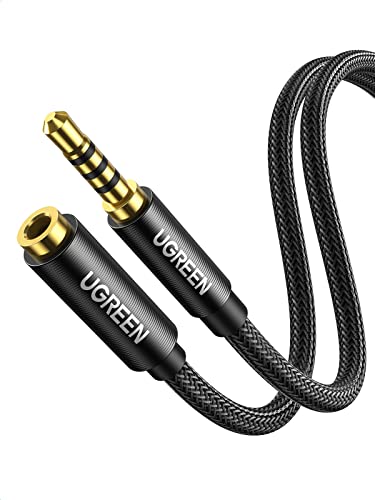
Two more metres of cable to get from the tower on the floor up to your head, and the important part is in its name: with microphone. The wrong extension leaves the headset playing and the microphone dead.
View ›
The accessory nobody mentions, and the one that decides whether your wired headset is any use on your new laptop. With its own conversion chip, which is what separates an adapter that works from one that hisses.
View ›The silliest fault in this category, and how to avoid it in ten seconds. A 3.5 mm plug carries either three contacts or four. Three is audio only. Four adds the microphone. Almost every cheap extension lead is a three, so the headset keeps playing and the microphone goes silent, and it looks like the headset broke. Before you buy any extension, check that the title says with microphone or four pole. If it does not say it, it is a three.
Every figure in this guide carries its source and its date. What this guide does is set what each manufacturer publishes against what can be checked: the platform lists come from each maker's own product page, the weights from the specification sheets, the wording of the 7.1 claim from the product titles themselves, and the Xbox rule from the existence of a separately licensed version of the same headset.
We started from the gaming headsets in the Amazon Spain catalogue that m8d monitors, read again on 1 September 2026, and kept nine that cover different situations rather than nine variations of the same one. Availability, variants and model names differ from one country's Amazon store to another, so the buttons take you to your own local store. Two of the nine have had very short stock in the catalogue we track, and that is written on their cards rather than hidden.
And a figure you will not find here: a decibel level. Measuring sound pressure needs a meter and a controlled room, so the loudness section explains where to look and what the standard actually covers, and stops there.
What does 7.1 mean on a gaming headset?›
That a program simulates seven channels and a subwoofer using the two speakers a headset physically has, one per ear. It is software, not hardware, so it costs nothing to include and it is not a reason to move up the range. It does genuinely help you tell which direction a sound came from. The wording is the tell: the makers doing it properly write virtual, digital, or the name of the system, and one headset in this guide does exactly that on its own box.
Will a wireless gaming headset work on an Xbox?›
Only if the maker says so on the product page, because Xbox uses a licensed wireless radio of its own rather than Bluetooth or a generic 2.4 GHz dongle. The proof is on the shelf: HyperX sells the Cloud Stinger Core and, separately, the CloudX version for Xbox Series X, S and One. If a generic adapter worked, the second version would not exist. A wired 3.5 mm headset plugged into the controller works on any of them.
Is 2.4 GHz wireless better than Bluetooth for gaming?›
For gaming, yes, and the manufacturers say so by how they use them. A 2.4 GHz adapter talks only to your headset, so the sound stays with the picture and does not drop out. Bluetooth shares the air with everything else and is built for convenience. The headsets that carry both keep the adapter for the console and the computer and leave Bluetooth for the phone, which tells you what each is for.
Do bigger drivers mean better sound?›
No. Driver diameter is a real figure but it does not describe how something sounds, which depends on the tuning, the material and the chamber, none of which appears on a listing. There are 40 mm headsets on this page that hold their own against 50 mm ones. Treat millimetres as a characteristic rather than a score, which is how the comparison table here presents them.
Are gaming headsets limited to a safe volume?›
Not in the way most people assume. The British Standard people are thinking of is BS EN 50332, whose own title describes headphones and earphones associated with personal music players. A gaming headset sold on its own and driven by a computer is not that product, and this page publishes no decibel figure. The practical advice is to set your level with the surround processing off and check whether turning it on made things louder, because it usually adds gain along with the effect.
Which gaming headset should I buy for a child?›
A wired one with a flip-to-mute microphone is the easiest for a younger child to use, and the Stinger in this guide is that. The more important part is not the headset: PEGI 12, 16 and 18 have been legally enforceable in the UK since 30 July 2012 and the Video Standards Council is the statutory body, but a rating classifies the content of the game and says nothing about who your child will speak to inside it. Set the voice chat controls on the family account before the headset arrives.
Why does my microphone stop working when I use an extension lead?›
Because the lead has three contacts instead of four. A 3.5 mm plug carries two for audio, one for the microphone and one common. Most cheap extensions carry three, so audio survives and the microphone goes silent. Before buying one, check that the title says with microphone or four pole.
All consulted on 1 September 2026.
- BSI, the UK national standards bodyBS EN 50332, Sound system equipment: headphones and earphones associated with personal music playersThe title of the standard states its own scope: headphones associated with personal music players. A gaming headset sold on its own and driven by a computer is not that product.
- Video Standards Council, United KingdomPEGI ratings and the statutory games rating bodyPEGI 12, 16 and 18 have been legally enforceable in the UK since 30 July 2012, with the Video Standards Council as the statutory body. A rating classifies content, not who a player will talk to.
- Product pages and specification sheets from Logitech G, JBL, HyperX, NEWSKILL, Redragon, Corsair and RazerPlatform lists, weights and 7.1 wordingEvery figure in the comparison table comes from the maker's own page. Five of the nine publish no weight at all, and those cells are left empty rather than estimated.
- HyperX, on its own product rangeThe existence of a separately licensed Xbox versionThe Cloud Stinger Core and the CloudX Stinger Core for Xbox are sold as different products. That is the evidence that a generic 2.4 GHz adapter does not work on that console.
If you have read this far and still cannot decide, the short answer is that almost everybody should settle the connection first and the rest afterwards. On PC or PlayStation, the Logitech G G321 Lightspeed buys the two things worth paying for, its own adapter and a low weight, and does not sell you channels that live in software. If you only want to stop gaming through the monitor speakers, the JBL Quantum 100M2 does that with a cable and no promises.
And if your console is an Xbox, most of this page does not apply to you: the HyperX CloudX Stinger Core exists because that console needs a licensed radio, and the fact that a separate version had to be made is the clearest evidence in the whole guide.