Best gaming mouse in 2026: 9 picks ranked by weight, shape and sensor, and the DPI you actually use
 m8d.ioUpdated on
This guide contains affiliate links. As an Amazon Associate, m8d.io earns from qualifying purchases, at no extra cost to you.
- For most people: the Attack Shark X3. It is the lightest on this page, it carries the PAW3395 sensor from the high end, and it costs a third of what the tournament mouse costs.
- If you want what the professionals use: the Razer Viper V3 Pro SE. Watch which one you buy, because the same mouse is sold in three editions at three very different prices, and we take that apart below.
- If you prefer the safe buy: the Logitech G Pro X Superlight 2, the shape more people have used than any other, with 60 grams and 95 hours declared by Logitech.
- For big hands and a palm grip: the DeathAdder V3 Pro, 63 grams in an ergonomic shape.
- And the number not to look at is DPI. Turned into centimetres of mousepad, it collapses on its own: at the 35,000 DPI one of these mice advertises, a full 360 turn fits in barely over a centimetre.
What is the best gaming mouse in 2026, and which one is best for you?
The two real candidates for the crown are the G Pro X Superlight 2 view ›, the one seen most at tournaments, and the Razer Viper V3 Pro SE view ›, the reference among shooter players. The third in the running is the DeathAdder V3 Pro view ›, for anyone who needs an ergonomic shape.
The uncomfortable truth is that the best in the world is the one that fits your hand and your game. Someone with big hands who rests the whole palm will suffer with an ultralight symmetrical mouse, and someone who plays on their fingertips will get nothing out of an ergonomic one. That is why this guide starts with weight and shape, and leaves the sensor figures for last: they decide the least and they are advertised the most.
What DPI should you use for gaming? The answer in centimetres of mousepad
DPI is the figure most advertised on a gaming mouse and the only one that changes nothing on its own. These are the ceilings declared by the listings and spec sheets of the mice on this page, read on 23 August 2026.
The Superlight 2 view › reaches 44,000 DPI according to Logitech. The Viper V3 Pro SE view › writes 35,000 in its own title. The DeathAdder V3 Pro view › and the Viper V3 HyperSpeed view › carry 30K in the sensor name. And the cheapest of them all, the DeathAdder Essential view ›, declares 6,400.
Between 400 and 1,600 DPI. That is the range almost everyone plays in, and you do not have to take our word for it: the calculator below does the arithmetic. Which means the cheapest mouse on this page and the most expensive one are used exactly the same way, while what they advertise differs by a factor of seven.
Competitive players are measured in centimetres per 360 turn, not in DPI: CS2 and Valorant professionals sit around 45 to 47 centimetres. Run that backwards through the arithmetic below and it comes out at roughly 900 DPI, which is exactly the 400 to 800 range the guides on the first page of results for this search recommend, consulted on 29 August 2026. The box still says up to 44,000: a factor of about fifty between the headline and the number that gets used.
m8d rule: If a mouse advertises tens of thousands of DPI, that figure is not a specification: it is a headline. The one that decides is how many centimetres your hand travels for a full 360 turn, and that takes ten seconds to work out.
The arithmetic that settles the argument is not an opinion: it is geometry. Put in the DPI of your mouse and the sensitivity of your game and it gives you exactly how many centimetres your hand travels to turn 360 degrees, and that is the number you can hold up against your mousepad.
The comfortable zone. This is where most people land, and where 800 DPI at sensitivity 1 lands, the most repeated setting in the world. You neither run out of turn nor need half the desk.
The arithmetic is the Source engine's, used by CS2 and Apex: each sensor step turns the camera 0.022 degrees, so degrees per inch are 0.022 times DPI times sensitivity, and from there come the inches per turn, converted to centimetres. Valorant and Overwatch use a different conversion factor, so a sensitivity number from one game cannot be compared with another's, but centimetres per turn can: it is the same physical distance in all of them.
The publishable rule: take the DPI advertised by the mouse you are looking at and put it into the calculator above at sensitivity 1. If the distance is shorter than the width of your hand, that figure is for the box, not for playing. At the 35,000 DPI the Viper V3 Pro SE view › declares, a full turn fits in barely over a centimetre.
Which gaming mouse sensor is the best in 2026, and which part of it is marketing?
The three reference sensors of 2026 are Logitech's HERO 2, Razer's Focus Pro in its two generations, and the PixArt PAW3395 fitted by the newer brands. And the fact that saves the argument: all three are good enough that none of them will miss a shot in the range people actually play in.
That has a practical consequence worth understanding before you spend: the Viper V3 HyperSpeed view ›, one of the cheapest here, carries the same Focus Pro 30K as the DeathAdder V3 Pro view ›, which costs more than twice as much, and the Attack Shark X3 view ›, cheaper still, fits the high-end PAW3395. What you pay for above the budget tier is not the sensor: it is the weight, the shape, the materials and the battery.
The 9 best gaming mice of 2026 compared
| Mouse | Declared weight | Sensor | Connection | Who it is for | |
|---|---|---|---|---|---|
 Attack Shark X3 (49 grams) view › Attack Shark X3 (49 grams) view › | 49 g | PixArt PAW3395 | 2.4 GHz, Bluetooth and cable | Most people: the best figures for the price on the page | View › |
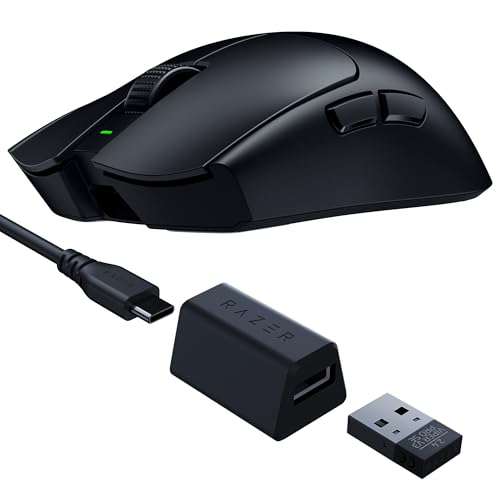 Razer Viper V3 Pro SE view › Razer Viper V3 Pro SE view › | 54 g | Optical, 35,000 DPI | 2.4 GHz (1,000 Hz) | Shooters: tournament hardware without the sticker | View › |
 Logitech G Pro X Superlight 2 view › Logitech G Pro X Superlight 2 view › | 60 g (Logitech) | HERO 2 | 2.4 GHz (up to 8 kHz) | Anyone who wants the safe buy | View › |
 Razer DeathAdder V3 Pro view › Razer DeathAdder V3 Pro view › | 63 g | Focus Pro | 2.4 GHz | Big hands and a palm grip | View › |
 HyperX Pulsefire Haste 2 S view › HyperX Pulsefire Haste 2 S view › | 64 g | Not declared in its listing | 2.4 GHz | The middle ground: magnesium without the flagship price | View › |
 Logitech G502 X Lightspeed view › Logitech G502 X Lightspeed view › | Not declared | Not declared in its listing | 2.4 GHz | Role-playing, strategy and plenty of buttons | View › |
 Razer Viper V3 HyperSpeed view › Razer Viper V3 HyperSpeed view › | Not declared | Focus Pro 30K | 2.4 GHz, battery powered | Anyone who does not want to remember to charge it | View › |
 Logitech G203 LIGHTSYNC view › Logitech G203 LIGHTSYNC view › | Not declared | Not declared in its listing | Cable | Starting out without spending | View › |
 Razer DeathAdder Essential view › Razer DeathAdder Essential view › | Not declared | Optical, 6,400 DPI | Cable | The floor of the list | View › |
Weight, sensor and connection are what each manufacturer declares in the title of its Amazon listing, read on 23 August 2026, except the G Pro X Superlight 2, which comes from Logitech's official spec sheet because its listing does not say. Where it says not declared, that is exactly what it means: the listing does not publish it and we do not fill it in. Availability varies by country: the buttons take you to your local Amazon store.
The lightest mouse in this guide is the fourth cheapest. Worth saying while we are on the subject of what the box claims and the hardware delivers: none of this transfers to a console, where the peripheral rules are different and the audio rules are stranger still. A PS5 will not send game audio over Bluetooth at all, which is the whole reason the best PS5 headsets is a separate guide. The Attack Shark X3 view › declares 49 grams and the G Pro X Superlight 2 view ›, which costs almost three times as much, declares 60. In a category where weight is criterion number one, those eleven grams run in the opposite direction to the price.
And there is a second pattern from the same census: of the nine mice on this page, five declare their weight in the listing title and four do not. The three Logitech models are among the ones that stay quiet.
The 4 gaming mice that deserve a closer look
Attack Shark X3 (49 grams) view ›
The one we would buy with our own money. It weighs less than anything else on this page, it carries the sensor from the expensive mice and it costs a third of what the tournament mouse costs. If the brand does not matter to you, the search ends here.
- It is the lightest in this guide and also the fourth cheapest: 49 grams declared in its own title, eleven less than the tournament mouse that costs almost three times as much.
- It fits a PixArt PAW3395, the same sensor found in mice costing three times as much. That is the entire argument of the product and it is written on its spec sheet, not in our opinion.
- Three connections in the same body: Bluetooth, a 2.4 GHz receiver and a cable. The 2.4 GHz one is what you play on; Bluetooth is for the work laptop.
- 49 declared grams: the lightest on the list
- PAW3395 sensor, high end, at an entry price
- Bluetooth, 2.4 GHz and cable in the same mouse
- Brand without the service network of the big names
- The materials sit below Razer's and Logitech's
- Less polished configuration software
Razer Viper V3 Pro SE view ›
The professionals' mouse at the price it should always have carried. Same body, same weight and same sensor as the collector editions that cost up to double. If you want tournament hardware without paying for the decoration, this is it.
- 54 grams declared in its title, five less than the tournament mouse and for meaningfully less money.
- It is the same mouse sold in two themed editions that cost far more. Buying the ordinary version is the most profitable buying decision on this page, which is why it has its own section below.
- Its spec sheet declares a 35,000 DPI sensor. Nobody uses that figure, and the calculator in this guide shows why in ten seconds.
- 54 declared grams
- The same body and sensor as the themed editions, for much less
- Symmetrical: right-handed and fingertip grip friendly
- Symmetrical with no buttons on the right: not for left-handers
- No RGB, if that matters to you
- The 1,000 Hz receiver, not the 8,000 Hz HyperPolling one
The finding of this update, and you do not have to take our word for it: three listings from Razer's own catalog, read via API on 23 August 2026. The Viper V3 Pro is sold in a standard version and in two themed editions. Same body, same sensor, same declared weight.
The Viper V3 Pro SE, 54 grams and a 35,000 DPI sensor. It is the one we link and the one on this page's podium.
The Viper V3 Pro SE Wuthering Waves Edition: the same declared 54 grams, the same sensor and the same body, for about half as much again. This edition was in our own table until today, and it leaves it for exactly this reason.
The Viper V3 Pro Counter-Strike 2 Dragon Lore: 55 declared grams, and roughly twice the standard version. The gap between the two is larger than the entire price of the Pulsefire Haste 2 S in this same guide.
m8d rule: Before buying a high-end mouse with a video game name on it, look for the same model without the special edition. Here the decoration costs about half again on one edition and roughly double on the other.
Logitech G Pro X Superlight 2 view ›
The safe buy: the shape more people have used than any other, with the longest battery on the page. You pay for the brand and for the certainty that you will not miss anything. If budget rules, there are two mice here that do the same for less.
- Logitech declares 60 grams, a HERO 2 sensor up to 44,000 DPI, polling up to 8 kHz and 95 hours of battery on its spec sheet. None of those figures is in its listing title: you have to go looking for them.
- It is the one seen most at tournaments, and that is a real reason: the shape is the one most people have used and the one that surprises you least when switching from another mouse.
- Its 44,000 DPI is the highest figure in this guide. It is also the least used: in practice people play between 400 and 1,600.
- 60 grams declared by Logitech
- The most widely used shape on the market
- 95 declared hours of battery
- The most expensive on the list
- Its listing declares neither the weight nor the sensor
- No RGB and very few buttons
Razer DeathAdder V3 Pro view ›
The reference ergonomic mouse. If mice feel too small and you rest the whole palm, this is the shape, and at 63 declared grams you will not find many like it. For medium hands or a fingertip grip there are cheaper and lighter options.
- 63 grams declared in an ergonomic shape, which is the difficult combination: most asymmetric mice weigh considerably more.
- It is the full palm shape. If you rest your whole hand and have long fingers, ultralight symmetrical mice will feel too small and this one will not.
- Same Focus Pro sensor as the Viper HyperSpeed, which costs less than half. What you pay for here is the shape, the weight and the battery, not the sensor.
- 63 declared grams in an ergonomic shape
- The best option on the list for big hands
- Focus Pro sensor, the same as Razer's high end
- Right-handed only
- Expensive for what it adds over the Viper in this same guide
- No RGB
The other 5 gaming mice on the list, straight to the point
HyperX Pulsefire Haste 2 S view ›
The best resolved middle ground on the page. It weighs what the expensive ones weigh, it is made of magnesium instead of holes, and it costs about half what the tournament mice cost. If the Attack Shark feels too obscure to you, this is the next step.
- 64 grams with a magnesium shell, and that is the difference with the cheap ultralights: there are no holes drilled in the shell to shed weight.
- It declares 120 hours of battery and glass skates in its own title. It is one of the few listings in this guide that says what it carries without you having to go looking.
- It is the step that was missing between the budget mice and the flagship ones: high-end weight with materials you can feel.
- 64 declared grams without drilling holes in the shell
- Magnesium and glass skates below the flagship tier
- 120 declared hours of battery
- Less well known than Razer or Logitech
- No full-palm ergonomic shape
- More basic configuration software
Logitech G502 X Lightspeed view ›
The only one in this guide that does not compete on weight. If your game asks for buttons and macros more than hundredths of a second, it is the obvious option; if you play shooters, any of the ultralights above will serve you better for less.
- It is the mouse for people who play games with a lot of keys: role-playing, strategy and simulators. Nothing further up this list has this many buttons within reach.
- Its listing declares neither the weight nor the sensor, like the other two Logitech models on the page. You have to go to the manufacturer's spec sheet for them.
- It is not a light mouse and it does not pretend to be. If you are coming from a 50 gram ultralight, you will feel it on day one.
- The most buttons within reach of anything on the list
- Free-spin scroll wheel
- A classic shape plenty of people already know
- Heavy next to everything else in this guide
- Its listing declares neither weight nor sensor
- For pure aim games there are better options for less
The sensor from the expensive mice inside a budget one. If what puts you off wireless is remembering to charge it, the problem ends here: two hundred and eighty declared hours and a spare cell.
View ›Plenty of people's first gaming mouse, and it still makes sense. If you are starting out and do not want to spend, this does the job. The moment you want light weight or wireless, the jump is to the Attack Shark above.
View ›The reasonable floor. At the bottom of the range you get Razer's best known shape and a sensor that is more than enough for playing. Nobody is going to notice missing DPI: they will miss the weight and the wireless first.
View ›Which is the best value gaming mouse of 2026?
The Attack Shark X3 view ›, and by a good distance. It declares 49 grams, less than anything else on this page, and it fits the PixArt PAW3395, the sensor found in mice costing three times as much. In the budget tier there is nothing that comes close.
If the brand matters to you, the next step up is the HyperX Pulsefire Haste 2 S view ›: 64 grams with a magnesium shell instead of holes drilled in the plastic, and 120 declared hours of battery, for a fraction of what the tournament mice cost. And if the goal is to spend as little as possible, the DeathAdder Essential view › does the job at the floor of the list.
What gaming mouse marketing does not tell you
The truth about 8,000 Hz. You only notice it with a high refresh rate monitor, a compatible game and a processor with headroom to spare, and it drains considerably more battery. With a 60 or 144 Hz monitor, a thousand hertz of polling gives exactly the same result.
DPI is the most inflated figure in the industry. 26,000, 35,000, 44,000. People play between 400 and 1,600, and above roughly 3,200 it is a number for the box. The calculator on this page turns it into centimetres so there is nothing left to argue about. The same 8,000 Hz claim has now moved onto keyboards, where it arrives with a second question that no spec sheet answers, and our guide to gaming keyboards with a UK layout deals with both.
Weight does matter, and it does not always cost more. It is criterion number one in aim-based games, and in this guide the lightest mouse is the fourth cheapest.
And the Logitech G305 is absent from this list on purpose. It is still on sale and still a good mouse on paper, but the community has spent years reporting double clicks and micro-cutouts after a few months on too many units. For similar money, the Attack Shark X3 view › fits better hardware.
How we chose these nine gaming mice
Every figure in this guide carries its source and its date. What we did was read the spec sheet each manufacturer declares, keep only what can be verified (grams, sensor, connection, battery life) and say not declared where the listing does not publish it, instead of filling it in.
The contrast between the three Viper editions comes from three listings in Razer's own catalog, read via API on 23 August 2026. The centimetres per turn are arithmetic from the Source engine, not an estimate. And the comparison with what other guides recommend was made by opening the first page of results for this search on 29 August 2026.
Update of 23 August 2026. This guide was rebuilt from scratch. Two things changed and are worth stating: the previous title advertised a price for the G Pro X Superlight 2 that had stopped being true, and the table carried the Wuthering Waves edition of the Viper instead of the standard version, which is the same machine for noticeably less. Both are corrected here rather than quietly patched.
No manufacturer gives us hardware or reviews this content. Model availability varies by country: the buttons take you to your local Amazon store so you can check yours.
What is the best gaming mouse in the world in 2026?›
The two real candidates are the Logitech G Pro X Superlight 2, the one seen most at tournaments, and the Razer Viper V3 Pro SE, the reference among shooter players. The third is the DeathAdder V3 Pro for anyone who needs an ergonomic shape. But the best in the world is the one that fits your hand and your game: someone who rests the whole palm will suffer with an ultralight symmetrical mouse, and someone who plays on their fingertips gets nothing out of an ergonomic one.
What is the best value gaming mouse of 2026?›
The Attack Shark X3, by a distance. It declares 49 grams, less than anything else in this guide, and it fits the PixArt PAW3395, the same sensor found in mice costing three times as much. The next step up, if you prefer a familiar brand, is the HyperX Pulsefire Haste 2 S with its magnesium shell.
What DPI should I use for FPS games?›
Between 400 and 1,600 DPI, with the in-game sensitivity adjusted so that a full 360 turn takes somewhere between thirty and fifty-five centimetres of hand movement. That distance is what you are really choosing, and professional CS2 and Valorant players sit around forty-five. At the 35,000 DPI the most advanced mouse on this page advertises, a full turn would fit in barely over a centimetre.
Is a wireless mouse slower than a wired one?›
Not any more, with a 2.4 GHz receiver. The high-end wireless mice in this guide sit below the threshold where a player notices a difference, and every tournament mouse is wireless. What a cable does change is that there is nothing to charge, which is why the Viper V3 HyperSpeed, with up to 280 declared hours, is an interesting middle answer. Bluetooth is a different matter and there latency is real: it is for the laptop, not for playing.
What is polling rate, and do I need 8,000 Hz?›
It is how many times per second the mouse tells the computer where it is. 8,000 Hz is only noticeable with a high refresh rate monitor, a compatible game and a processor with headroom to spare, and it drains much more battery. With a 60 or 144 Hz monitor, a thousand hertz gives exactly the same result.
How do I know which grip type I have?›
Look at your hand on the mouse right now. If you rest the whole palm and your fingers lie flat, that is a palm grip and an ergonomic shape like the DeathAdder suits you. If the heel of your hand touches but your fingers are arched, that is a claw grip and almost anything fits. And if only your fingertips touch, that is a fingertip grip: there weight rules, and the lighter the better.
Do I need a mousepad if I have a good sensor?›
For the sensor, no: the three reference sensors of 2026 read correctly on almost any surface that is not glass or a mirror. For you, yes, and for a reason of size: if your full turn takes forty centimetres, you need forty centimetres of uniform surface. Before buying a mousepad, do the arithmetic in this guide and measure.
Is a special edition of a gaming mouse worth it?›
Almost never. In this very guide the Razer Viper V3 Pro is sold in a standard version, in a Wuthering Waves edition that costs about half as much again, and in a Counter-Strike 2 collector's edition that costs roughly double, all three with the same body, the same sensor and the same declared weight. The gap between the cheapest and the dearest is larger than the entire price of another good mouse on this same page, and it buys decoration. Read on 23 August 2026.
The specific data on this page, with its origin and its date.
- Logitech GOfficial PRO X SUPERLIGHT 2 spec sheet60 grams, HERO 2 sensor up to 44,000 DPI, polling up to 8 kHz and 95 hours of battery. Its Amazon listing publishes none of those figures. Spanish-language page.
- Amazon, read via APIListings of the nine mice in this guideWeight, sensor, connection and battery life, on 23 August 2026, from the European catalog that m8d tracks. Where the table says not declared, the listing does not publish it.
- Razer catalog on AmazonThe three editions of the Razer Viper V3 ProStandard version, Wuthering Waves Edition and Counter-Strike 2 Dragon Lore, with their three prices read on the same day. The comparison in this piece is expressed as ratios, not amounts, because prices vary by country.
- Source engine arithmeticConverting DPI into centimetres per turn0.022 degrees per sensor step at sensitivity 1. Valorant and Overwatch use a different factor, which is why a sensitivity number from one game cannot be compared with another's.
- First page of Google for "best gaming mouse 2026" and "what DPI for FPS"DPI recommendations from other guides in the resultsConsulted on 29 August 2026. The English-language guides converge on 400 to 800 DPI for competitive play and cite around 45 to 47 centimetres per 360 turn among professionals, which is the range this page's arithmetic produces.
If you take one idea away, let it be this: in a gaming mouse you choose the weight and the shape, and the big number on the box goes unused. Work out your centimetres per turn once and you will never look at DPI again.
With that done, the Attack Shark X3 view › is the sensible buy for most people: it is the lightest on the page and the sensor is the one from the expensive mice. The Razer Viper V3 Pro SE view › is tournament hardware at the price it should always have carried, and it is worth repeating because it is what saves the most money of anything here: the same machine with different decoration costs up to double. And the G Pro X Superlight 2 view › is the safe buy for anyone who does not want to think about it twice.
Comments
Be the firstNo sign-up: just a name. Every comment is reviewed before it is published.