Best PS5 headset in 2026: eight compared by how they connect, and why Bluetooth gives you no game audio
 m8d.ioUpdated on
This guide contains affiliate links. As an Amazon Associate, m8d.io earns from qualifying purchases, at no extra cost to you.

PS5 compatibility for real: how each of these connects
m8d rule: If the listing only says Bluetooth, it will not carry game audio on a PS5: look for a 3.5 mm cable, a 2.4 GHz adapter or PlayStation Link.
Will your headphones work on a PS5? Check before you buy
Pick what you already own, or what you are looking at in a shop, and the check tells you whether it will carry game audio on the console, why, and which headset from this guide fits that case. Two of the five answers deliberately sell you nothing: they teach you to read the listing instead.
A PS5 pairs controllers and accessories over Bluetooth, but it does not send game audio over Bluetooth. The proof is on PlayStation's own support pages: the PULSE Elite connects to a phone or tablet over Bluetooth and to the console with the PlayStation Link USB adapter that comes in the box. If the console spoke Bluetooth audio, Sony's own headset would not need an adapter. There are third-party USB transmitters that work around it, with added lag and usually no microphone, and there is not one in this guide because we have not analysed any.
The Bluetooth point and the adapter in the official headset's box both come from PlayStation's own UK product and support pages, read on 31 August 2026 and listed in the sources at the foot of this guide.
Tempest 3D audio does not live in the headset: the console generates it, and any headset receives it
m8d rule: On a PS5 the 3D sound comes from the console, not the headset: any decent stereo pair receives it, and the special label adds nothing.
The 8 best PS5 headsets at a glance: connection, declared battery and who each one is for
| Headset | Best for | How it reaches the PS5 | Battery declared | Also works on | |
|---|---|---|---|---|---|
| HyperX Cloud III view › | Overall value | Cable into the controller | Not needed | PC, Xbox and Switch | View › |
 SteelSeries Arctis Nova 3P Wireless view › SteelSeries Arctis Nova 3P Wireless view › | The balanced wireless one | 2.4 GHz (USB adapter) | 40 h (its own listing) | PC and Switch | View › |
 PlayStation PULSE Elite view › PlayStation PULSE Elite view › | The official one, no questions | PlayStation Link (included) | 30 h (Sony's spec sheet) | PC and Mac | View › |
 Razer BlackShark V2 X view › Razer BlackShark V2 X view › | Competitive play, wired | Cable into the controller | Not needed | PC, Xbox and Switch | View › |
 SteelSeries Arctis Nova 5P view › SteelSeries Arctis Nova 5P view › | Long sessions | 2.4 GHz plus Bluetooth (phone) | 60 h (its own listing) | PC, Switch 2 and phone | View › |
 Sony INZONE H5 view › Sony INZONE H5 view › | Sony sound without Link | 2.4 GHz (USB adapter) | About 30 h | PC | View › |
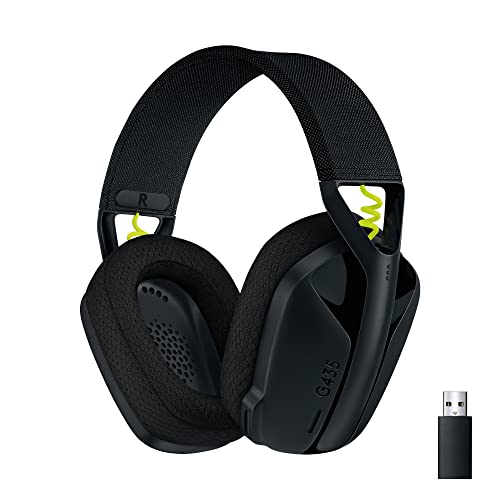 Logitech G G435 Lightspeed view › Logitech G G435 Lightspeed view › | Light, when it is at the bottom of its range | 2.4 GHz plus Bluetooth (phone) | About 18 h | PC | View › |
 Trust GXT Forta view › Trust GXT Forta view › | Starting out | Cable into the controller | Not needed | PC, Xbox and Switch | View › |
The battery figure is the one each maker publishes in its own listing or spec sheet. The Bluetooth on the Nova 5P and the G435 is for your phone: with a PS5 they talk through their 2.4 GHz adapter. None of the 2.4 GHz headsets works on Xbox, which uses its own protocol.
The 8 headsets reviewed, grouped by how they reach your console
HyperX Cloud III view ›
The one we would recommend without hesitating if a cable does not bother you: HyperX comfort, a clear microphone with a mute light, and zero latency into the controller.
- It goes by cable into the DualSense controller's jack: zero latency, nothing to charge, and the console's 3D audio reaches it exactly as it reaches any wireless headset, because the PS5 is what generates it.
- The detachable microphone with its mute light is among the clearest in this tier for party chat, and with it removed you are left with a normal pair of headphones for a phone or a laptop.
- Its angled 53 mm drivers are declared on its own spec sheet. The DTS on the box is a PC feature: on a console what counts is its stereo, which is exactly what Tempest needs.
- Zero latency, and it works on everything: PS5, PC, Xbox and Switch
- Clear detachable microphone with a mute light
- Nothing to charge, ever
- No wireless option: the cable goes to the controller
- The DTS it advertises is for PC, not for the console
Razer BlackShark V2 X view ›
The one for hearing footsteps: closed, isolating, and with a cardioid microphone, at the entry end of the price range. For competitive play on a cable it is hard to spend better.
- A closed-back design with good passive isolation: footsteps and reloads come through without turning the volume up, which is exactly what competitive play asks for.
- The 3.5 mm cable goes into the controller: zero latency, and it works on PC, Xbox and Switch without buying anything else.
- Razer declares 50 mm drivers and a cardioid microphone aimed at the voice on its spec sheet. There is no software: you plug it in, and what it sounds like is what you get.
- Isolation and clarity that suit competitive play
- Zero latency over a cable, compatible with everything
- Entry-level outlay for what it gives you
- The microphone is fixed: it swings away, it does not come off
- No software and no fine tuning
Trust GXT Forta view ›
The entry point with an official licence: cable into the controller, detachable microphone, and the lowest outlay on the list. For a second headset in the house, or for starting out.
- It carries an official PlayStation licence declared in its own product title: the design matches the console and the connector is the right one without you having to work it out.
- The 3.5 mm cable into the controller means zero latency and no battery to charge: plug it in and it plays, on PC, Xbox and Switch too.
- Its microphone is detachable: take it off and you have a sofa headset that neither bothers anyone else nor puts a boom in front of your face.
- Official PlayStation licence at the lowest outlay here
- Cable into the controller: zero latency, nothing to charge
- Detachable microphone for chat
- It sounds correct and no more: the tier above walks past it
- Materials to match: treat it kindly
SteelSeries Arctis Nova 3P Wireless view ›
The wireless headset we would buy for a PS5 today: a 2.4 GHz adapter, 40 hours declared in its own listing and the SteelSeries app to tune it, without asking for the top tier.
- It reaches the console through its 2.4 GHz USB adapter, which is the wireless route a PS5 does understand: plug in and play, no menus.
- Its listing declares 40 hours of battery, which is weeks of evening sessions. That figure is the maker's, and we say where it comes from.
- It is declared multi-platform: PS5, PC and Switch. It does not work on Xbox, and that is not a fault of this headset: it is that console's own protocol, and it applies to every 2.4 GHz model on this page.
- 2.4 GHz adapter included: the right connection for a PS5
- 40 hours of battery declared by its maker
- An app to equalise it without fighting console menus
- It does not work on Xbox: Microsoft's own protocol
- The microphone is fine for chat, not for recording
SteelSeries Arctis Nova 5P view ›
The one for long sessions: 60 declared hours, 2.4 GHz for the console and Bluetooth for your phone at the same time. If you play every evening and hate charging things, this is your tier.
- It declares 60 hours of battery, the ceiling of this list: a month of daily sessions without going near the charging cable.
- It runs two connections at the same time: the 2.4 GHz adapter talks to the PS5 while Bluetooth talks to your phone, for music or a call without taking the headset off.
- Its current listing declares PS5, PC, Switch 2 and phones. Xbox is out, as it is for every 2.4 GHz headset on this page.
- The Arctis app with per-game presets and those extra 20 hours of battery are the real difference from the Nova 3P, and they are what decides whether the step up is worth it to you.
- 60 declared hours: the ceiling of this list
- 2.4 GHz and Bluetooth at once: console and phone
- App with per-game equaliser presets
- It does not work on Xbox
- At this level the official Link headset is only one step away
Sony INZONE H5 view ›
Sony without PlayStation Link: low-latency 2.4 GHz and the company's own 360 Spatial Sound, from the range Sony aims at PC and PS5 rather than at the console alone.
- This is Sony without being PlayStation: the INZONE range is aimed at PC and PS5 with a 2.4 GHz adapter, and the integration with the console is in-house.
- It declares 360 Spatial Sound for games. Remember that the console's Tempest engine already does 3D with any headset: this is Sony's own version for its ecosystem, not a requirement.
- It is the odd one out on compatibility. Where the SteelSeries models declare Switch as well, this one declares PC and PS5 and stops there, so read the line before you assume it covers everything you own.
- Low-latency 2.4 GHz with the adapter included
- The Sony sound signature without stepping up to Link
- Lighter on the head than most of this tier
- It only declares PC and PS5: no Switch, no Xbox
- Its roughly 30 hours no longer stand out against the Nova 5P
Logitech G G435 Lightspeed view ›
At the bottom of its range it is the wireless bargain of this list. Higher up, the Nova 3P does more for the same outlay. Check where it is sitting, and check the delivery estimate, before you decide.
- It is the one on this list whose recommendation depends on the day. The headset has not changed: where it sits has, and it moves more than anything else here.
- It is still light and built for smaller heads, with 2.4 GHz for the console and Bluetooth for a phone. That concept is exactly what it was.
- Its microphone is built in, with no boom: fine for the occasional call-out, noticeably worse than the boom microphones on this list if you are on party chat every night.
- Light and comfortable on smaller heads, including children
- 2.4 GHz for the console and Bluetooth for a phone
- It comes back down often, and there it is a buy
- It swings a lot, and the delivery estimate swings with it
- Built-in microphone, weak for serious chat
PlayStation PULSE Elite view ›
The official headset of this generation: PlayStation Link with the adapter in the box, 30 hours and a retractable microphone, all from Sony's own spec sheet. You pay for the integration, and here it is real.
- This is the PlayStation Link headset, Sony's current protocol: the USB adapter is included and the official UK page declares it compatible with PC and Mac as well.
- Sony declares 30 hours of battery and that ten minutes of charging gives two hours of play. Both figures come from its official spec sheet, cited in the sources at the foot of this guide.
- It has planar magnetic drivers and a retractable microphone: it tucks back into the earcup instead of sitting in front of your face between matches.
- The detail that explains this entire guide: its Bluetooth is for your phone. With the console it talks through the Link adapter, and PlayStation's own page says so.
- PlayStation Link adapter included, and it works on PC and Mac too
- 30 declared hours plus official fast charging
- Retractable microphone: it disappears when you are not talking
- It costs about twice what the balanced wireless pick on this list does
- Delivery tends to take a few days longer than the rest
Cable into the controller, a clear microphone and it works on everything you own. The sensible buy of the guide.
See it on Amazon ›The traps when buying a PS5 headset, and the one-minute checklist
If it arrives and it does not work on the PS5: what UK law gives you
What is the best gaming headset for PS5?›
For most people, the HyperX Cloud III: cable into the controller, zero latency, a clear detachable microphone with a mute light, and it works on everything. If you want it without a cable, the SteelSeries Arctis Nova 3P with its 2.4 GHz adapter. Sony's own is the PULSE Elite, with the PlayStation Link adapter included in the box.
Does the PS5 support Bluetooth headphones?›
The PS5 has Bluetooth, but it does NOT support Bluetooth audio: you cannot hear the game through ordinary Bluetooth headphones, which the console only uses for controllers and accessories. The proof is Sony's own headset. The PULSE Elite's Bluetooth is for phones and tablets, and it reaches the console through the PlayStation Link USB adapter that comes in the box. For PS5 audio you need a 3.5 mm cable into the controller, a 2.4 GHz adapter, or PlayStation Link.
Which headphones work with a PS5?›
Three kinds. Any headphones with a 3.5 mm cable plugged into the DualSense controller. Any wireless headset that includes a 2.4 GHz USB adapter, such as the SteelSeries Arctis models or the Logitech G435. And the official ones that use PlayStation Link, such as the PULSE Elite. A Bluetooth-only pair will give you no game audio.
Do AirPods work with a PS5?›
Not for game audio. AirPods are Bluetooth, and the PS5 does not support Bluetooth audio. They will work through the PS Remote Play app on a phone, but not on the console itself. For a PS5, choose something wired, something with a 2.4 GHz adapter, or something with PlayStation Link.
Wired or wireless for a PS5?›
A 3.5 mm cable gives you zero latency, a stable connection and full compatibility for less outlay, which is what the HyperX Cloud III and the Razer BlackShark V2 X are. A 2.4 GHz wireless headset gives you freedom of movement with latency you will not notice, and it is the right answer if the cable annoys you. What you should avoid for playing on a PS5 is Bluetooth on its own.
Do I need a special headset for Tempest 3D audio?›
No. The PS5 generates the Tempest 3D audio itself, so it works with any stereo headset, PlayStation branded or not. The official PlayStation Blog says so: it is meant to be enjoyed with the headphones you already have, over USB or through the controller jack. Do not pay a premium for the label.
Will these also work on PC, Switch or Xbox?›
The wired ones work on everything: PC, Switch, and Xbox through the controller. The 2.4 GHz wireless ones generally cover PC, PS5 and Switch but NOT Xbox, which uses its own protocol. That is why makers sell separate Xbox versions such as the CloudX or the Kaira range. If you also play on Xbox, check the model has an Xbox version or a cable.
How do I connect a wireless headset to a PS5?›
Plug the included 2.4 GHz USB adapter into a USB port on the PS5 and switch the headset on: the console picks it up as an audio output on its own. If it does not, go to Settings, Sound, Audio Output and choose the USB device. It works the same way with the official headsets, using the PlayStation Link adapter instead. The console's Bluetooth is not part of this.
The headset I bought does not work on my PS5. Can I send it back?›
If it was sold as compatible with your console and it will not carry game audio, that is a description problem rather than a taste problem. The Consumer Rights Act 2015 says goods must be as described, and its section 22 sets a short-term right to reject running to the end of 30 days from the day after delivery. That is a short clock, so test a new headset the day it arrives rather than at the weekend, and keep the listing you bought from. We publish this because it is the risk the connection section is written to prevent, not as legal advice.
The ones that hold up the specific claims on this page, with the date each was read.
- PlayStation UKPULSE Elite wireless headset, official pageThe PlayStation Link USB adapter for PS5, PC and Mac, and Bluetooth described as the way to connect to a phone or tablet. Read 31 August 2026.
- PlayStation SupportHow to connect the PULSE Elite to your PS5 consoleThe included PlayStation Link USB adapter. Read 31 August 2026.
- PlayStation Blog, officialTempest 3D AudioTech on PS53D audio works with the headphones you already have, over USB or through the controller jack.
- legislation.gov.ukConsumer Rights Act 2015, section 22The short-term right to reject runs to the end of 30 days beginning with the first day after delivery. Read 31 August 2026.
- Amazon Spain catalogue, read via APISpec sheets for the eight headsetsRead on 31 August 2026. Availability, model variants and delivery times differ by country, so what your local Amazon shows may not match this list.
 Best budget over-ear headphones 2026For a phone or a laptop rather than a console, and the noise cancelling word that marks the tier.
 Best budget open ear headphones 2026The opposite shape: clip-on and earhook, for hearing the room while you play or run.
 Best gaming mouse 2026The other half of the setup, with the arithmetic that turns DPI into centimetres of mousepad.
Comments
Be the firstNo sign-up: just a name. Every comment is reviewed before it is published.