Best WiFi extender 2026: which booster your home needs by floors, walls and broadband, or when it is powerline or mesh
 m8d.ioUpdated on
This guide contains affiliate links. As an Amazon Associate, m8d.io earns from qualifying purchases, at no extra cost to you.
WiFi extender, powerline or mesh: which one your home needs by its floors, its walls and your broadband
WiFi coverage calculator for your home: extender, powerline or mesh
Before choosing a model you have to choose a route, and four things you already know decide it: how many floors, what the walls are made of, which broadband you pay for and how many devices are connected at once. One floor with ordinary internal walls is the case for an extender; two floors or a garden office are the case for a mesh; a concrete or stone wall is the case for powerline. The calculator works it out and also gives the speed ceiling you can expect, with the sum in view. With its default answers (a flat on one floor, solid brick, 500 Mbps and under 10 devices) it gives an extender with a ceiling of 434 Mbps, half the 867 the RE330 declares on 5 GHz, and a 100 Mbps cable port, below what you pay for. A free m8d.io tool, with no account.
The spec sheet of the TP-Link RE330 declares 867 Mbps on the 5 GHz band. Because that device has to talk on that same band to the router and to you, the same packet uses it twice: the ceiling drops to 434. Against the 500 Mbps you pay for, what can arrive is 434. The figure comes from its spec sheet and is divided by two, and the reason for the division is written above.
When we would change the answer: if you later plugged a device into it by cable in that room and your broadband is faster than 100 Mbps, you would need a Gigabit port and the model that has one.

The band and port ceilings are the ones each device's official spec sheet declares: official RE330 spec sheet on tp-link.com/uk, read on 22 September 2026; official RE500X spec sheet on tp-link.com/uk, read on 22 September 2026; official TL-WPA7617 KIT spec sheet on tp-link.com/uk, read on 22 September 2026; official Halo H1500X page on mercusys.com/uk, read on 22 September 2026. The range and powerline speed of the kit, official TL-WPA7617 KIT spec sheet on tp-link.com/uk, read on 22 September 2026. The division by two comes from how the device works: one that receives from the router and re-transmits on the same band uses that band twice for the same packet, which is the same statement TP-Link makes the other way round on its RE330 page when it says dual band doubles the performance of a single band. The census of 159 extenders comes from m8d's census of the Spanish catalogue on 16 September 2026, across eight shops.
m8d rule: Halve the number in the listing, and halve it again if the device has a single band. What is left is the ceiling, before counting walls.
This is not a flaw of one model or a trick of one brand: it is how an extender works. It receives from the router and transmits again, and while it does one it is not doing the other. The way round it has a name, dedicated backhaul, and it means reserving a third radio just to talk to the router.
Of the 159 devices in this category with a price read in our Spanish catalogue on 16 September 2026, only seven declare dedicated backhaul or tri-band, and all seven are mesh systems, not extenders. Below that, no device in this category avoids sharing the air. The other way out costs a cable, and hardly anyone mentions it: linking the two nodes of a mesh with an Ethernet cable, which both mesh kits in this guide list on their spec sheets as optional wired backhaul.
Superfast, Full Fibre 500 or Gigafast: which WiFi extender your broadband tier needs
UK broadband is sold in tiers, and the tier decides which extender becomes the bottleneck. Sky's range, read on its own site on 22 September 2026, includes Superfast at 67 Mbps average, Full Fibre 150, 300 and 500, and Gigafast at 900 Mbps. On Superfast, every extender in this guide carries more than the line delivers, and even the RE330's 10/100 cable port is above it. From Full Fibre 150 up, that port becomes the limit for anything plugged into it; from 500 up, so does the RE330's own radio, because half of its declared 867 Mbps on 5 GHz is about 434.
- Superfast, 67 Mbps average. Any extender here carries more than the line, cable port included: the TP-Link RE330 is enough.
- Full Fibre 150 to 300. The RE330's radio still carries it, about 434 Mbps after halving, but its 10/100 port does not: for a TV or a console on a cable, the RE500X with its Gigabit port.
- Full Fibre 500. Half of the RE330's 867 Mbps falls below the line; the RE500X, about 600 after halving, keeps up, and across two floors a mesh does the same job for the whole home.
- Gigafast, 900 Mbps. Halving puts every wireless extender in this guide below the line. A mesh whose nodes are linked by an Ethernet cable avoids the halving between nodes.
Before you buy a WiFi booster: what BT, Sky and Virgin Media already offer with your broadband
The largest UK broadband providers sell or include their own answer to dead spots, and it is worth knowing before buying anything. According to Uswitch's guide, read on 22 September 2026, BT sells Complete Wi-Fi, its Smart Hub 2 with a Wi-Fi Disc, backed by a money-back guarantee; Sky's Wi-Fi Guarantee comes with its paid Broadband Boost and promises at least 3 Mbps in every room; and Virgin Media includes an extender with its broadband deals. Moneysupermarket's guide, read the same day, adds Vodafone's Super Wi-Fi Plus and a TalkTalk powerline kit.
That changes the order of the decision, not the physics. A disc or a pod from your provider is still an extender or a mesh node, and it still shares the air unless it is linked by cable; what it adds is a promise with a figure, like Sky's 3 Mbps per room, that you can hold them to.
If your provider offers one of these, we would ask them first: a guarantee with a minimum speed per room is a figure you can hold a company to, and 3 Mbps is enough for messages and music but not for a video call in 4K, so check the promise against what that room is for.
The devices in this guide, with the figure from each spec sheet that explains why it is here
If the problem is a single room on the same floor with ordinary internal walls in between, it is the one we would buy: real dual band and the cost of an extender, not of half a mesh system. On Superfast broadband even its 10/100 port keeps up.
View ›
When there is concrete, stone or a solid floor between the router and the weak room, WiFi does not get through and no extender fixes it. This kit does not go through it: it goes round it along the mains wiring that is already there.
View ›
When the WiFi fails across two floors, in a garden office or with the house full of devices, an extender does not fix it and this kit does: it is the pick here because it replaces the router's WiFi with one network, has Gigabit ports on both units and can link its nodes by cable.
View ›The three routes solve different problems. An extender repeats the router's signal into one weak area; a powerline kit carries the connection through the mains wiring and puts WiFi where its second adapter is; a mesh system replaces the router's WiFi with two or more nodes under one network name. Two extenders for two weak areas leave you with two networks and two names, and that is the point where a mesh starts to make sense.

TP-Link RE500X view ›
The same job as the RE330 with two differences you notice on fast broadband: the 5 GHz band declares 1200 Mbps instead of 867 and the cable port is Gigabit. On Full Fibre 500 it is the extender in this guide that keeps up after halving.
- 1200 Mbps declared on 5 GHz against the 867 of the RE330 view ›, according to TP-Link's two spec sheets. Because the device uses that same band to talk to the router and to you, the practical ceiling stays near half: about 600 instead of about 434.
- Gigabit Ethernet port, written like that on its spec sheet. It is the difference that decides whether the step up is worth it: on Full Fibre 150, 500 or 900, a 10/100 port turns the extender into the bottleneck for everything plugged into it.
- WiFi 6 only helps if the router and the devices are WiFi 6 too. In a home with an older router, what is left is the port and the wider band, and that already justifies the difference.
- Maximum power consumption of 10 W according to its UK spec sheet, which plugged in all year is at most about 88 kWh: the figure nobody looks at and the only one paid for every month.
- The 5 GHz band declares 1200 Mbps, second in this selection to the RE550's 1300 Mbps
- Gigabit port: whatever you plug in by cable is not held to 100 Mbps
- EasyMesh, like the RE330
- WiFi 6 adds nothing if the router and the devices are older
- Still no reserved band: it shares the same air to receive and to re-transmit
TP-Link RE550 view ›
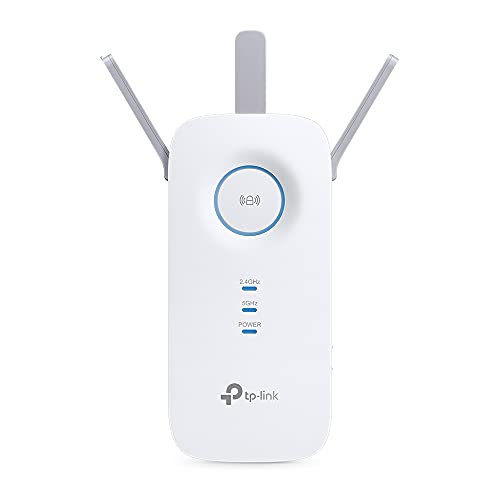
The extender in the selection that reaches furthest, because it is the only one with three adjustable external antennas. It is still an extender, so it still shares the air, but it starts from a better link with the router.
- 600 Mbps on 2.4 GHz and 1300 on 5 GHz, according to TP-Link's spec sheet: it is the only one in this selection that also raises the 2.4 GHz band, the one that gets through walls.
- Three external antennas against the two internal ones of the RE330 view ›. In a long hallway or with a wall in the way, that is exactly what changes the link with the router, the part no extender can invent.
- Gigabit Ethernet port, like the RE500X view ›.
- It is WiFi 5, not WiFi 6. If your router and devices are recent, the RE500X has more room to grow; if the problem is pure distance, this one reaches further.
- Three adjustable external antennas: the strongest link to the router in the selection
- Also raises the 2.4 GHz band, the one that crosses walls
- Gigabit port
- WiFi 5: gains nothing from a WiFi 6 router
- It is large and does not hide behind furniture
TP-Link Deco X1500 (2-Pack) view ›
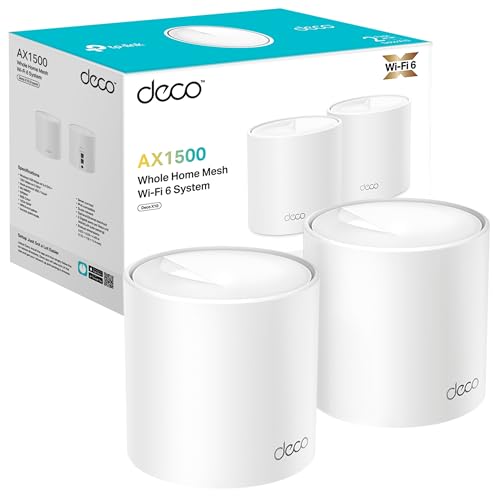
The mesh for anyone already in TP-Link's range: if there is a network socket at home or a cable can be run between the two floors, the nodes link by cable and the air sharing disappears, the same option Mercusys lists for the Halo.
- TP-Link's spec sheet declares optional Ethernet backhaul between the units. In plain terms: if you can run a network cable from one node to the other, the link between them stops using air and the whole 5 GHz band is left for your devices.
- 1201 Mbps on 5 GHz and 300 on 2.4 GHz, and two Gigabit ports per unit, according to its spec sheet.
- TP-Link states the coverage of the two-pack by number of bedrooms, two to four, on the page we read on 16 September 2026: more honest than a square-metre figure, and still not your home.
- Against the Mercusys Halo H1500X view ›, the declared speed is the same and both list wired backhaul: the argument for this one is staying in TP-Link's range, alongside the extenders in this guide.
- Optional Ethernet backhaul between nodes: with a cable, the air sharing ends
- Two Gigabit ports on each unit
- Coverage stated by bedrooms, not by square metres
- It declares the same speed as the Halo H1500X
- No dedicated wireless band: if the nodes link by air, it shares like the rest
What the 159 extenders in our Spanish catalogue census actually declare, counted one by one
m8d rule: If the product name does not state the band, assume a single 2.4 GHz band until its spec sheet says otherwise.
- Halfway between the router and the weak room, never inside the weak room: it repeats what it receives, and there it receives little.
- At mid height and away from the microwave, the consumer unit and the fish tank. 2.4 GHz shares its frequency with the microwave and with almost everything wireless in the home.
- With the signal light on green before accepting the position: the extenders in this guide have one, and that is what it is for.
- And then the check that really counts: start a video call in the weak room. If it drops there, that was not the right socket.
WiFi extender, powerline and mesh compared: declared bands, cable port and the problem each one solves
| Device | What it is | Declared bands | Cable port | For which problem | |
|---|---|---|---|---|---|
| TP-Link RE330 view › | Extender | 300 + 867 Mbps | 10/100 | One room on the same floor | View › |
| TP-Link RE500X view › | Extender | 300 + 1200 Mbps | Gigabit | The same, with broadband over 100 Mbps | View › |
| TP-Link RE550 view › | Extender | 600 + 1300 Mbps | Gigabit | A long distance or a hallway with a wall | View › |
 TP-Link TL-WA850RE view › TP-Link TL-WA850RE view › | Extender | 300 Mbps, single band | 10/100 | Some signal where there is none | View › |
| TP-Link TL-WPA7617 Kit view › | Powerline with WiFi | 300 + 867 Mbps | Gigabit | Concrete, stone or a floor in the way | View › |
| Mercusys Halo H1500X (2-Pack) view › | Mesh, 2 nodes | 300 + 1201 Mbps | Gigabit | Two floors or a house full of devices | View › |
| TP-Link Deco X1500 (2-Pack) view › | Mesh, 2 nodes | 300 + 1201 Mbps | Gigabit ×2 | The same, in TP-Link's range | View › |
Bands and ports as declared on each maker's official spec sheet: the four devices in the calculator checked on their UK pages on 22 September 2026, the rest on 16 September 2026. The sum of the two bands is the commercial figure in the product name, not the speed a device receives, which connects to one band.
WiFi booster, extender and mesh questions
Which is better, a WiFi booster or an extender?›
They are the same device under two commercial names, and repeater is a third. All three receive the router's signal and transmit it again. What really changes between models is three things: one band or two, a 10/100 or a Gigabit Ethernet port, and whether it is EasyMesh compatible, which lets it join a compatible router's network under one name.
Do WiFi boosters actually work?›
Yes, within a limit that the maker's own figures explain. TP-Link's RE330 declares 300 Mbps on 2.4 GHz and 867 on 5 GHz, and because it receives and re-transmits on the same radio, what reaches the far side is roughly half of what reaches it. On a Superfast line of 67 Mbps that halving is not noticed; on Full Fibre 500 it is, and the RE500X or a mesh keeps up better.
Where should a WiFi booster be placed?›
Halfway between the router and the weak room, never inside it, because it repeats what it receives. At mid height, away from the microwave and the consumer unit, and with its signal light on green before you accept the spot. Then start a video call in the weak room: if it drops there, move the booster one socket closer to the router.
Do all WiFi extenders work with any router?›
A standard extender joins any router's WiFi like one more device, so it works with the router your provider gave you, whatever the provider calls it. What depends on the router is EasyMesh: the RE330 and the RE500X are EasyMesh compatible, according to TP-Link's UK spec sheets, and with a router that is too they keep one network name; with one that is not, they work as an ordinary extender with a second name.
How do I get WiFi to a garden office or another building?›
Two hops away from the router is beyond what one extender can do well, because the second hop hangs off the first at half speed. The two routes that work are a mesh node placed within reach of both buildings, or a powerline kit if both sockets are on the same electrical circuit, as TP-Link's UK spec sheet for the TL-WPA7617 KIT requires; it declares up to 300 metres over the wiring.
Is powerline better than a WiFi extender?›
Powerline wins when the problem is a wall WiFi does not get through: concrete, stone or a solid floor. It does not try to cross it; it goes round it along the mains wiring. What decides it is not the speed but the circuit: both adapters have to be on the same electrical circuit and plugged straight into wall sockets, and that is checked on day one.
Can I just plug in a WiFi booster?›
Plugging it in is half the job; it also has to join your network. With WPS, you plug it in near the router, press the router's WPS button and then the booster's, and once they are paired you move it to its final spot. Without WPS, you connect a phone to the network the booster creates, its setup page opens and you choose your home network and type its password.
Can I use two WiFi extenders in the same house?›
You can, but chaining them is rarely a good idea: the second receives what already arrived halved from the first. If two areas need help, a mesh system leaves one network with one name instead of two, and its nodes choose the route between them.
Checked on 22 September 2026. Band, port and range figures are the ones each maker publishes on its own spec sheet; the census comes from our Spanish price register of 16 September 2026.
- TP-Link UKRE330: bands broken down, 10/100 port and EasyMesh
- TP-Link UKRE500X: 1200 Mbps on 5 GHz, Gigabit Ethernet port, 10 W maximum
- TP-Link UKTL-WPA7617 KIT: up to 1000 Mbps over the mains, up to 300 metres, same electrical circuit
- Mercusys UKHalo H1500X: 1201 Mbps on 5 GHz, Gigabit ports and optional Gigabit Ethernet backhaul
- TP-LinkRE550: 600 and 1300 Mbps, three external antennasChecked on 16 September 2026. Spanish-language page
- TP-LinkTL-WA850RE: single-band N300 WiFi 4 extenderChecked on 16 September 2026. Spanish-language page
- TP-LinkDeco X1500: AX1500, two Gigabit ports and optional Ethernet backhaulChecked on 16 September 2026. Spanish-language page
- SkySky broadband tiers and average speedsSuperfast 67 Mbps, Full Fibre 150, 300 and 500, Gigafast 900. Read on 22 September 2026
- UswitchBoost your Wi-Fi: signal extenders explainedBT Complete Wi-Fi, Sky Wi-Fi Guarantee with a minimum of 3 Mbps in every room, Virgin Media extender. Read on 22 September 2026
- MoneysupermarketWhat are Wi-Fi boosters and how do they work?Provider boosters, including Vodafone Super Wi-Fi Plus and a TalkTalk powerline kit. Read on 22 September 2026

Comments
Be the firstNo sign-up: just a name. Every comment is reviewed before it is published.