Best short throw projector 2026: which of six fits your room, from a 1.10 m laser to 4K with zoom, and how far each sits
 m8d.ioUpdated on
This guide contains affiliate links. As an Amazon Associate, m8d.io earns from qualifying purchases, at no extra cost to you.
The best short throw projector for you depends on where the lens can go. For a 100-inch 16:9 screen, the BenQ TH671ST sits 1.53–1.84 m away (5–6 ft) with zoom and 1080p, the Optoma GT2000HDR about 1.10 m (3 ft 7 in), and the BenQ TK705STi 1.77 m (5 ft 10 in) with 4K and Google TV.
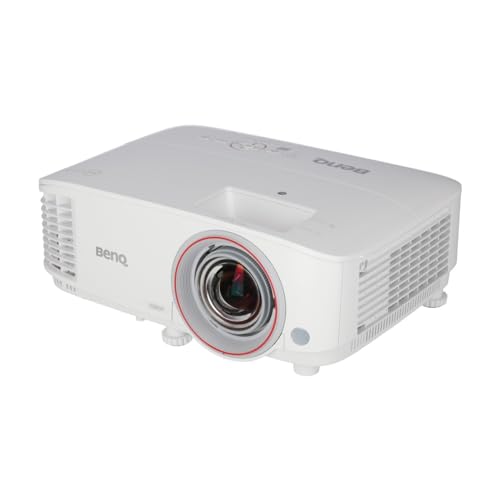
If 1080p is enough and the lens can sit 1.53–1.84 m from a 100-inch screen. Budget for the replacement lamp too.
See it on Amazon ›Short throw projector distance calculator: which of six projectors fits your room
Short throw projector distance calculator: which model fits your room
Measure the image surface and where the lens can go. The calculator checks the six lenses at once and applies the X2-4K's 60–120-inch range. 100 inches 16:9 takes up 2.21 × 1.25 m, about 7 ft 3 in by 4 ft 1 in. After that come the height, the tolerances and the conditions in the manual. A tool from m8d.io, free, with no account and no adverts.
6 of the 6 lenses fit by measurement. Check the installation conditions before choosing.
How it is calculated and what is left to check
Width = diagonal × 0.0254 × 16 ÷ √337. Height = width × 9 ÷ 16. Nominal distance = width × throw ratio. No keystone correction or digital zoom is applied. Fixed lenses give one position, not a range.
Check the manual for the vertical offset, the size of the unit, tolerances, mounts and ventilation. The sum does not confirm brightness, legibility, contrast or whether an ALR screen suits. It does not work out the distance from an ultra short throw projector's body to the wall.
Several units: preparing the budget
Enter the price the shop quotes you and the extras per unit, always on the same VAT basis. This sum does not check stock or volume discounts.
Enter between 1 and 1,000 units, a positive price and extras from £0 to £100,000 per unit.
Short throw or ultra short throw (UST) projector: do not buy one for the other's installation
Short throw and ultra short throw sound like one family and install very differently. LG's UK guide puts a short throw projector at 90 to 180 cm for a 100-inch image, while an ultra short throw (UST) projector sits only a few inches from the wall and throws the image steeply upwards. The six projectors in this guide are all short throw: none of them goes on a TV unit against the wall.
To choose, use the throw ratio and the installation table of the exact model. A distance that one listing measures from the edge of the furniture cannot be compared with another that measures from the lens.
m8d rule: If the only place is furniture against the wall, start with an ultra short throw installation; do not force one of these lenses.
How far a short throw projector sits for 80, 100 and 120 inches, in metres and feet
The three models with a 0.69–0.83 ratio need 1.22–1.47 m for 80 inches, 1.53–1.84 m for 100 and 1.83–2.20 m for 120: about 4 ft to 4 ft 10 in, 5 ft to 6 ft and 6 ft to 7 ft 3 in. The two Optomas, with 0.496, need about 0.88 m, 1.10 m and 1.32 m (2 ft 11 in, 3 ft 7 in and 4 ft 4 in). The TK705STi, with 0.8, needs 1.42 m, 1.77 m and 2.13 m (4 ft 8 in, 5 ft 10 in and 7 ft). They are 16:9 sums from the lens: not distances from the furniture, nor mounting tolerances.
An image that comes out rectangular does not prove the projector is well installed.
m8d rule: First position, height and surface; then focus and zoom. Digital correction is the final adjustment, not the installation plan.
Six short throw projectors compared: output resolution, light source and lens position
| Model | Output image | Light source | Lens for 100″ 16:9 | What makes you choose it | |
|---|---|---|---|---|---|
| BenQ TH671ST view › | 1920 × 1080 | Lamp | 1.53–1.84 m | Optical zoom and the lowest outlay | View › |
 Optoma GT2000HDR view › Optoma GT2000HDR view › | 1920 × 1080 | Laser | 1.10 m · fixed | Shortest distance to the screen | View › |
 BenQ TK705STi view › BenQ TK705STi view › | 3840 × 2160 | 4LED | 1.77 m · fixed | 4K output and Google TV | View › |
 BenQ X500i view › BenQ X500i view › | 3840 × 2160 | 4LED | 1.53–1.84 m · zoom | 4K with optical adjustment for consoles | View › |
 ViewSonic X2-4K view › ViewSonic X2-4K view › | 3840 × 2160 | LED | 1.53–1.84 m · zoom | Consoles; declared size 60–120″ | View › |
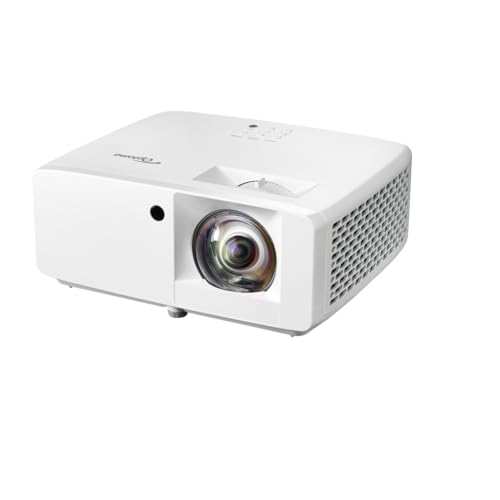 Optoma ZH350ST view › Optoma ZH350ST view › | 1920 × 1080 | Laser | 1.10 m · fixed | RS232 and professional mounting | View › |
Nominal sum from the official ratios: 0.69–0.83, 0.496 and 0.8. Distance from the lens, with no digital correction. The output resolution does not describe the DMD's physical matrix on its own.
Each short throw projector: who it is for, and when the choice changes
BenQ TH671ST view ›
Our pick for a first projector if the lens can sit 1.53 to 1.84 m from a 100-inch screen. The optical zoom gives room to place it; in exchange, it uses a lamp and projects 1080p.
- It suits a first projector without paying for 4K, if the distance available matches. For a 100-inch 16:9 screen the nominal sum gives 1.53–1.84 m from the lens, about 5 to 6 ft: the optical zoom adjusts the size.
- BenQ's UK spec sheet declares 3,000 ANSI lumens and a lamp life of 4,000 hours in normal mode, up to 15,000 in LampSave. The listing followed for this guide said 3,500 lumens: the figure that counts is the maker's.
- The lamp is a part to budget for if you use it many hours: at three hours a day, 4,000 hours is about three and a half years in normal mode. Ask about the replacement lamp before choosing it over a laser or LED model for a small difference.
- Room to place it, thanks to the 1.2× optical zoom
- 1080p for anyone who does not need 4K output
- The simplest of the six to set up: zoom and no smart system to keep updated
- Lamp light source: budget for its replacement
- Not the option for anyone who needs 4K output
Optoma GT2000HDR view ›
Choose it if the space in front of the screen rules and you can put the lens near 1.10 m for 100 inches. It is laser and Full HD; its fixed lens means getting the position right first time.
- Its advantage here is geometry: the 0.496 ratio gives the same image from a shorter distance. For 100 inches 16:9 that is about 1.10 m, 3 ft 7 in. It is not the same as putting it against the wall like an ultra short throw.
- It has no optical zoom. If the mount has to go in a fixed spot, check the size you get there. Correcting with digital zoom a setup that does not fit is not a fix.
- The laser light source saves the periodic lamp replacement. For business use, operating conditions, warranty, service and legibility in the room still need confirming.
- About 1.10 m for 100 inches: less space in front of the screen
- Laser light source
- HDMI inputs for an external video source
- 1080p output: not a substitute for a 4K model
- Fixed lens: little freedom to improvise the position
BenQ TK705STi view ›
It suits whoever wants 4K output and Google TV and can give the lens 1.77 m for 100 inches. Do not pay for that step up if your content, viewing distance or budget does not justify it, and if the apps are the reason, check BenQ's security update date for it first.
- It combines 4K output and built-in apps. The fixed 0.8 ratio needs about 1.77 m, 5 ft 10 in, for 100 inches, and the body and cables need space on top of that.
- Google TV plays from the compatible apps without adding an HDMI source, and BenQ's UK page lists Netflix, YouTube and Prime Video among them. Check the service you use, its subscription and its network needs: a platform does not mean that every app works.
- BenQ declares a 4LED source, 3,000 ANSI lumens and 20,000 hours of light in normal mode. That does not make it a replacement for a television with the curtains open: the room light and the screen still decide the contrast.
- 4K output declared by BenQ
- 4LED light source and Google TV
- Connections for an external HDMI source when you need one
- Fixed lens: none of the TH671ST's zoom margin
- Its UK spec sheet dates the guaranteed security updates to 20 July 2025
BenQ X500i view ›
Choose the X500i over the TK705STi if you need to adjust the distance with optical zoom and will use its game modes; its apps come on an Android TV dongle with security updates guaranteed until 31 December 2026, according to BenQ UK. If the lens already fits at 1.77 m and you prefer Google TV built in, compare the TK705STi first.
- It solves a problem the TK705STi does not: the optical zoom lets you place the lens anywhere between about 1.53 and 1.84 m for a 100-inch image.
- BenQ declares 16.7 ms at 4K 60 Hz and 4.2 ms at 1080p 240 Hz. They are different conditions: it does not mean 4K at 240 Hz, nor that any console reaches the lower figure.
- Its UK spec sheet says a 2K 120 Hz input is scaled down to 1080p 120 Hz. If your requirement is 1440p at 120 Hz, that note changes the comparison with the ViewSonic: it is not enough that both accept a 2K signal.
- 4K output with an optical zoom margin
- 4LED light source
- Game modes with declared resolution and latency
- A 2K input at 120 Hz is scaled down to 1080p, according to BenQ
- Not one to buy for the 4.2 ms if you will play at 4K 60 Hz
ViewSonic X2-4K view ›
Compare it first with the X500i if you want a console and optical zoom. Check the signal mode you will use and the playback system; the X2-4K is not the X2-4K Pro nor the X2-4KE Pro.
- For 100 inches it shares the nominal 1.53–1.84 m range of the other zoom models. The spec sheet limits the image to 60–120 inches: the calculator applies that limit even where the formula would allow more.
- ViewSonic's own material covers 1440p at 120 Hz for Xbox. Check that combination at the source and on the projector; an Xbox logo does not turn every signal into 4K at a high frame rate.
- The listing followed is the original X2-4K. It is not credited with the Google TV of its Pro variants, and its 2,900 LED lumens are not treated as 2,900 ANSI lumens: they are different measurement labels.
- Optical zoom to adjust the position
- 4K output alternative for consoles
- Documented image size range, built into the calculator
- The spec sheet limits the image to 120 inches
- Pro and non-Pro versions are easy to mix up when buying
Optoma ZH350ST view ›
It belongs on the list for a room or an exhibition that needs RS232 control, mounting orientation and professional service. For home cinema, sharing the laser label is no reason to pay the step up from the GT2000HDR.
- For 100 inches it needs about 1.10 m from the lens, like the GT2000HDR. It adds no resolution: both are Full HD. Its reason to be in the comparison is installation.
- Optoma documents RS232, portrait projection and 360° orientation. RS232 is a control path, not a video input nor a promise of a ready-made video wall.
- To buy several units, ask for the service, mounting and operating conditions in writing. The advertised life of a laser source does not replace a warranty on the unit, nor does it prove the stock of the batch.
- RS232 control for compatible installations
- Laser light source and short throw optics
- Orientation options described by the maker
- Full HD, like the GT2000HDR, at the same lens distance
- Installing several units means checking control and service first
Lamp, 4LED or laser in a short throw projector: hours of light and what BenQ's UK warranty covers
The light source is the part of a projector that wears, and the six in this guide use three kinds. BenQ's UK spec sheets give the hours: the TH671ST's lamp lasts 4,000 hours in normal mode, 10,000 in SmartEco or Eco and 15,000 in LampSave; the 4LED source of the TK705STi and the X500i, 20,000 hours in normal mode and 30,000 in Eco. At three hours a day, 4,000 hours is about three and a half years, and 20,000 hours about eighteen.
BenQ's UK warranty treats the light source as a consumable with its own limit, whichever comes first: 1 year or 2,000 hours, or 3 years or 3,000 hours for a lamp depending on the model; 3 years or 20,000 hours for LED; and from 2 years or 10,000 hours to 5 years or 30,000 hours for laser. The dimming that comes with use is not covered in any case (read on 23 September 2026).
- Lamp, in the TH671ST: the lowest outlay, and a lamp to budget for, 4,000 to 15,000 hours depending on the mode.
- 4LED, in the TK705STi and the X500i: 20,000 hours in normal mode, with no lamp to change.
- Laser, in the GT2000HDR and the ZH350ST: no lamp to change either; the hours and the warranty are on each model's own sheet.
Smart projectors in the UK: the security update end date makers must publish, and BenQ's for its two with apps
Since 29 April 2024, UK law requires makers of connectable products to publish the minimum period for which they will provide security updates, with an end date: it is the product security regime of the PSTI Act. For a projector with apps built in, that date says how long its smart system will keep getting fixes.
BenQ prints it on each UK spec sheet. The X500i, whose apps come on an Android TV dongle, is guaranteed until 31 December 2026. The TK705STi, with Google TV built in, shows 20 July 2025, a date that had already passed when this guide was written on 23 September 2026. The TH671ST, which has no apps, shows 31 December 2024.
If the apps are the reason you are buying the TK705STi, we would ask BenQ UK for its current support date before paying. The fallback is simple: a streaming stick with its own published date in an HDMI port, and the projector used as a screen.
Live TV, BBC iPlayer and Netflix on a projector in the UK: the tuner it lacks and the TV Licence you still need
The projectors in this guide have no TV tuner, so live channels arrive through a Freeview box, a streaming stick or built-in apps. The screen changes nothing about the licence: in the UK you need a TV Licence, £180 a year since 1 April 2026, to watch or record live TV on any channel or service, or to use BBC iPlayer, on a TV, a computer or any other device. Watching another service's on-demand programmes, such as Netflix, is not on that list.
- For films: check that your service is on the projector's own system; Wi-Fi does not mean every app. BenQ's UK page lists Netflix, YouTube and Prime Video among the TK705STi's Google TV apps.
- For a laptop: check its real video output. USB-C describes a connector, and not every USB-C port carries video. An external HDMI source avoids depending on the projector's smart system.
- For sound: decide whether it will come from the source, the projector or a receiver, and check the ports and the audio return mode of each device before buying a cable or a soundbar.
- For the ceiling: leave cable length, power, access to the filter if there is one, room for ventilation and a way to take it down for maintenance.
- For occasional use: favour a setup you can repeat. A handy autofocus does not replace a compatible distance.
Short throw projectors for PS5, Xbox and PC: 4K and 240 Hz do not add up
If you play from the sofa and put the picture first, compare the 4K output at the frame rate your console really delivers. If you put response first from a PC, check which resolution is left when the fast mode is on. The lowest latency in a listing usually belongs to one particular combination, and it does not necessarily include every picture setting switched on.
The X500i's sheet is a useful example: it separates 16.7 ms at 4K/60 from 4.2 ms at 1080p/240 and warns that its 2K/120 input is scaled down to 1080p. The X2-4K advertises an Xbox combination of 1440p/120. Sharing zoom and an LED source does not make them equivalent. For films and apps, the TK705STi can be a more direct buy if its fixed lens fits.
The light in the room matters more than a promise of maximum inches
A wall that receives daylight reflects it even when the projector is trying to draw black, and more light from the projector cannot subtract it. That is why no screen size "that will look fine in daylight" can be promised from a lumen figure: the room's light, the surface, the picture mode and how much contrast you expect are all missing from it.
For films, plan how to control the light. For a meeting room where the blinds cannot come down, check legibility with real content and consider a television or a professional display if the size you need fits the budget. An ALR screen has to match the optics and the mounting angle; the word "anti-glare" on it is not enough.
A figure only helps to compare when you know what it measures and under which conditions.
m8d rule: If you cannot compare the same method of measurement, do not present a difference in figures as a win.
When not to buy any of these short throw projectors
A budget that does not reach the full installation: do not swap the model for another that only promises "4K" and leaves out its throw ratio. Reduce the size, change the location or put the purchase off until an alternative is checked.
A requirement not yet confirmed: if you do not know the distance of the mount, need a particular app or cannot control the light, settle that first. No discount fixes an incompatibility.
You already have a projector that works: a suitable screen, aligning it properly or controlling the light may make more sense than replacing it with a higher resolution. And if you want a small image to watch in bright light, compare a television too.
Short throw projector questions from UK buyers: distance, 100 inches, TV and lamp life
How far away does a projector need to be for a 100-inch screen?›
Distance is image width times throw ratio, and a 100-inch 16:9 image is 2.21 m wide. The six short throw projectors in this guide need from about 1.10 m (a 0.496 ratio) to 1.84 m (0.83) from the lens; LG's UK guide gives about 3.35 m for a standard 1.5 ratio.
Is a short throw projector worth it?›
If your room does not leave about 3 m or more between the screen and the projector position for a standard model, yes: these need 1.10 to 1.84 m for 100 inches. If you can place one further back, a standard throw projector widens the choice, and the budget projector guide covers them.
What are the disadvantages of short throw projectors?›
Fixed-lens models give one position, not a range, so the mount has to be exact. The projector sits closer to the audience, so its fan and cables are nearer too. And they are not ultra short throw models: none of these six goes on a unit against the wall.
How long do short throw projectors last?›
The light source sets it. BenQ's UK sheets give the TH671ST's lamp 4,000 hours in normal mode and up to 15,000 in LampSave, and the 4LED source of the TK705STi and X500i 20,000 hours, 30,000 in Eco. At three hours a day, 20,000 hours is about eighteen years.
Can I watch normal TV on a projector?›
Yes, through a Freeview box, a streaming stick or built-in apps, because these projectors have no tuner. In the UK a TV Licence, £180 a year since 1 April 2026, is needed to watch live TV on any device and to use BBC iPlayer.
Why can't you watch Netflix on a projector?›
Because the app depends on the projector's own system, not on the image. BenQ's UK page lists Netflix among the TK705STi's Google TV apps; with any projector, a streaming stick in an HDMI port brings its own apps.
Which is better, an LED or a lamp projector?›
Neither by itself: the light source does not set resolution, optics, colour or contrast. A lamp needs replacing after 4,000 to 15,000 hours depending on the mode (TH671ST), and the 4LED source lasts 20,000 hours in normal mode (TK705STi, X500i). Start with distance and task, then compare performance in equivalent conditions.
What is the best short throw projector in the UK?›
There is not a universal one. The TH671ST to start with 1080p and zoom if the lens can sit 1.53–1.84 m from a 100-inch screen, the GT2000HDR if you only have about 1.10 m, and the TK705STi for 4K with Google TV at 1.77 m, having checked its security update date.
Which to choose between the BenQ X500i and the ViewSonic X2-4K?›
Both have a 0.69–0.83 zoom and 4K output. The choice depends on the console mode and the size: ViewSonic declares 60–120 inches. Read the X500i's note on 2K signals scaled down before choosing for 1440p/120.
Can I use an ultra short throw screen with these projectors?›
Do not assume so. Directional screens are designed for a given angle of incoming light. Check the compatibility with the throw and the height; an ALR or CLR label does not validate any projector.
How these short throw projectors were chosen and what is left out of the comparison
Research reviewed for the UK on 23 September 2026. Six exact models from the Amazon Spain catalogue that m8d follows were checked against official documentation, the makers' UK pages wherever they exist: two Full HD models with different compromises of optics and light, three with 4K output and one aimed at professional installation. The distances come from a public, reproducible formula applied to each maker's throw ratio. Brightness, latency and connections are attributed to the maker, with their condition where it is documented, and no picture quality score is drawn from them. A model is in if it adds an alternative that can be explained, and out of a recommendation if it fails on distance, size or a function you need. Availability changes by country: the buttons take you to Amazon's store for yours.
Read on 23 September 2026. The distances are our own sums from official ratios; the product photos match the catalogue references.
- BenQ UKTH671ST: lamp, resolution, zoom, lamp life and security update date
- Optoma UKGT2000HDR: Full HD laser and 0.496 ratio
- BenQ UKTK705STi: 4LED, 4K output, fixed lens, apps and security update date
- BenQ UKX500i: zoom, signal output, latency by mode and security update date
- ViewSonic UKX2-4K: optics, image size and LED lumens
- Optoma UKZH350ST: connections and installation conditions
- BenQ UKProjector warranty: lamp, LED and laser light sources
- GOV.UKThe UK product security regime (PSTI)
- GOV.UKTV Licence: when you need one and what it costs
- LG UKThe correct wall-to-projector distance
- BenQThrow ratio and distance from the lens
- BenQInstallation calculator by model
- BenQWhat changes when keystone is applied
If you ask us, buy for your installation, not for a ranking. The TH671ST if Full HD is enough and you value the zoom; the GT2000HDR if distance rules; the TK705STi if its fixed position and its apps fit, with its security update date checked. Look at the X500i and the X2-4K for consoles with zoom, and at the ZH350ST if you need installation features. If your measurements or your room light are not confirmed yet, one piece of information is still missing before buying.
Comments
Be the firstNo sign-up: just a name. Every comment is reviewed before it is published.