Best 3D printers in the UK for 2026: which one to buy to start at home, and what every print costs to run
 m8d.ioUpdated on

This guide contains affiliate links. As an Amazon Associate, m8d.io earns from qualifying purchases, at no extra cost to you.
The best 3D printer for most people is the Creality K2 SE Combo, whose maker publishes all three speed figures: maximum, recommended and acceleration. With filament at the British median of 17.45 pounds a kilo and electricity at the price cap, a 25 gram part costs about 43 pence to print, and a kilo gives you forty.
What a 3D print actually costs in the UK, in filament and in electricity
The machine is paid for once. The part is paid for every time, and that is the number missing from every page that ranks for this search today: six of the nine results on the first page are manufacturer shops, one is an encyclopaedia entry and one is a model library. None of them puts a price on a printed object.
It is not laziness. The sum needs two figures almost nobody publishes: the watts the machine draws while printing and the grams thrown away at every colour change. The first appears in none of the 45 3D printer listings counted on 4 September 2026. The second is published by Bambu Lab inside its own documentation, and that is where the figure below comes from.
The two prices are British and public. A kilo of PLA had a median of 17.45 pounds across 23 UK shops on 18 September 2026, with budget listings from 14.70 and the premium band starting past 20.99. Electricity under the Ofgem price cap is 26.11 pence per kilowatt hour for 1 July to 30 September 2026, rising to 26.32 pence from 1 October. Both are linked at the foot of the page.
Free 3D print cost calculator: filament, electricity and the colour you throw away
Your slicer gives you the grams and the hours before it prints; the watts come from the machine's spec sheet. With the values it opens on, a 25 gram replacement part printed in four hours, at 57 watts of published average draw and filament at 15 pounds a kilo, costs about 43 pence between plastic and power, and a kilo gives you forty of them. Put in eighty colour changes and the same part takes 68 grams, so a kilo gives you fourteen. Free, no account.
25 grams of filament and 0.23 kilowatt hours of electricity.
With one colour there is no purge and all the filament ends up in the part. Those 25 grams are 8.4 metres of the 335 a kilo of 1.75 mm filament holds.
Counted by us on Amazon's European catalogue on 4 September 2026: ten searches across the family, 45 distinct listings, and not one declares its wattage. The grams per colour change, 0.54, come from the worked example Bambu Lab publishes in its own documentation: 83 grams of purge and 153 changes for an 11 gram object. Electricity is priced at the Ofgem price cap unit rate for 1 July to 30 September 2026, 26.11 pence per kilowatt hour.
The calculator divides declared figures, it does not measure anything: the grams and the hours are the ones your slicer gives you before printing, the watts are the ones each machine's spec sheet declares, and the grams per colour change come from the worked example published by the maker of the most widespread multicolour system, which is the lower of the two examples it publishes itself. The price of a kilo and the electricity rate are the ones you pay and you choose them above; the median for a kilo of PLA in the United Kingdom was 17.45 pounds across 23 British shops on 18 September 2026, and the price cap unit rate for 1 July to 30 September 2026 is 26.11 pence per kilowatt hour. Metres per kilo come from the arithmetic of 1.75 mm filament: 1,000 grams divided by 1.24 grams per cubic centimetre is 806 cubic centimetres, and that volume in a 2.4 square millimetre section is about 335 metres.
The rule from this section, to take to the shop: a kilo of 1.75 mm filament is about 335 metres of thread. At 25 grams a part that is forty parts; at five grams a keyring, two hundred. What breaks that sum is not the size of the part. It is the number of colour changes.
Is owning a 3D printer worth it? Count it in objects, not in months
It is the first thing people also ask on this search, and the answer is usually given as a payback period in months, which is a made up number: it depends entirely on what you print. Half of the sum can be worked out, and it is the half above. The other half, what the same object would cost you to buy, only you know.
So the honest way to put it is in objects. Take what a machine costs, divide it by what the thing you keep needing costs to buy, and you get a count. A bracket nobody makes, a discontinued plastic spare, a jig for a job: those are the prints that pay. A decorative figure that is already sold, printed at home, costs more in time than it saves.
And there is a case where it does not pay, worth saying before the purchase rather than after: if you are going to print now and then. Filament takes on moisture from the air, and a spool left open for six months gives adhesion problems that look exactly like a fault in the machine. In this category the consumable matters more than the appliance.
The category is sold on speed and colours, and it is bought on running cost. Only one half of that running cost can be published honestly, and it is the one this page has just calculated for you.
"It pays for itself in a few months." The figure travels around this category without the one input it needs: the price of the object you were going to buy instead. Nobody who publishes it knows what you print.
The cost of a print can be worked out and it is small: about 43 pence for a 25 gram part with filament at 15 pounds a kilo, 57 watts of published draw and the 26.11 pence price cap unit rate. Over a kilo that is roughly forty parts. What the sum cannot know is the price of the alternative.
Colour. The same part with eighty colour changes takes 68 grams instead of 25, because every change pushes the old colour out of the nozzle before the new one arrives. A kilo drops from forty parts to fourteen, and none of that shows in the price of the machine.
m8d rule: Before you buy, write down the three objects you already know you would print. If those three exist for sale and cost less than a few pounds each, the machine is a hobby, not a saving. If one of them does not exist for sale at all, that alone is the reason to own one.
What 600 mm/s on a 3D printer really means, and why the maker publishes a second figure
600 mm/s, 500 mm/s, 250 mm/s. Speed is the figure that sells this category, and it is a real figure: it is the fastest the head can move in the best case. What it is not is the speed it prints at. And that does not have to be inferred, because the makers publish both figures themselves, only the second one does not fit in a shop title.
Three of the machines here have it written on their own brand's page. And there is a second figure almost nobody looks at that decides more than the first: acceleration, which tells you whether the head ever reaches that speed before it has to brake for the next corner.
It is the trap of this category and none of the pages that hold this search today resolves it. The big number in the title exists, but it only appears on long straight runs, and how long is decided by a second figure almost no listing shows.
"600 mm/s", "500 mm/s", "250 mm/s". It is the most repeated figure in the titles of this category: 16 of the 34 filament listings counted on 4 September 2026 carry one. Six add the word maximum or up to; in the other ten the number stands alone.
The makers publish the other figure in their own house. Creality declares for the Ender-3 V3 SE a default printing speed of 180 mm/s alongside the 250 maximum, and for the K2 SE "500 mm/s max speed and 20,000 mm/s2 acceleration, recommended 300 mm/s for optimal quality". Anycubic answers on its Kobra 3 page: "the recommended printing speed is 300 mm/s, with a maximum of up to 600". Not one shop listing carries that second figure.
Because the speed that comes to exist depends on acceleration, and that can be worked out. A head accelerating at 2,500 mm/s2 needs twenty five millimetres of straight line to reach 250 mm/s and stop again. One at 20,000 needs eighteen to reach 600. Two machines with "500 mm/s" in the title do not print the same: the one at 10,000 mm/s2 asks for twenty five millimetres of run and the one at 20,000 asks for twelve and a half.
m8d rule: Divide the square of the advertised speed by the acceleration: that is the straight run, in millimetres, your part needs for that speed to exist. At 250 mm/s with 2,500 of acceleration it is 25 millimetres. If your part has no straight walls that long, you will never see the number on the box.
Which 3D printer to buy to start at home, and what can wait
Starting at home takes three things and none of them is speed: automatic bed levelling, a direct drive extruder and a working volume that does not force you to cut the first part into four. That covers about ninety per cent of what gets printed in a first year, which is brackets, boxes, spares and presents.
What does need deciding before you pay is whether you will want several colours, because on almost no machine can the loader be added afterwards, and whether the material will only ever be PLA. PLA does not need an enclosure; ABS and ASA do, and that is where the price doubles. Everything else, wireless connection, camera, big screen, is convenience rather than result.
If you want our shortest answer, we would start on one colour. Between the four colour machine in this guide and its single colour twin the volume, the speed and the acceleration are identical: the only thing that changes is the loader, and the section below puts a number on what each colour change costs.

Automatic levelling, direct drive and 20,000 mm/s2 of acceleration, so its headline speed is one of the more reachable ones.
See it on Amazon ›What a multicolour 3D printer really costs, counted in grams of filament
Multicolour printing is the argument of the year: fifteen of the 34 filament listings counted sell it, with four, eight or sixteen colours in the title. It works, and it works well. What no listing tells you is the price of the feature, which is not paid when you buy the machine. It is paid on every print.
The reason is physical. On a single nozzle printer, every time the colour changes the old filament has to come out, the new one goes in, and the machine pushes until what leaves the tip is only the new colour. That material never reaches the part. And here is the part that decides the purchase: the amount does not depend on what the part weighs, it depends on how many times the colour changes.
It is the figure that turns an attractive feature into a buying decision, and it is published by the maker of the most widespread multicolour system inside its own user documentation.
"Four colours", "eight colours", "sixteen colours". Fifteen of the 34 filament listings counted sell it, and in several of them the number of colours is the first thing in the title, ahead of the volume and the speed.
Bambu Lab publishes the exact number in its own documentation: its demonstration cube, an 11 gram object, prints with 153 filament changes and leaves 83 grams of waste. Seven and a half times the weight of the part. In another example in the same document, three parts with sixteen changes leave 22 grams. And Creality writes it in words on its own buying blog: multicolour printing brings material waste and longer print times for each colour change.
Because it changes which machine you buy and how you use it. Divided out, it is between half a gram and a gram and a half per colour change. The maker gives the way out in the same document: print several identical copies at once and the changes are the same, so the purge is shared. And some makers sell the alternative outright: Flashforge offers a machine with four independent heads and Snapmaker another with the same idea, which in its own description comes down to printing several materials without purging so much.
m8d rule: Before buying for the colours, count the changes and not the colours. Every change throws away between half a gram and a gram and a half of filament, and that figure does not fall because the part is small: it falls if you print several identical copies on the same plate.
Resin or filament 3D printer: what changes, and why their speeds cannot be compared
Eleven of the 45 listings counted are not filament printers: they are resin printers. It is not a variant, it is a different machine. Instead of melting a plastic thread and laying it down layer by layer, they cure a liquid resin with ultraviolet light through a screen. The result is a level of detail no filament machine at that price reaches, and the trade off is three things: far less working space, a washing and curing step after every part, and different consumables.
The detail that confuses people most when comparing is the unit. A filament printer advertises millimetres per second, which is how fast the head moves. A resin printer advertises millimetres per hour, which is how fast the part rises. The 70 mm/h of one and the 600 mm/s of the other cannot go in the same table, even though both say speed.
A 3D printer as a Christmas present: what else has to be in the box
This is the one purchase in the category that gets made by somebody who is not going to use it, and it fails for reasons that have nothing to do with the machine. Three of them are worth knowing before the parcel arrives.
Filament is not included, and one spool is not enough. A kilo is about 335 metres, forty replacement parts or two hundred keyrings, and at the British median it is 17.45 pounds. A second colour is a second spool, and on a multicolour machine it is also the purge.
The slicer runs on the computer, not on the printer. Preparing a large model or one with many colours is real work for the machine it runs on, and an old laptop turns the first evening into an argument. It is the part of the present nobody buys.
Where it is going to live decides the model, and if the room is a bedroom or a study we would pay for the enclosed version with the filter rather than for speed: three machines in this guide share the same volume, the same 600 mm/s and the same 20,000 mm/s2, and the only differences between them are the enclosure, the filter, the nozzle temperature and the colour loader. An open frame machine printing PLA is fine on a desk. ABS and ASA want an enclosure, and a machine with a moving bed needs as much clear table in front of it and behind it as the bed itself. If the answer is a bedroom or a study, the enclosed version with a filter is not an upgrade, it is the right model.
Flashforge Adventurer 5M, the same base without the colours view ›
It is the single colour version of the best seller, and it is what puts an exact price on multicolour: between the two, the volume does not change, the speed does not change and the acceleration does not change. If you are not going to print in several colours, here is the same machine without paying for the loader, and for a first printer that is the answer we would give.
- Declared spec sheet: 220x220x220 mm, 600 mm/s maximum, 20,000 mm/s2 acceleration, a 280 degree nozzle and a 110 degree bed. They are the same numbers as the multicolour version except for the twenty degrees of nozzle.
- What changed against the model before it: the comparison here runs the other way, because this is the base. What you pay for when you move up to the four colour version is the loader and the twenty degrees; the rest is identical and it is in both spec sheets.
- With 20,000 mm/s2 of acceleration, its 600 mm/s need eighteen millimetres of straight run. It is one of the machines that makes best use of its headline figure, because the acceleration keeps up.
- Like its four colour sister, it does not publish a working speed. That is the pattern of the category, and it is why this guide works it out from the acceleration instead of taking the headline on trust.
- The same base as the best selling model, without paying for the colour loader
- 20,000 mm/s2 of acceleration: its headline speed is one of the more reachable ones
- Quick release nozzle, no tools
- One colour, and the loader cannot be added
- A 280 degree nozzle, twenty less than the multicolour version
- It does not publish a working speed either

Flashforge Adventurer 5M Pro, enclosed and filtered view ›
Same base as the 5M: the same 220x220x220 volume, the same 600 mm/s and the same 20,000 of acceleration. What changes is the enclosed build and the dual air filter, HEPA13 plus activated carbon. That is what to look at if the printer is going to live in a room where somebody sleeps or works.
- Declared spec sheet: 220x220x220 mm, 600 mm/s, 20,000 mm/s2, a 280 degree nozzle and a 110 degree bed, with an enclosed build and internal and external filtration.
- Three machines from the same house share volume, speed and acceleration. The only things that change between them are the enclosure, the filter, the degrees of the nozzle and the colour loader.
- With the same acceleration as its sisters, its 600 mm/s ask for the same eighteen millimetres of straight run.
- Enclosed build and dual air filtration, on the same base as the 5M
- The same speed and acceleration as the other two in its family
- One colour, like the 5M
- A 280 degree nozzle, twenty less than the four colour version
With the catalogue counted and the spec sheets declared, not with the brand name. (1) Catalogue sweep: ten searches across the 3D printer family on Amazon's European catalogue, 45 distinct listings, read on 4 September 2026, classifying what each selling title declares. (2) The maker's or its distributor's spec sheet for volume, maximum speed, working speed, acceleration, temperatures and power, with the date it was read and the link at the foot. (3) The maker's user documentation for what does not fit on a spec sheet: the average draw while printing and the grams of purge per colour change. (4) British prices from public sources: the median price of a kilo of PLA across 23 UK shops, and the Ofgem price cap unit rate for the current period. (5) Two divisions done in the open, so anyone can redo them with the figures on their own spec sheet: the straight run each speed demands given its acceleration, and the working volume in litres. (6) No product price on this page: each button opens the Amazon store in your country. Where a figure is not on the spec sheet we say so, which is why the table has so many cells that say it is not declared. Model availability varies by country: the buttons take you to your local Amazon store.
The ten 3D printers compared by what each spec sheet declares, not by what the listing says
| Printer | Declared volume | Speed in the listing | Declared working speed | Acceleration | Straight run it needs | |
|---|---|---|---|---|---|---|
 Creality K2 SE Combo, 500 mm/s maximum and 300 recommended view › Creality K2 SE Combo, 500 mm/s maximum and 300 recommended view › | 220x215x245 mm, 11.6 L | 500 mm/s | 300 mm/s | 20,000 mm/s2 | 12.5 mm | View › |
| Flashforge Adventurer 5M, the same base without the colours view › | 220x220x220 mm, 10.7 L | 600 mm/s | Not declared | 20,000 mm/s2 | 18 mm | View › |
 Flashforge Adventurer 5X, four colours with the IFS loader view › Flashforge Adventurer 5X, four colours with the IFS loader view › | 220x220x220 mm, 10.7 L | 600 mm/s | Not declared | 20,000 mm/s2 | 18 mm | View › |
 Bambu Lab A1 mini, the one that publishes what it draws view › Bambu Lab A1 mini, the one that publishes what it draws view › | 180x180x180 mm, 5.8 L | 500 mm/s | Not declared | 10,000 mm/s2 | 25 mm | View › |
| Flashforge Adventurer 5M Pro, enclosed and filtered view › | 220x220x220 mm, 10.7 L | 600 mm/s | Not declared | 20,000 mm/s2 | 18 mm | View › |
 Bambu Lab P1S, enclosed and 256 millimetres view › Bambu Lab P1S, enclosed and 256 millimetres view › | 256x256x256 mm, 16.8 L | 500 mm/s | Not declared | 20,000 mm/s2 | 12.5 mm | View › |
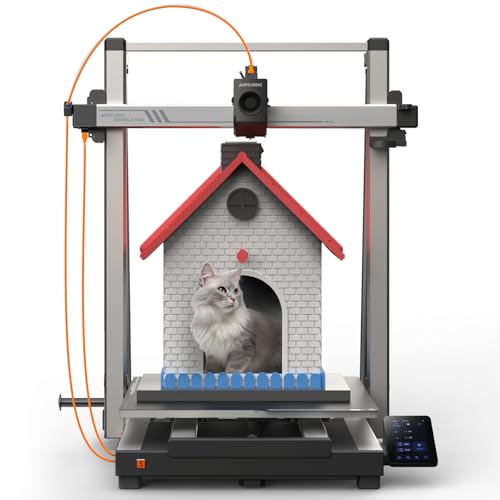 Anycubic Kobra 3 MAX, 420 by 420 by 500 millimetres view › Anycubic Kobra 3 MAX, 420 by 420 by 500 millimetres view › | 420x420x500 mm, 88.2 L | 600 mm/s | Not declared | Not declared | 18 mm at 20,000 | View › |
 Creality K2 SE, 500 mm/s maximum and 300 recommended view › Creality K2 SE, 500 mm/s maximum and 300 recommended view › | 220x215x245 mm, 11.6 L | 500 mm/s | 300 mm/s | 20,000 mm/s2 | 12.5 mm | View › |
 Creality Ender-3 V3 SE, 250 mm/s maximum and 180 by default view › Creality Ender-3 V3 SE, 250 mm/s maximum and 180 by default view › | 220x220x250 mm, 12.1 L | 250 mm/s | 180 mm/s | 2,500 mm/s2 | 25 mm | View › |
 Elegoo Mars 5, resin for small parts view › Elegoo Mars 5, resin for small parts view › | 143x90x150 mm, 1.9 L | 70 mm/h | A different unit | Not applicable | Not applicable | View › |
Every figure is the one declared by each maker's spec sheet or its distributor's, read on 4 September 2026. The straight run is a division with those same two figures: speed squared divided by acceleration, which is the shortest straight line needed to accelerate and brake again. Seven of the ten do not publish a working speed. The resin machine uses its own unit, which is why its cells say it does not apply. On the Kobra 3 MAX, the 300 mm/s recommended speed the brand publishes is for the standard model of the series, not for this large version.
The ten 3D printers, with what each one declares and who it is not for
Affiliate links: the buttons in this section go to Amazon and, as an Amazon Associate, m8d.io earns from qualifying purchases at no extra cost to you.
Creality K2 SE Combo, 500 mm/s maximum and 300 recommended view ›
It is not here for being the fastest or the biggest. It is here because its maker publishes the maximum speed, the recommended speed and the acceleration at the same time, and because it brings the colour loader with it. In a category where 16 of 34 filament listings put a speed in the title and not one puts the speed it prints at, that is the recommendation.
- Creality publishes all three figures on its own store: 500 mm/s maximum, 20,000 mm/s2 acceleration and 300 mm/s recommended for the best finish. Translated into what you will see on the bed: the 500 only exist on straight runs of twelve and a half millimetres or more, and everywhere else acceleration decides, which here is one of the highest in the catalogue.
- Its volume is 11.6 litres of working space, the normal band in this category: a part twenty one centimetres on a side fits. If your thing is helmets, big planters or one piece cases, this size falls short and the design has to be cut up in the slicer.
- A CFS loader takes four spools, and the maker states that up to four loaders can be chained to reach sixteen colours. Each of those colours is paid for on every print, in the grams the calculator above works out.
- Check the listing before you pay whether the loader is in the box: the same model is sold in two configurations, the plain one and this Combo, and on 4 September 2026 both were on sale with the letters CFS in the title. The model name does not tell you which is which.
- Its maker publishes the maximum, the recommended speed and the acceleration, which is more than the rest of this table
- Twelve and a half millimetres of straight run to reach its headline speed, half what the entry band needs
- Up to sixteen colours by chaining loaders, according to its maker
- Open frame: the materials that lift in a draught are out of scope
- Every added colour is more purge, and purge does not depend on the size of the part
- Today it costs close to twice the same model without the word Combo in the title
Flashforge Adventurer 5M, the same base without the colours view ›
It is the single colour version of the best seller, and it is what puts an exact price on multicolour: between the two, the volume does not change, the speed does not change and the acceleration does not change. If you are not going to print in several colours, here is the same machine without paying for the loader, and for a first printer that is the answer we would give.
- Declared spec sheet: 220x220x220 mm, 600 mm/s maximum, 20,000 mm/s2 acceleration, a 280 degree nozzle and a 110 degree bed. They are the same numbers as the multicolour version except for the twenty degrees of nozzle.
- What changed against the model before it: the comparison here runs the other way, because this is the base. What you pay for when you move up to the four colour version is the loader and the twenty degrees; the rest is identical and it is in both spec sheets.
- With 20,000 mm/s2 of acceleration, its 600 mm/s need eighteen millimetres of straight run. It is one of the machines that makes best use of its headline figure, because the acceleration keeps up.
- Like its four colour sister, it does not publish a working speed. That is the pattern of the category, and it is why this guide works it out from the acceleration instead of taking the headline on trust.
- The same base as the best selling model, without paying for the colour loader
- 20,000 mm/s2 of acceleration: its headline speed is one of the more reachable ones
- Quick release nozzle, no tools
- One colour, and the loader cannot be added
- A 280 degree nozzle, twenty less than the multicolour version
- It does not publish a working speed either
Flashforge Adventurer 5X, four colours with the IFS loader view ›
It is the best selling machine in the category and the one that best explains why multicolour became the argument of the year. It is also the best one for understanding what it costs: every colour change is paid in grams that never reach the part, and no title says that.
- Its spec sheet declares 220x220x220 mm of volume, 600 mm/s maximum, 20,000 mm/s2 acceleration, a 300 degree nozzle and a 110 degree bed. It does not publish a working speed: with that acceleration, the 600 need eighteen millimetres of straight run to come into existence at all.
- What changed against the model before it: against the Adventurer 5M the volume does not change (the same 220x220x220 mm), the speed does not change (the same 600 mm/s) and the acceleration does not change (the same 20,000 mm/s2). What it adds is the four colour loader and twenty more degrees of nozzle, from 280 to 300. Both spec sheets read on 4 September 2026.
- The four colours have a price you can work out before buying. At the 0.54 grams per change that come out of the example published by the maker of the most widespread multicolour system, a part with eighty changes throws away forty three grams of purge. The calculator on this page does it with your numbers.
- On 4 September 2026 the catalogue carried three separate listings for the same model, under two names, Adventurer 5X and AD5X. It does not change what you buy, but it does change what a search returns.
- Four colours without moving up to the next tier
- A 300 degree nozzle, twenty more than the single colour version
- 20,000 mm/s2 of acceleration: eighteen millimetres of straight run for its maximum speed
- It does not publish a working speed, only the maximum
- 10.7 litres of space: less than the twelve litre machines in this table
- Every colour change is paid for in filament that never reaches the part
Bambu Lab A1 mini, the one that publishes what it draws view ›
It is the smallest machine in this guide and the one that says least in its own listing: its shop title is six words and not one figure. It is here for the opposite reason, for what its maker publishes outside the listing. It is the only one in the sweep that says how many watts it draws on average while printing, which is the figure the calculator on this page needs.
- Its official documentation answers the question no listing answers: 6 watts idle and an average of 57 watts while printing, with a warning that the peak is considerably higher while the bed and the nozzle heat up. Its spec sheet also declares 150 watts of maximum power. Both numbers are needed: one is the ceiling of the board and the other is the electricity bill.
- A volume of 180x180x180 mm, which is 5.8 litres: less than half the twelve litre machines in this guide. That is the trade off for being small, and it is worth checking before the speed, because space cannot be added later.
- 500 mm/s maximum with 10,000 mm/s2 of acceleration: the same 500 that more expensive machines advertise, but it needs twenty five millimetres of straight run to reach them, twice what the 20,000 machines need. The headline figure is the same and the result on a small part is not.
- Its shop listing declares neither volume, nor speed, nor power: it gives the model and little else. That is the case with all three listings from this brand in the catalogue counted, and it means the spec sheet is not optional here.
- It publishes its average draw while printing, which is the figure nobody else publishes
- A 500 mm/s head on the smallest machine here
- An optional colour loader from the same maker
- 5.8 litres of space: the smallest of the filament machines here
- Its listing declares no figure at all: everything has to be looked up on the maker's spec sheet
- 10,000 mm/s2 of acceleration, half that of the machines in its speed band
Bambu Lab P1S, enclosed and 256 millimetres view ›
This is the step where the enclosure stops being an extra and becomes the reason for the purchase. With a closed chamber the materials that lift at the corners on an open machine are back in play, and with 16.8 litres of space you stop having to cut medium sized parts in half.
- Declared spec sheet: 256x256x256 mm, a 500 mm/s head, 20,000 mm/s2 acceleration, a 300 degree nozzle and a 100 degree bed, with an enclosed frame. Those 16.8 litres are almost three times the space of the mini from this same brand.
- With 20,000 mm/s2 of acceleration, its 500 mm/s ask for twelve and a half millimetres of straight run: half what the mini from the same house needs, which advertises the same speed with half the acceleration. It is the cleanest example of why the headline speed cannot be compared on its own.
- Its declared power is 1,000 watts at 220 volts. That number is the ceiling of the board, not what it draws: the same brand publishes an average of 57 watts while printing for its small model, and that is the difference between nominal and real.
- The enclosure is what makes ABS and ASA possible, the materials that peel at the corners on an open machine when a draught crosses the room. If you are only going to print PLA, you will not use it.
- An enclosed chamber: the technical materials that warp in open air are back on the table
- 16.8 litres of space, almost three times the mini from the same brand
- 20,000 mm/s2 of acceleration with a 500 mm/s head
- If you are only going to print PLA, the enclosure is money that does not get used
- Its shop listing declares no figure either
- It is the most expensive of the filament machines in this guide
Anycubic Kobra 3 MAX, 420 by 420 by 500 millimetres view ›
It is here for one reason and it is a good one: size. With 88 litres of working space it prints in one piece what the rest of this guide has to cut into four and glue. If that is not your problem, it is the wrong purchase.
- Its maker declares a print space of 420x420x500 millimetres, which is 88.2 litres: seven times the volume of the normal band in this category, which sits around twelve.
- The title says 600 mm/s and does not say the working speed. The brand does answer for the standard model of the same series on its questions page: "the recommended printing speed is 300 mm/s, with a maximum of up to 600 and an acceleration of 20,000 mm/s2". For the large version it does not publish that figure.
- The brand devotes a line of its page to reducing filament waste in batch production, with a function that skips failed objects. It is the same idea that runs through this guide: on a big printer, what gets thrown away weighs as much as what gets printed.
- It takes the room it takes. Before buying it, measure the table: a machine whose bed travels needs as much clear space in front of it and behind it as the bed itself.
- 88 litres of working space: seven times the normal size in this category
- 600 mm/s declared, with the high acceleration of its series
- The brand publishes the recommended speed for the standard model of the same family
- For normal sized parts it is space you pay for and do not use
- It does not publish a working speed or an acceleration for this large version
- It needs a lot of table: the bed travels forwards and backwards
Elegoo Mars 5, resin for small parts view ›
It does not compete with the rest of this guide, it does something else. If what you are going to print is miniatures, figures or parts with fine detail, resin gives a finish no filament machine at this price reaches. If you are going to print brackets, boxes or spares, it is the wrong purchase.
- Its declared volume is 143.43 x 89.6 x 150 millimetres, which is 1.9 litres: six times less space than the twelve litre filament machines in this guide. In resin that is not usually a problem, because what gets printed fits in the palm of a hand.
- Its declared speed is 70 millimetres per hour, and that unit is the point: in resin what is measured is how fast the part rises in an hour, not how fast a head moves. The 600 mm/s of a filament machine and the 70 mm/h of this one cannot be compared, even though both say speed.
- It carries a 6.6 inch 4K monochrome screen with a declared resolution of 35 microns per pixel. That figure is what explains the finish: the detail of a layer is set by the size of the pixel, not by the thickness of the thread.
- The work does not end when the lid opens. The part comes out wet with resin and has to be washed and cured under ultraviolet light, which is one more step and normally one more appliance. Saying so in advance avoids the surprise of the first week.
- 35 microns of detail per pixel, out of reach of filament at this price
- Automatic levelling, which resin machines do not always include
- A compact format, the kind that fits on a shelf
- 1.9 litres of space: six times less than a filament machine at the same price
- Washing and curing after every part, with its own equipment and its own time
- Its speed is in millimetres per hour and cannot be compared with filament
Flashforge Adventurer 5M Pro, enclosed and filtered view ›
Same base as the 5M: the same 220x220x220 volume, the same 600 mm/s and the same 20,000 of acceleration. What changes is the enclosed build and the dual air filter, HEPA13 plus activated carbon. That is what to look at if the printer is going to live in a room where somebody sleeps or works.
- Declared spec sheet: 220x220x220 mm, 600 mm/s, 20,000 mm/s2, a 280 degree nozzle and a 110 degree bed, with an enclosed build and internal and external filtration.
- Three machines from the same house share volume, speed and acceleration. The only things that change between them are the enclosure, the filter, the degrees of the nozzle and the colour loader.
- With the same acceleration as its sisters, its 600 mm/s ask for the same eighteen millimetres of straight run.
- Enclosed build and dual air filtration, on the same base as the 5M
- The same speed and acceleration as the other two in its family
- One colour, like the 5M
- A 280 degree nozzle, twenty less than the four colour version
It is the machine whose spec sheet this whole guide is built on: the only one under its tier whose maker publishes the maximum speed, the recommended speed and the acceleration at the same time. Today the configuration to look at is the Combo above, which shares that spec sheet and brings the loader in the box.
View ›It is the reference entry machine of the category: automatic levelling, direct drive and both speeds published, the maximum and the working one, on the maker's spec sheet and on a shop page. It is not fast and it does not pretend to be, and on a first printer that is worth more than a big number in the title.
View ›Frequently asked questions about 3D printers
Is owning a 3D printer worth it?›
Half of that sum can be published and half cannot. The half that can: a 25 gram part costs about 43 pence between filament and electricity, with a kilo at 15 pounds, the 57 watt average one maker publishes, and the 26.11 pence per kilowatt hour price cap unit rate for 1 July to 30 September 2026. Over a kilo that is roughly forty parts. The half that cannot is what those parts would cost you to buy, because it depends entirely on what you print, which is why we do not give a payback period. It pays when what you print replaces a purchase: a bracket nobody makes, a discontinued plastic spare, a working part you would otherwise have to order. It does not pay if you are printing decorative objects that already exist made, or if you are going to print very occasionally, because filament takes on moisture and a spool left open for six months gives adhesion problems that look like a fault in the machine.
How much does a decent 3D printer cost?›
The useful band starts where automatic bed levelling, a direct drive extruder and a normal working volume all appear together, and that is the band the eight filament machines in this guide sit in. Below it the catalogue changes character: two of the cheapest listings counted on 4 September 2026 give a build space and in both it is 100 x 100 x 100 millimetres, which is one litre against the twelve that is normal in this category, and the only one of them that declares a speed gives 10 to 40 mm/s against the 180 working speed of a mainstream machine. They are not badly made and they do not mislead: they are a different thing, and their price says so.
Is 3D printing difficult to learn?›
The part that used to be difficult is the part the machines now do themselves. Automatic bed levelling and a direct drive extruder remove the two jobs that made the first week frustrating, and eight of the ten machines here have both. What is left to learn is the slicer, the program on your computer that turns a model into instructions, and the first useful settings are three: layer height, infill and whether the part needs supports. The second thing to learn is not software at all: keep filament dry. In this category the consumable causes more failed prints than the machine.
How long does 1 kg of filament last?›
A kilo of 1.75 mm filament is about 335 metres of thread. The sum is direct: 1,000 grams divided by the density of PLA, 1.24 grams per cubic centimetre, is 806 cubic centimetres, and that volume spread across the section of the thread gives that length. In parts it depends on the weight of each one: at 25 grams you get forty, at five gram keyrings you get two hundred. What breaks that sum is multicolour: every colour change takes between half a gram and a gram and a half that never reaches the part.
How much does it cost to run a 3D printer in the UK?›
Almost nothing per hour, and it is the electricity that surprises people by being small. One maker in this guide publishes an average of 57 watts while printing and 6 watts idle, with a higher peak while the bed and nozzle heat up. At the Ofgem price cap unit rate of 26.11 pence per kilowatt hour for 1 July to 30 September 2026, four hours of printing at that average is about six pence. The consumable is the real cost: filament had a median of 17.45 pounds a kilo across 23 UK shops on 18 September 2026. That is why the calculator on this page puts the two together instead of quoting either on its own.
Which is the best 3D printer for beginners?›
The one with automatic levelling, a direct drive extruder and a build volume around twelve litres, so the first project does not have to be cut into pieces. In this guide that is the Flashforge Adventurer 5M if you want one colour, and the Creality K2 SE Combo if you want the fullest spec sheet, since its maker publishes the maximum speed, the recommended speed and the acceleration, which almost nobody does. If you also want several colours from the start, decide it at the moment of purchase: on nearly every machine here the loader cannot be added later.
Is 3D printing copyrighted models illegal?›
The file and the object are two different things, and the question that decides it is what you do with the print, not whether you own the printer. Printing a model somebody else designed, from a file they did not license for it, is a copyright question; selling the result is a stronger one, and a shape that carries a registered trade mark adds a second layer on top. We are not lawyers and this is not legal advice: what we can say without interpreting anything is that the model libraries publish a licence next to each file, and reading that line takes ten seconds. Where the file is your own design or the licence permits it, there is nothing to ask.
Resin or filament: which one should you choose?›
They are different machines and the choice is made by what you print, not by price. Resin gives detail a filament machine at the same price cannot reach, which is why it wins for miniatures, figures and anything with fine features, and the resin machine here declares 35 microns per pixel. It costs you three things: a working space of under two litres against the twelve that is normal, a washing and curing step after every part with its own equipment, and different consumables. For brackets, boxes and spares, filament is the answer without discussion.
For most people, the Creality K2 SE Combo, 500 mm/s maximum and 300 recommended view ›: it is the one whose maker publishes the maximum speed, the recommended speed and the acceleration all three, and at 20,000 mm/s2 its headline figure needs twelve and a half millimetres of straight run, half what the entry band asks for. If you are starting and want one colour, the Flashforge Adventurer 5M, the same base without the colours view ›, which shares volume, speed and acceleration with the four colour version and simply leaves out the loader. If the reason for the purchase is colour, the Flashforge Adventurer 5X, four colours with the IFS loader view ›, knowing now what each change costs in grams. If you are going to print ABS or ASA, the Bambu Lab P1S, enclosed and 256 millimetres view › and its enclosure. And if the part does not fit, the Anycubic Kobra 3 MAX, 420 by 420 by 500 millimetres view ›. The rule to take with you, whatever you spend: the speed in the listing is the head's ceiling, not the speed it prints at. Divide its square by the acceleration and you have the straight run your part needs for that figure to exist.
m8d pick, the configuration with the colour loaderCreality K2 SE Combo, 500 mm/s maximum and 300 recommendedSee it on Amazon ›The same base, in one colourFlashforge Adventurer 5M, the same base without the coloursSee it on Amazon ›The best selling one with a four colour loaderFlashforge Adventurer 5X, four colours with the IFS loaderSee it on Amazon ›If the part does not fit in twenty two centimetresAnycubic Kobra 3 MAX, 420 by 420 by 500 millimetresSee it on Amazon ›The ones that hold up the specific figures in this piece, with the date they were read.
- SpoolHound, price indexPLA filament price index for the United KingdomA median of 17.45 pounds a kilo across 23 shops in the United Kingdom, with budget listings from 14.70 and premium brands past 20.99. Read on 18 September 2026.
- OfgemEnergy price cap unit rates and standing chargesThe average electricity unit rate for direct debit customers in England, Scotland and Wales: 26.11 pence per kilowatt hour for 1 July to 30 September 2026 and 26.32 from 1 October. Read on 18 September 2026.
- Creality, maker's storeCreality K2 SE, official store page with the three speed figures"500 mm/s max speed and 20,000 mm/s2 acceleration for high-efficiency printing (recommended 300 mm/s for optimal quality)", and the CFS system of four spools expandable to sixteen colours. Read on 4 September 2026.
- 3DJake, distributor, on the maker's spec sheetCreality Ender-3 V3 SE, spec sheet with the default and maximum speedsDefault printing speed 180 mm/s, maximum printing speed 250 mm/s, acceleration 2,500 mm/s2, volume 220x220x250 mm. Spanish language page. Read on 4 September 2026.
- Anycubic, maker's storeAnycubic Kobra 3, questions on the official store"The recommended printing speed is 300 mm/s, with a maximum printing speed of up to 600 mm/s and a maximum acceleration of 20,000 mm/s2". Read on 4 September 2026.
- Anycubic, maker's spec sheetAnycubic Kobra 3 Max, official page with the declared build space"420*420*500mm3 Print Space", "Printing Speed Up to 600mm/s" and the note on reducing filament waste in batch production. Read on 4 September 2026.
- Bambu Lab, maker's documentationHow to reduce waste during a filament change, official documentation"With 153 filament changes and 83 grams of waste for an 11-gram object", and the second example of three parts with sixteen changes leaving 22 grams. It is the source of the grams per colour change used by the calculator. Read on 4 September 2026.
- AmazonAmazon product listingsDeclared specifications of the ten printers and the count of 45 distinct listings across ten searches of the family, read through our interface on 4 September 2026 from the European catalogue m8d tracks daily.
Comments
Be the firstNo sign-up: just a name. Every comment is reviewed before it is published.